Inspiring
August 7, 2023
Answered

Search/ magnifier vanished.

  • August 7, 2023
  • 1 reply
  • 460 views

USing search, and magnfier, and poof gone . was upper right.


Don't see it in View or window , how get it back? Mac. Apple

This topic has been closed for replies.
Correct answer gary_sc

OK, this is amusing: either I never knew this, or I forgot.


And thanks for the screenshot, that helped!


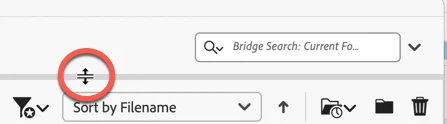
What you need to do is to move your cursor just to where you see it on the screenshot below. Once you see the double arrow, drag it down and your Search region will be seen. Slide-drag up to hide it.


Let me know if that solves the issue!

1 reply

gary_sc
Community Expert
Community Expert
August 7, 2023

Not a clue; I'm on a Mac (Mac Studio on Ventura), and the searching capability is certainly seen in mine. I've not heard of anyone having this issue.


OK, you say you're on a Mac, which one, and what is your OS? Also, which version of Bridge are you using?

larry45Author
Inspiring
August 7, 2023

Gary thanks


above the sort by file name was a magnifier, gone now. CAn you please send screenshot of what you have? thanks.  Imac,  Ventura 13.4.1  mac mini

gary_sc
Community Expert
gary_scCommunity ExpertCorrect answer
Community Expert
August 7, 2023

OK, this is amusing: either I never knew this, or I forgot.


And thanks for the screenshot, that helped!


What you need to do is to move your cursor just to where you see it on the screenshot below. Once you see the double arrow, drag it down and your Search region will be seen. Slide-drag up to hide it.


Let me know if that solves the issue!