
Known Participant
March 17, 2020
Answered

Searching images in Bridge

  • March 17, 2020
  • 2 replies
  • 1532 views

I'm new to Bridge so probably a dumb question,. I've set up a range of keywords and sub-keywords (thus creating categories) for each image and I now want to search via the keywords, selecting options within each category (or master keyword) I have set up. But I can only find a way to search all keywords in a single bucket, very inefficient. Surely there is a way to search using the categories set up?
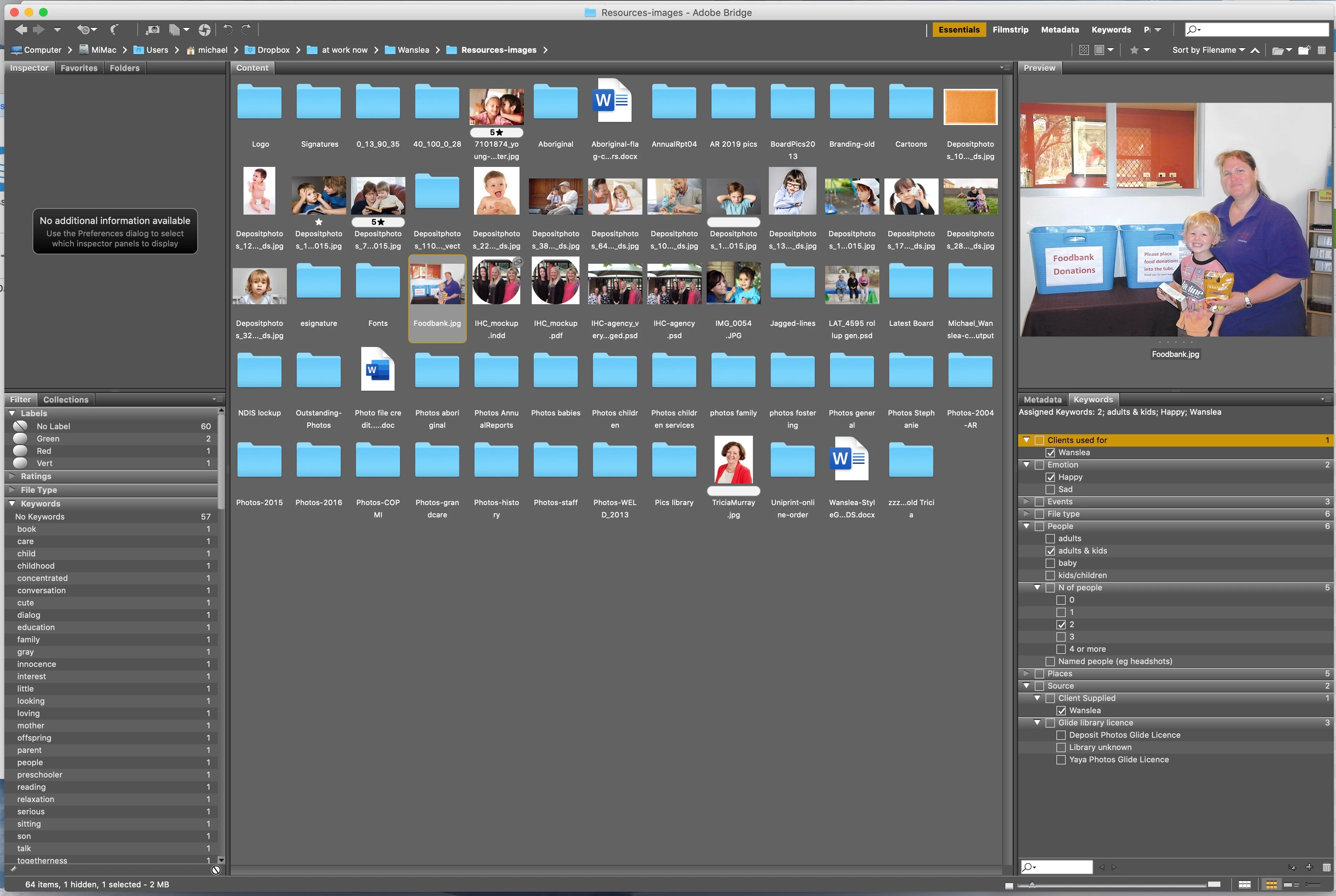


(Attachment Removed and image placed inline with the test. Done by Mod JSM)

This topic has been closed for replies.
Correct answer gary_sc

Hi Michael,


Personally I think that Lightroom is better for that level of search. However, if you are wishing to remain with Bridge, is it too late to create separate folders for clients and then separate folders for any subcategories under that? You might also benefit with using collections for this level of separations.


If all of your images are in one folder, Bridge just cannot deal with that number of images. It wasn't designed to do that, keywords notwithstanding.


Sorry, best of help I can provide. 

2 replies

Known Participant
March 17, 2020

Thanks for that. In your example, the search is of all keywords, which has what I meant by "bucket". What I have is keywords with sub-keywords, creating default categories, and I want to search within the categories. So for example I want to search under "Clients used for" for value "Wanslea" and under "Source" for "Client Suppled" and under "N of people" for "2". I understand I could just list all these keywords without the search window without identifying their category, but this is clumsy and not exactly the same and takes more time. An elegant solution would be great! (Surely I'm not the only person struggling with huge photo libraries and multiple clients.)

gary_sc
Community Expert
gary_scCommunity ExpertCorrect answer
Community Expert
March 18, 2020

Hi Michael,


Personally I think that Lightroom is better for that level of search. However, if you are wishing to remain with Bridge, is it too late to create separate folders for clients and then separate folders for any subcategories under that? You might also benefit with using collections for this level of separations.


If all of your images are in one folder, Bridge just cannot deal with that number of images. It wasn't designed to do that, keywords notwithstanding.


Sorry, best of help I can provide. 

Known Participant
March 18, 2020


Hi

Separate folders is the strategy I've been using and need to escape. Over time many many of my pics have 6 to 10 copies in different folders where the same photos is used for multiple clients, multiple projects for a client etc. I used to have a resource folder for each client but that got so cumbersome I fell into making a gathered folder for every job, further accelerating the explosion of copies.

But I think you line "If all of your images are in one folder, Bridge just cannot deal with that number of images" tells me what I need to know: continue any search for a cataloging system.

Thanks, appreciated.

Legend
March 17, 2020

Use Edit->Find. There aren't "buckets" of keywords. You create the keywords you want and assign them to files as needed.