November 18, 2016
Answered

Some previews are blurry in Bridge

  • November 18, 2016
  • 1 reply
  • 4272 views

Full screen previews are appearing blurry in Bridge.  It happens inconsistently.  Sometimes it's a psd, sometimes it's a jpeg, but never the raw preview.  I have cleared the cache, checked the preferences in Bridge and rebooted.  Nothing helps.  Any ideas.  I am on a mac using El Capitan.  Any ideas?

    This topic has been closed for replies.
    Correct answer Sahil.Chawla

    Hi mjdl,

    Please Choose Generate Monitor-Size Previews Under Preference > Advanced

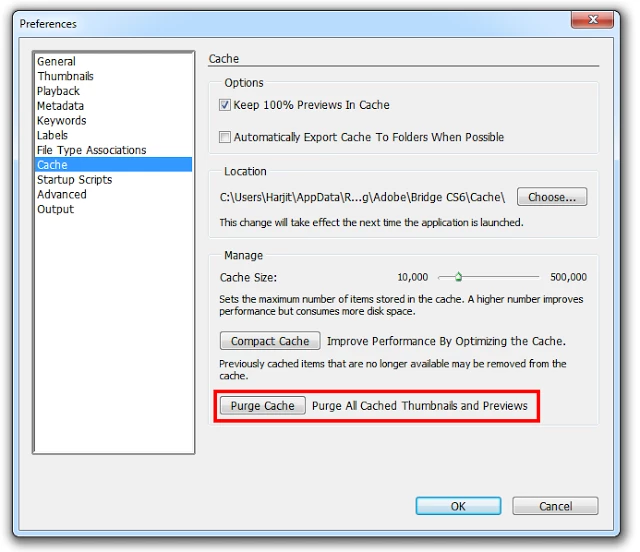
    Then Purge the thumbnail cache

    and let us know about the outcome.

    Regards,

    Sahil

    1 reply

    Sahil.Chawla
    Adobe Employee
    Sahil.ChawlaCorrect answer
    Adobe Employee
    November 29, 2016

    Hi mjdl,

    Please Choose Generate Monitor-Size Previews Under Preference > Advanced

    Then Purge the thumbnail cache

    and let us know about the outcome.

    Regards,

    Sahil

    December 5, 2016

    Thank you for your answer.  I had already done that but it didn't work.  I have to click on the photo and purge the cache from each photo  that appears blurry while in Bridge and that seems to work.   It only happens with certain PSD's and JPegs.  So I really don't know what the problem is.  Thank you again for your help.

    Regards,

    Mary Jean

    Adobe Employee
    October 4, 2019
    Hi, The Bridge 2020 version (v10.0) has a fix for this issue. If you want to try out this version of bridge, please go to https://adobeprerelease.com and Sign up for Bridge Prerelease program. You can download the latest version of Bridge from there.