


Known Participant
March 30, 2026
Question

Space Colour reported incorrectly?

  • March 30, 2026
  • 2 replies
  • 19 views

Hi there,


I was re-organizing an old bunch of photos under LrC and Br (respectively 2026 versions) and I noted one thing: 

the EXIF value for color “mode” under Bridge is: RGB  (under LrC → Metadata Panel → Exif section I wasn’t even able to see this value!!! Why?) 
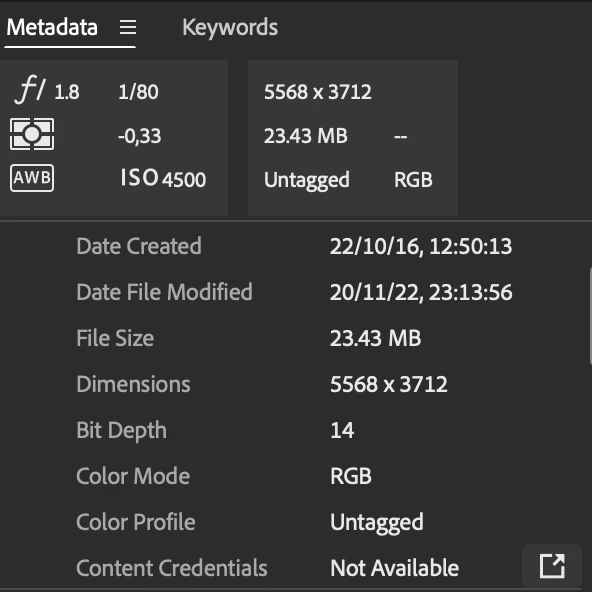
Now I’m pretty sure that at that time my camera’s color space was set to AdobeRGB and if I open this image with the MacOS preview and then I go to the the its inspector (cmd+i) what I got is that: 

  • in the General tab the “colour mode” is RGB (as in Bridge)
  • but in Picture Style tab I got “AdobeRGB, 2, 2” under picture Style Colour Space
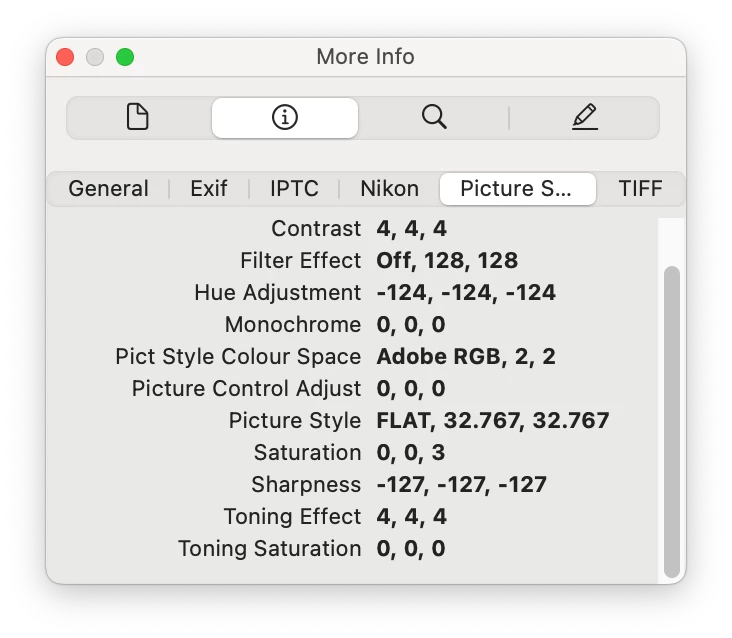
so, somehow, the information about which colour space was set on the camera for shooting this picture is correctly reported. 

Now the question is simple: how come that Bridge doesn’t report it correctly? and is there way to correctly have the color space in EXIF data under Adobe apps? 

    2 replies

    Conrad_C
    Community Expert
    Community Expert
    March 31, 2026

    Dynamic_hearted16B7 asked:

    so there is no EXIF value for color profile?


    It’s sort of a trick question, even though you didn’t intend it that way.

    Original camera raw data has no color space information, so all color space readouts you see for a raw file are an interpretation of one kind or another.

    The real tricky part is, there are multiple ways that color space can be recorded and reported for an image, especially if it’s a camera raw image which means its color hasn’t been permanently interpreted. We’ll start with this:

    • As ExUSA pointed out, color mode is not the same thing as color space, so be careful which field you’re looking at. 
    • An embedded standard ICC color profile is not the same as an assumed color space, or a color space assigned to a proprietary interpretation such as a camera maker’s picture style, so again, be mindful of what the field you’re looking at actually means.
    • Different applications do not display or interpret color space metadata in the same way. Some applications show more than others. or label it differently. Most applications, such as Bridge and Lightroom Classic, show a selected subset of all the metadata fields available. Specialized applications can show all of them, but that can be overwhelming to a non-technical person. 

    With all that in mind, I looked at a sample NEF raw image to see what color space is reported. I used GraphicConverter and Apple Preview, both of which show metadata in different ways than Bridge and Lightroom Classic. (In the picture below, if my Apple Preview looks different than yours, it’s because I used Apple Preview 11, which comes with macOS 26. )

    Notice that there are three different color spaces reported for the same Nikon NEF raw file. As you found, the color space that’s reported can depend on which metadata tab you’re looking at:

    • GraphicConverter reports Adobe RGB (1998) in its Image (file) tab, but sRGB in the ExifTool (metadata) tab.
    • Preview reports DisplayP3 in its General Info (file) tab, but sRGB in its More Info tab, within the proprietary Nikon PictureStyle tab.

    Why is this?

    • The file-level (OS file system) metadata may be looking at the ICC color profile associated with the JPEG preview that the camera attached to the raw file, because it sure won’t apply to the original raw data itself. macOS and Apple Preview are a little weirder; it looks like the General tab ignores the preview and reports the macOS default color space for raw files. macOS wants to assume because, again, it knows that a camera raw file has no color space, so just to get a default color interpretation it uses the default color space (Display P3) of the macOS raw processing engine. This is very confusing.
    • In the EXIF/IPTC metadata, there is no color space information for the camera raw data itself (as expected), but the applications find color space info in the Nikon proprietary Picture Style metadata and report that. But it is possible to set the Picture Style color space to something different than would show up in the OS file system metadata.
    • Bridge is probably the most honest about reporting this, because in Color Profile it reports “Untagged”. That is absolutely true, camera raw data has no ICC color profile.

    So when you ask for an “EXIF value for color profile,” be aware that for a raw file, you can’t get that exact thing. Color space info might be in IPTC (not EXIF), and it might not be an ICC color profile but another color space description such as a proprietary picture style tag.

    Another note: In GraphicConverter, I had to use the ExifTool view because the Exif view does not show the Nikon proprietary metadata. How Bridge and Lightroom Classic work is consistent with this; their EXIF/IPTC metadata views also do not show proprietary metadata, only standard.

    If your goal is to view the image in the Nikon Picture Style you used, that is best done in the Nikon raw software. Adobe applications may ignore that proprietary information in part because the Picture Style can only be accurately reproduced by the Nikon color engine. The closest you will get through the Adobe raw processing color engine is to apply the Adobe camera matching profile that tries to reproduce the Nikon Picture Style you used in camera, such as Camera Standard or Camera Neutral.


    Legend
    March 30, 2026

    RGB is a color mode, AdobeRGB/sRGB etc is a color profile. These are NOT the same thing. If its a RAW file, there is no profile assigned. Picture Style is just metadata saved by the camera to tell Nikon’s RAW processor to use that particular develop setting.

    tl;dr there is no error.

    Known Participant
    March 30, 2026

    so there is no EXIF value for color profile?

    Legend
    March 31, 2026

    Is this a RAW file?