B. Allen
Participant
August 14, 2012
Answered

String substitution help

  • August 14, 2012
  • 1 reply
  • 5117 views

We purchased a large batch of design assets and began to rename them.  After much thought we decided we would like to keep the original file names based on the fact that we can search the provider (shutterstock) which would make them easier to find in our DB.  I need help removing the text we've added and reverting to the original file names.  Examples below.

Current name:

baby_feet shutterstock_9193737.jpg

stars shutterstock_1018373.eps

we simply want to drop everything prior to the "shutterstock" and keep everything the same after.  We would like the follows to look as shown below.

shutterstock_9193737.jpg

shutterstock_1018373.eps

thanks in advance for any advice on how to fix this blunder

This topic has been closed for replies.
Correct answer gregreser

I have a similar issue but I don't understand the find functions. The Photoshop export layers to files function add a load of unwanted prefix numbering to the files.


Do you know what string substitution I should need to use to remove a sequence like so:


I can remove _0000s_00 by simply adding that, but how do I do the entire sequences between the underscores in one clean sweep?


It would save me a lot of messing about.


Thanks

Will


I can't see your full file names, but I think this will do what you want:

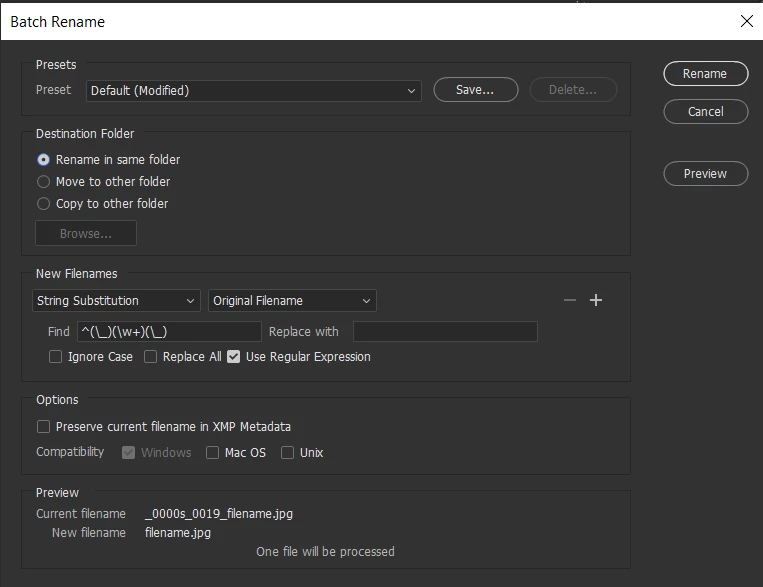
Find: ^(\_)(\w+)(\_)

Replace: blank


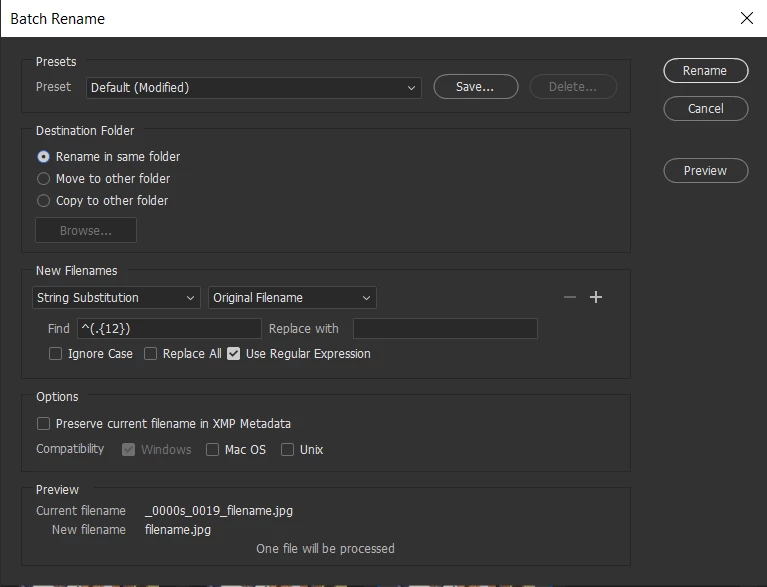
Another approach: if you want to remove the same number of characters from the beginning of all the file names (in your case, 12), you could do this:

Find: ^(.{12})

Replace: blank


1 reply

Inspiring
August 14, 2012

Have you looked at using Bridge's batch rename…? It now has regexp & string subbing… You also have the opportuinity to store previous name in file XMP when renaming…

B. Allen
B. AllenAuthor
Participant
August 14, 2012

Yes,

Familiar with it, but unfamiliar with the needed text or text string to remove the titles shown above and simply leave the last portion.

Inspiring
August 14, 2012

Well this could be done with script or the built-in Batch Rename function… Much depends on where all these files are?

This should give you what you want… ^ matches beginning of line . the dot matches any character the + makes the dot greedy then \s matches space… Replace with nothing… Hope that makes sence…?