
goran lo
Participant
April 19, 2020
Question

Strong noise in dark areas

  • April 19, 2020
  • 1 reply
  • 1056 views

Can any of you help me please?


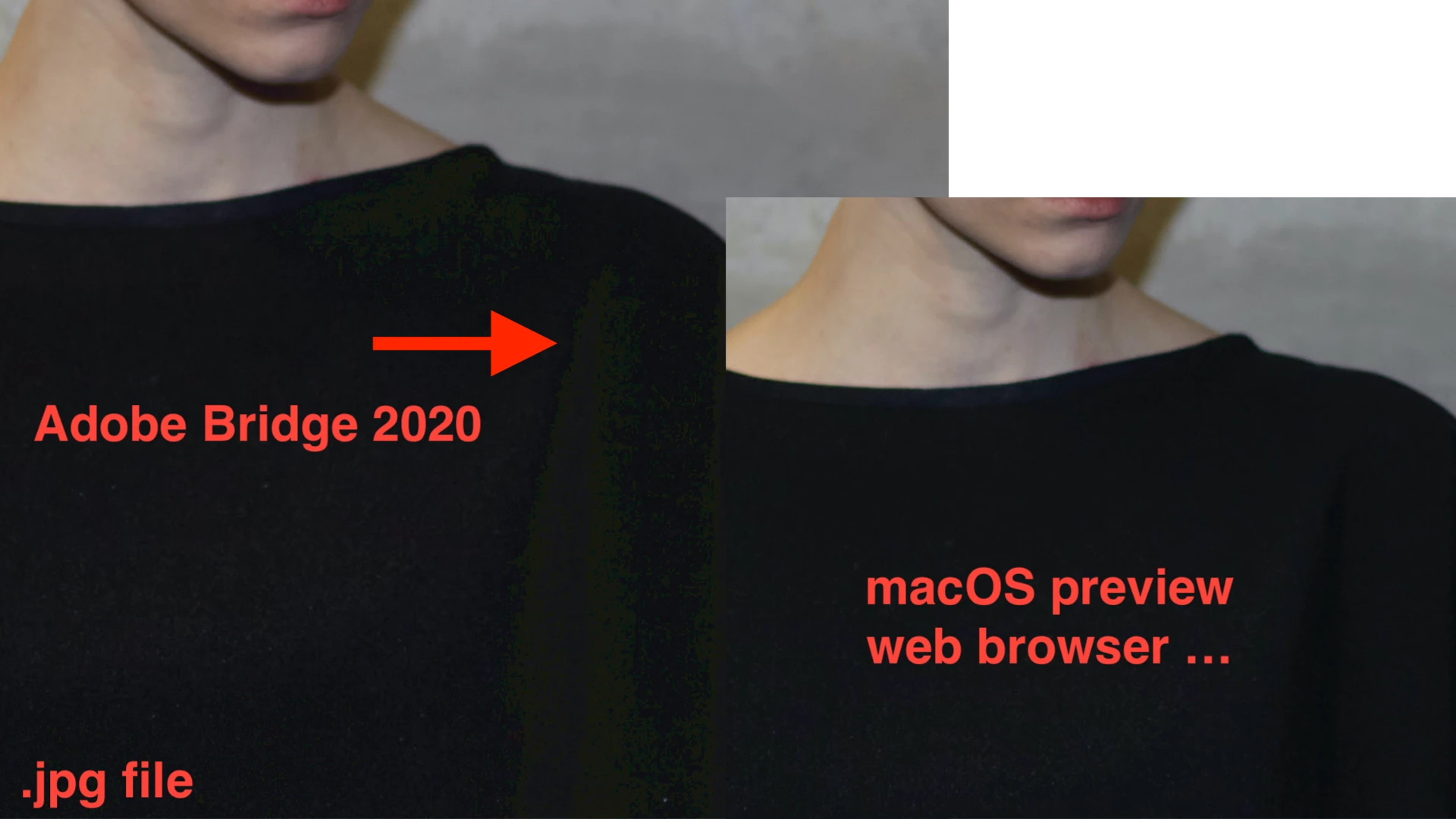
When I open a JPEG files in Adobe Bridge 2020, I have this noise in the dark areas.

But when I open the same image file in macOS Preview or in the browser,  I have no longer this noise.

What could be the reason for this?


* MacBook Pro (15 Zoll, 2019), MacOS Catalina 10.15.4, latest Adobe CC ver.
 

This topic has been closed for replies.

1 reply

gary_sc
Community Expert
Community Expert
April 19, 2020

Ho Goranlo,


I'm sorry but I don't see noise. Rather I see posterization (no smooth blending between different shades or hues, sometimes called banding). You can see that here (I lightened the photo a bit to make it easier to see):

So the next question is why are you seeing that posterization? I have a couple of questions for you:


Is software rendering checked or unchecked. Whatever it is, set it to the opposit and see if the problem still exists.


If that doesn't work, please trash your cache (from the Tools menu select Cache -> Manage cache...):

And if that doesn't work please le tme know:


1) What is the color profile of these images (RGB, sRGB, Adobe RGB, etc.)

2) Where these images originally raw images?

3) What is your OS (and what release)?

4) Which version of Bridge and Photohsop are you using (and which release)?


Good luck!

goran lo
goran loAuthor
Participant
April 20, 2020

Hi Gary

Thank you!


- The software rendering is unchecked. At "checked" same problem

- I trashed my cache but the problem still exists


Full screen preview in Adobe Bridge. No matter if I zoom or not, the posterization remains.


1)

2. Yes, I edited the RAW in Capture One 20 and exported it as a JPG

3. MacBook Pro (15 Zoll, 2019), MacOS Catalina 10.15.4, latest Adobe CC ver.


4. Bridge 10.0.3.138 , Photoshop 21.1.2. I don't see the posterization in PS, only in Adobe Bridge.


Here is the original file to download https://www.dropbox.com/t/kB64otBwEAnRMh2g


Greetings

gary_sc
Community Expert
Community Expert
April 20, 2020

Hi Goranlo,


THANK YOU for sending me that file. 


I am not getting any posterization in Bridge so I have a hunch it has something to do with your instillation.


I'm mulling on this but meanwhile, have you tried to use ACR to do the initial rendering into a an image to open in PS and then save to JPG?


If you did, what happened.


Oh, one more thing. What is the camera, what kind of raw image (e.g., Canon is CR2)?


Thanks