EsTaF
Inspiring
March 15, 2024
Answered

sync acr settings from one file to other (as in lr)

  • March 15, 2024
  • 1 reply
  • 289 views

In lr I can select several files and copy for it some settings (exposure, wb etc) with sync button.
Can I that one in Adobe Bridge?

I don't know how right ask a question in google about it. adobe bridge sync - not best idea for google.

This topic has been closed for replies.
Correct answer gary_sc

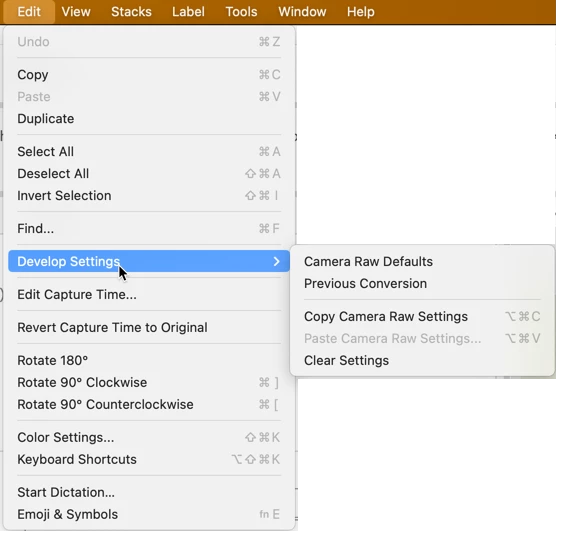
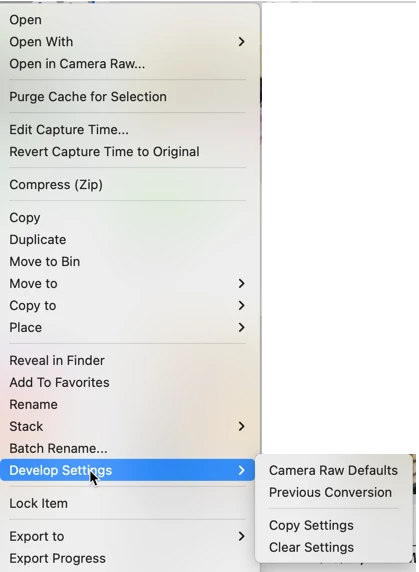
Hi @EsTaF, yes you can. If you right-click or from the Edit menu, you can copy settings and paste settings, revert to the original (by selecting "Clear settings"), paste the Previous Settings, and other options.


Let us know if this is what you were looking for.


1 reply

gary_sc
Community Expert
gary_scCommunity ExpertCorrect answer
Community Expert
March 15, 2024

Hi @EsTaF, yes you can. If you right-click or from the Edit menu, you can copy settings and paste settings, revert to the original (by selecting "Clear settings"), paste the Previous Settings, and other options.


Let us know if this is what you were looking for.


EsTaF
EsTaFAuthor
Inspiring
March 15, 2024

Thank you, Gary.