
Inspiring
May 25, 2018
Answered

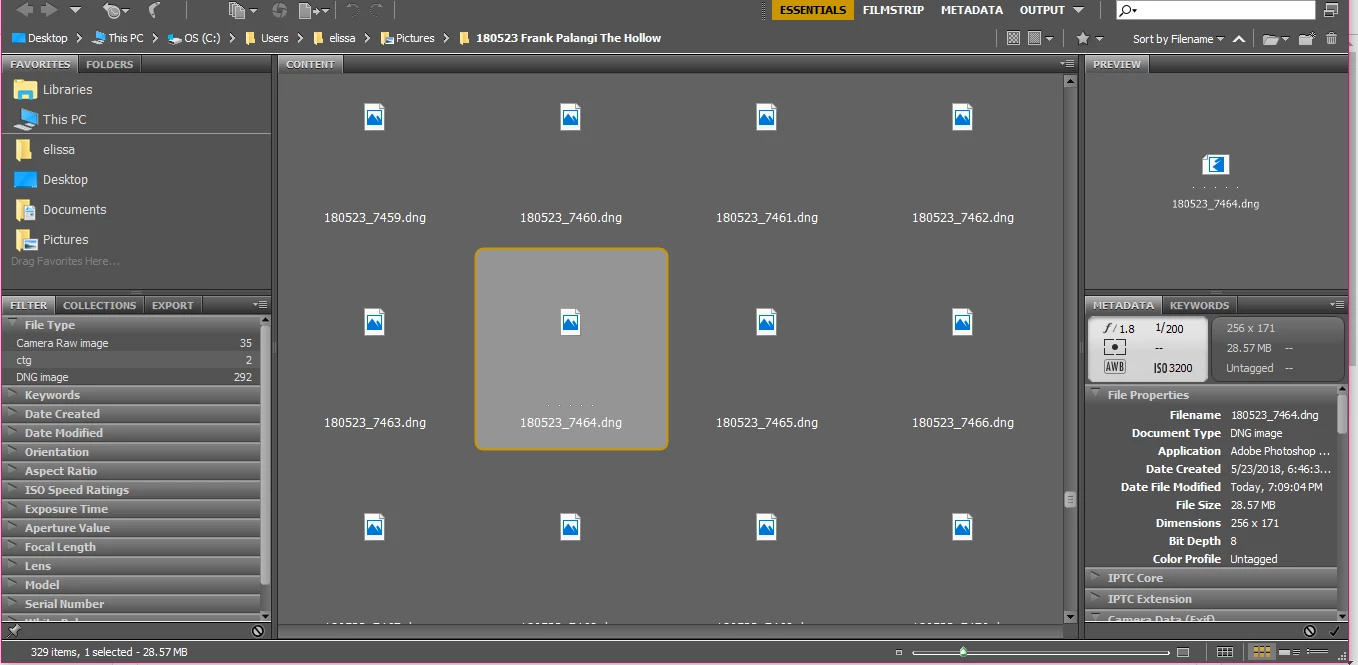
Thumbnails and Previews not working in CS6 Bridge

  • May 25, 2018
  • 5 replies
  • 2949 views

Windows 10, 64bit.

Just got new camera. I loaded my photos and of course it didn't work so I installed the newest RAW patch. All of a sudden all of my thumbnails are previews are blank. Restarted, purged the cache and reset preferences. Even tried reinstalling. Nothing works for loading previews or thumbnails. But if i click on a file, it'll load in Photoshop. Help!

This topic has been closed for replies.
Correct answer Jeff Arola

What version of camera raw did you install?

Camera raw 9.1.1 is the newest camera raw plugin that works with cs6.

Camera Raw plug-in installer

If in photoshop cs6 you go to Help>About Plug-In do you see more than one Camera Raw listed?

In addition the newest 9.1.1 camera raw plugin for cs6 doesn't support the Canon EOS 6D Mark II, you need at least camera raw 9.12 or newer, which are not compatible with cs6.

Cameras supported by Camera Raw

You can use the adobe dng converter 10.4 to convert the Canon EOS 6D Mark II cr2s to dng copies which then cs6 will open.

Adobe - Adobe Camera Raw and DNG Converter : For Windows : Adobe DNG Converter 10.4

5 replies

Jeff Arola
Community Expert
Jeff ArolaCommunity ExpertCorrect answer
Community Expert
July 14, 2018

What version of camera raw did you install?

Camera raw 9.1.1 is the newest camera raw plugin that works with cs6.

Camera Raw plug-in installer

If in photoshop cs6 you go to Help>About Plug-In do you see more than one Camera Raw listed?

In addition the newest 9.1.1 camera raw plugin for cs6 doesn't support the Canon EOS 6D Mark II, you need at least camera raw 9.12 or newer, which are not compatible with cs6.

Cameras supported by Camera Raw

You can use the adobe dng converter 10.4 to convert the Canon EOS 6D Mark II cr2s to dng copies which then cs6 will open.

Adobe - Adobe Camera Raw and DNG Converter : For Windows : Adobe DNG Converter 10.4

ElissaEAuthor
Inspiring
June 24, 2018

Yes, I tried purging the cache on individual files.

Adobe Employee
July 11, 2018

Hi ElissaE,

Can you please download the latest version of Adobe Bridge CC (CC 2018) https://creative.adobe.com/products/download/bridge

and let us know if it solves the issue.

Regards,

Abhishek Seth.

ElissaEAuthor
Inspiring
July 11, 2018

Trust me, if I had the finances to upgrade to CC I would. But we all can't afford a subscription service. So I need a solution for CS6.

Legend
June 6, 2018

Can you purge the cache for individual files to see if that helps?

Legend
June 1, 2018

What camera is this for?

ElissaEAuthor
Inspiring
June 1, 2018

It was for the Canon 6D Mark II, but it is ALL RAW files from my XTi and my T6s as well (which I had before, and it was working before I installed the RAW update)----CRN, DNG, etc. None show up. Thumbnails for JPGs and TIFs show up (haven't tested PSDs). I'm frustrated.

Legend
June 4, 2018

CS6 will not work at all for 6D II files. Do your older RAW files open in Camera RAW?

ElissaEAuthor
Inspiring
May 31, 2018

Am I allowed to bump?