
Inspiring
December 1, 2018
Answered

Tools/photoshop is missing

  • December 1, 2018
  • 3 replies
  • 3099 views

HI Everyone,

I was following a tutorial that was walking through the steps to import multiple photoshop files as layers in a new photoshop file. The tutorial shows that you should be able to go to Tools in Bridge and there should be a photoshop option with a bunch of sub options. See image below:
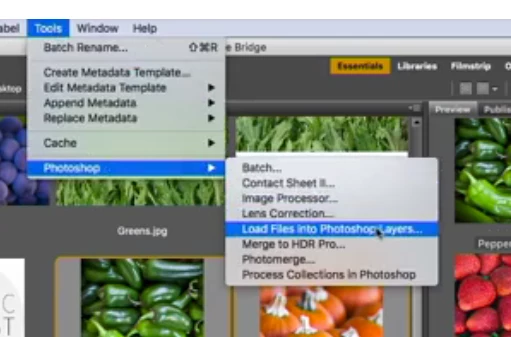
However when I go to the Tools menu I see this :
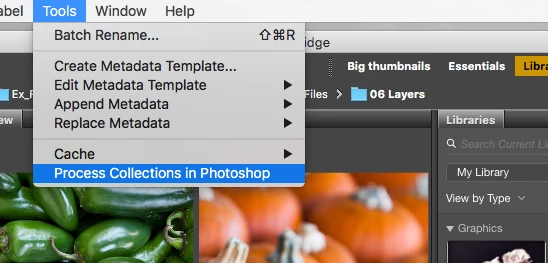
Where did the missing options go and how to I access them? I am using Bridge cc 8.1.0.383 on a mac running High Sierra

    This topic has been closed for replies.
    Correct answer Chuck Uebele

    You need to make sure you have the right version of Bridge. If you installed PS 2019, but didn't install the new Bridge version, you will have this problem.

    3 replies

    gary_sc
    Community Expert
    Community Expert
    August 17, 2023

    If you installed the latest Photoshop Beta, and are missing your PS tools in the Tools menu, uninstall the RELEASE version of Photoshop (24.7, or the 2023 release), and then reinstall that same one back.

    Participant
    August 17, 2023

    Thank you very much Gary! 

    It helped a lot! Installing a previous version of Photoshop did the trick! Thanks again!!!!!!

    Participant
    June 1, 2022

    I have the newest version and it's still not showing it!!!

    gary_sc
    Community Expert
    Community Expert
    June 1, 2022

    Hi Gretchen,


    The scripts to place that tool are included in the Photoshop installer, it's not automatically installed within Bridge.


    What you need to do is to uninstall both Bridge and Photoshop, (you may wish to restart your computer, just in case), and then install first Bridge and then Photoshop. 


    See if that works.

    Known Participant
    October 7, 2022

    Hi Gary.
    This solved the missing Tool/Photoshop option for me.

    I've had this problem on and off for years and have never been able to understand why it went or how it came back. Thank for such a clear explanation.

    Chuck Uebele
    Community Expert
    Chuck UebeleCommunity ExpertCorrect answer
    Community Expert
    December 2, 2018

    You need to make sure you have the right version of Bridge. If you installed PS 2019, but didn't install the new Bridge version, you will have this problem.