


Participant
Feb 9, 2024 10:19 PM UTC
Question

Unable to rate stack image in Adobe Bridge 2024


Hello everyone,

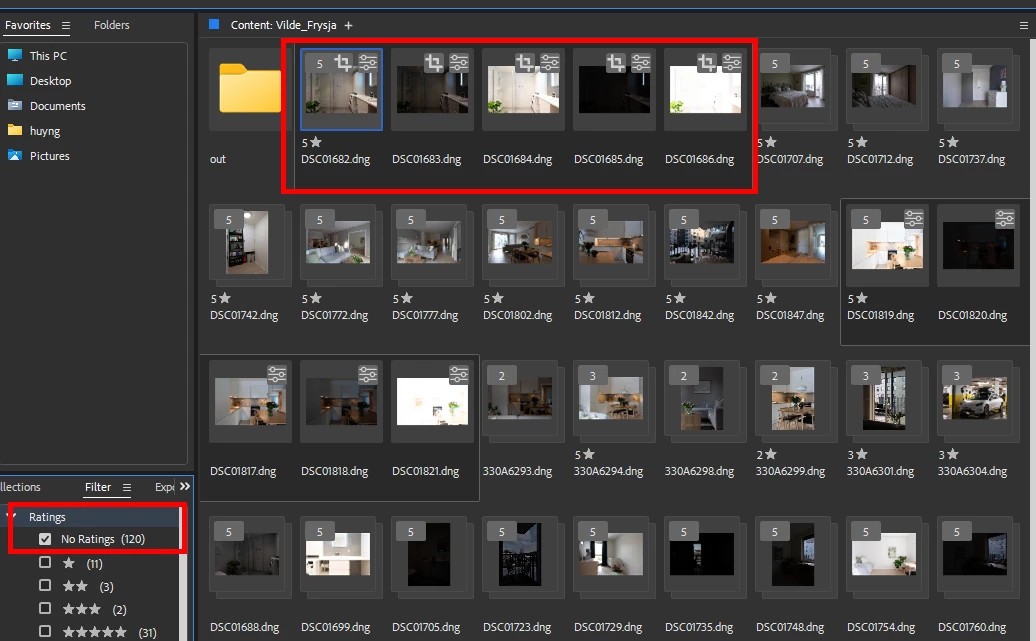
Is anyone experiencing issues like mine when switching to Adobe Bridge 2024? With version 2019, I could rate entire stacks, but with version 2024, I can only rate the first image, while the rest of the images in the stack are marked as "no rating," making it extremely difficult to count and filter a large number of photos.

Does anyone have any guidance on how to resolve this? Thank you.
4 replies

Participating Frequently
Oct 26, 2025 2:01 AM UTC

Its very frustrating that Adobe completely broke the stacking features in Bridge 14 and now subsequently Bridge 15. 

I am still running Bridge 2022 because the stacking is passable. I still cannot even select multiple stacks in any way other than individually clicking on them while holding CMND + OPTION.


If you have any insights on this I would very much appreciate it!

Translate
gary_sc
Community Expert
Community Expert
Feb 10, 2024 12:09 AM UTC

I do not stack images all that often in Bridge, so I cannot speak to the history of this. However, I use Stacks a lot in Lightroom Classic and the same issue/problem exists there as well. 


Nonetheless, I do have a potential solution for you:


If you select all the Stacks you wish to give a (say) 5-star rating and press Command/Control-Shift-G, you will expand all of these stacks. And, if the stack is selected, all of the images that open should be selected as well. Then you can set the rating for all images. Then you can press Command/Control-G to close the Stacks.


Let me know if this works.

Translate
Participant
Feb 27, 2024 11:56 PM UTC


Yes, I can rating for all image in stack but it will get wrong number, because filter will count all image rating like this one

Picture below is bridge 2019, an it show correct what i want ( rating stack)

Translate
kglad
Community Expert
Community Expert
Feb 9, 2024 10:30 PM UTC

in the future, to find the best place to post your message, use the list here, https://community.adobe.com/

p.s. i don't think the adobe website, and forums in particular, are easy to navigate, so don't spend a lot of time searching that forum list. do your best and we'll move the post (like this one has already been moved) if it helps you get responses.


<"moved from cc desktop">
Translate