
Inspiring
October 21, 2017
Answered

Unable to Save Raw Conversions Bridge ACR 2018
  • October 21, 2017
  • 8 replies
  • 5258 views

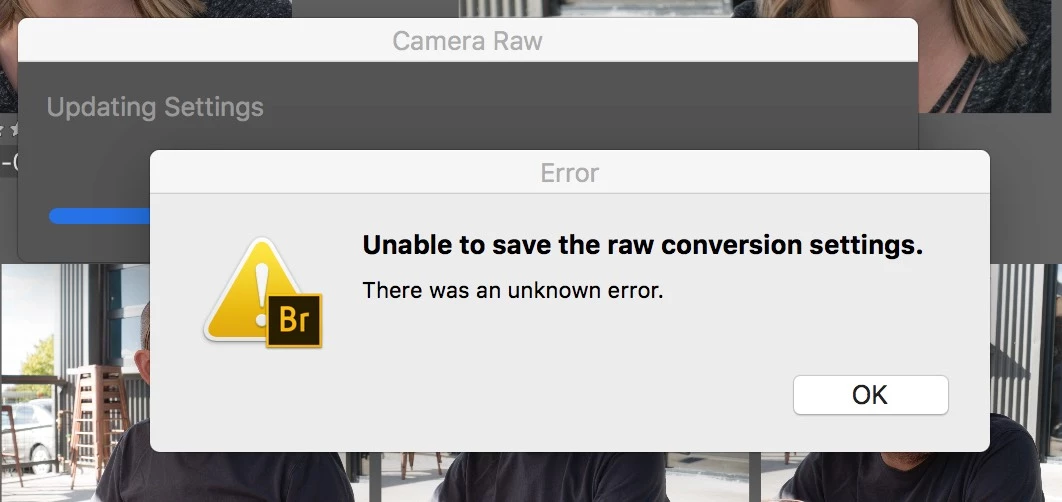
When finished working up Raw DNG images in ACR 2018 this error message appears.

Selecting "OK" the message disappears and the "Update Setting" proceeds as expected.

I have cleared the Camera Raw Cache. Same result.
    This topic has been closed for replies.
    Correct answer Junebug Clark

    Finally a FIX for "Unable to Save Camera Raw Data" Error Message

    Everything is now working and even better than before....

    Let me know when you find this message and if it works for you too....

    8 replies

    rickburress
    Inspiring
    December 17, 2018

    Latest update to Bridge* SOLVES THIS PROBLEM!
    *v. 9.0.2.219

    Known Participant
    January 14, 2019

    Thanks! Finally! It seems to be working at last... Not sure if it was the ACR update, or some Photoshop update (it was not mentioned in any of the release notes), it now works correctly in Photoshop and ACR as well. Now I can get back to latest version back from the Photoshop CS 2017...

    Known Participant
    December 8, 2018

    Well, I just did some testing in different versions of Photoshop. Adobe Camera Raw was the same, v11 I believe (latest). DNG files freshly converted from RAF files by latest Adobe DNG Converter.

    CC 2019 (v 20.0.1) - NOT WORKING

    CC (v 19.1.7) - the same

    CC 2017 (v 18.1.6) - WORKS every time, full size preview, medium size preview, whatever.

    Same set of files, reinstalled all the Photoshop versions, same Adobe Camera Raw, rebuilt my caches, ran all the maintenance scripts, rebuilt permissions (the apple's recommended way in Terminal), rechecked file permissions (local drive, folder on Desktop, read/write by Everybody, I even manually chmod'ed the folder and files with 777, that means EVERY process can access them, to make sure). Different versions of Photoshop. Old one works, new ones give Unable to save... error (Unknown error).

    Adobe, please get your mess together!

    rickburress
    Inspiring
    December 10, 2018
    Known Participant
    December 8, 2018

    Adobe Camera Raw still unable to save the settings. Did try everything suggested, resetting preferences in ACR, changing preview size from full to medium, editing on another drive, doublechecking the permissions were correct (yes they were, even tried changing permissions to r/w everybody), tried latest version of DNG converter (11.1 beta), tried saving to CRDB instead of XMP sidecars, nothing works.

    Every time I update setting of my DNG files, ACR cannot save the settings - or more precisely, it saves the settings in metadata correctly (if I change the exposure, I can see that it is changed upon next opening the file), but cannot update the preview (and fails with the abovementioned error).

    Well, I am stuck. I am using DNG because they are smaller than my RAF files and allow full size previews for checking focus and allow changes to the file to be visible to other applications. Now I can't. Thanks Adobe, for my monthly payments I get this

    Adobe CC 2019, Mac OS High Sierra, Adobe DNG Converter

    Known Participant
    October 1, 2018
    Resetting preferences did not help at all. The error appears with DNG files converted by DNG converter 10.5.0.1001. Original files have permissions: User R/W, Staff R/W. Converted DNGs have User R/W, Staff R only. That might be the problem? Photoshop is saving the files under Staff group, but DNG Converter creates the files with Staff set to Read Only?
    Legend
    October 2, 2018

    Group shouldn't matter if you are the user.

    Permissions are one possibility, corrupt preferences are another.

    Try using different files and a different user account. Also put the files on the internal hard drive.

    Adobe Employee
    October 16, 2018

    Hi,

    We have released a new version of Adobe Bridge CC (9.0.0.204) which is now available to download using Adobe Creative Cloud Desktop Application.

    You can also download it from https://www.adobe.com/products/bridge.html

    Digital asset management software | Download free Adobe Bridge CC trial

    Please refer to  New and enhanced features | Latest release of Bridge CC for the complete list of new and exciting features.

    Regards,

    Abhishek Seth

    Participating Frequently
    April 6, 2018

    Same problem for me. got 2 brand new macs...both have this problem. everything up to date. spending hours to resolve that issue. what a waste of time!! really frustrating adobe won't find a solution. also tried the cache cleaning solution with no succsess!!

    Junebug ClarkAuthorCorrect answer
    Inspiring
    January 18, 2018

    Finally a FIX for "Unable to Save Camera Raw Data" Error Message

    Everything is now working and even better than before....

    Let me know when you find this message and if it works for you too....

    Inspiring
    January 18, 2018

    That is...

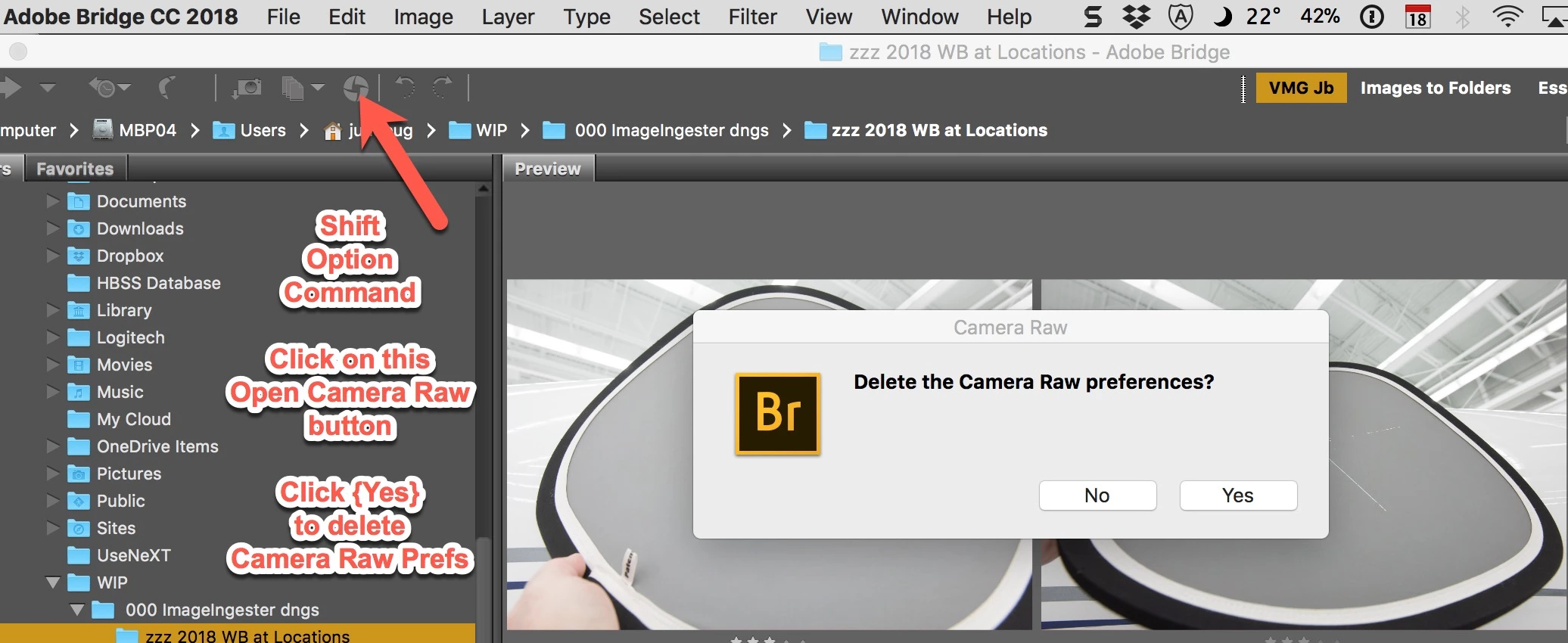
    Select a couple of images in Bridge

    Hold down Shift-Option-Command and Click on the "Open Camera Raw" icon (see image above.

    Then Click [Yes] to "Delete the Camera Raw Preferences"

    That's it... Good Ol' Bridge and Camera Raw should be working as expected again.

    YT... Jb.

    Participant
    November 15, 2017

    I am also having the same problem. When updating settings in Camera Raw, 'Error' message appears, 'Unable to save raw conversion settings There was an unknown error' When reopening image in Camera Raw the settings have ,in fact, been saved. However, when I attempt to bulk update through Bridge the Error message re-appears & no images have been updated.

    What the.......

    CC2018. iMac Retina 5K, 27" 2017, OS High Sierra, 10.13.1

    My folders are Read & Write activated. Have had no problems on older Mac CC2014.

    Mohit Goyal
    Community Manager
    Community Manager
    November 11, 2017

    Hi JunebugClark,

    You get this because of the improper disk permission to Bridge application. Please refer the below discussion related to this issue.

    Unable to save camera raw conversion settings | Photoshop Family Customer Community

    Regards,

    Mohit

    Inspiring
    January 18, 2018

    This is not a permission problem. I have posted the fix in this "Unable to Save Camera Raw Conversions Settings" discussion.

    YT... Jb.