Known Participant
February 17, 2022
Answered

Unable to view A7IV photos with latest Bridge?

  • February 17, 2022
  • 1 reply
  • 433 views

I just updated to the latest version of Bridge on my Mac, and I can see thumbnails for my photos and when I click on some of them they somtimes show in the Preview window and sometimes they dont, though they never display large when I press spacebar. Is there something I can do to fix this?

Thanks

This topic has been closed for replies.
Correct answer gary_sc

Hi Media kat,


First thing I'd try is to toss the cache for that folder:

If that worked, you may want to toss the cache for all your folders (or do them one-at-a-time as above).


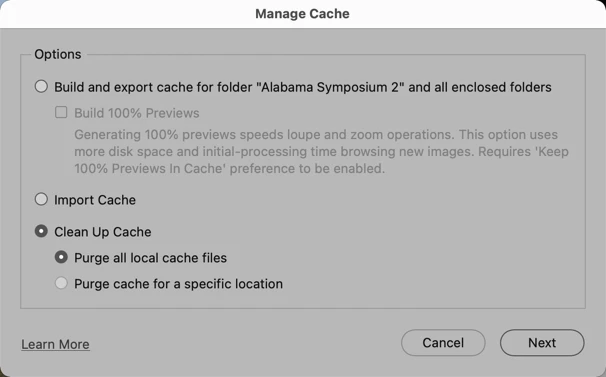
If so, go to Manage Cache (as shown above) and then follow as below


Do let us know if this works, if not we can try other things.

1 reply

gary_sc
Community Expert
gary_scCommunity ExpertCorrect answer
Community Expert
February 17, 2022

Hi Media kat,


First thing I'd try is to toss the cache for that folder:

If that worked, you may want to toss the cache for all your folders (or do them one-at-a-time as above).


If so, go to Manage Cache (as shown above) and then follow as below


Do let us know if this works, if not we can try other things.

media katAuthor
Known Participant
February 17, 2022

Yes, thanks that worked!


What other cache folders should I consider doing this for? Is this cache folder some folder that just sits on the computer and grows and grows huge over time unless you do the step you just told me about?


Thanks!

gary_sc
Community Expert
Community Expert
February 17, 2022

That's up to you. If you encounter other folders that you cannot see your images, you can do them one-at-a-time or just zap them all. It really doesn't make a difference.


FWIW, it's not uncommon when updating some applications like Bridge, for you to need to do some housecleaning. So, the next time you update Bridge, you may also will need to do the same thing.


If this helped you, can you please go to my previous message and tap "Correct Answer?" It will help others.