
Using CS6, can't access Photoshop to look at JPEG images in Bridge
Recently I had a problem with Bridge. I fixed the problem by uninstalling CS5 which I forgot to do after installing CS6 a few years ago.
Now when I try to open Photoshop in Bridge by clicking on the image and also by right clicking and choosing "open with", I get the following message:
"Windows cannot find 'C:\ProgramFiles\Adobe\AdobePhotoshop CS4 (64bit) Photoshop.exe' Make sure you typed the name correctly and then try again.
I no longer have CS4 on my computer. That's been long gone. And now I no longer have CS5 on the computer.
can open images in Photoshop via the backdoor (open Photoshop and search for file outside of Bridge) but that is cumbersome and time consuming when processing hundreds of images in Bridge.
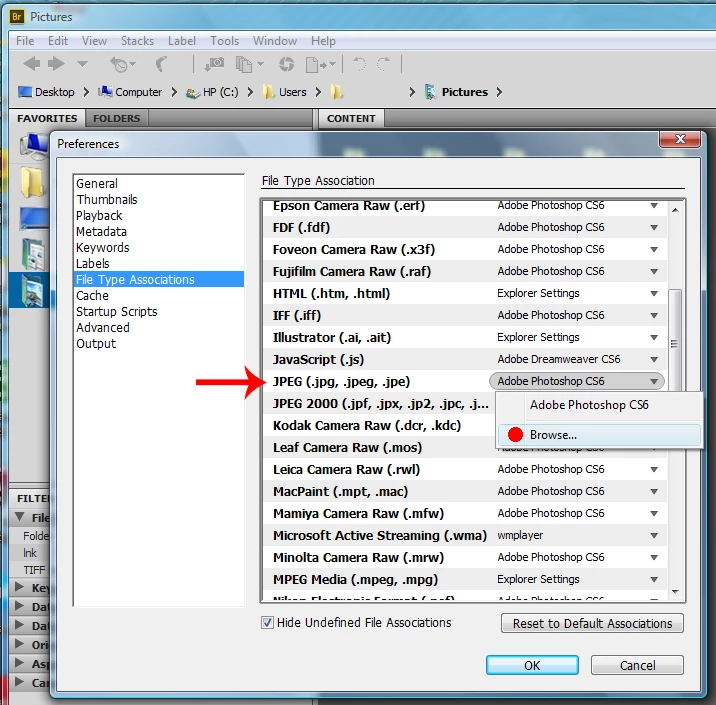
In attempting to fix the problem in Bridge I clicked on edit, preferences, I reset the default. I also checked in preferences Nikon RAW which indicated Photoshop. I checked Photoshop document (.psd.psb... and it said Photoshop CS6.
When searching these forums I saw one line discussing on how to change the registry for a similar problem. Not sure if that's the way to go and if the instructions were correct. I suppose the other alternative would be uninstall and reinstall CS6. I just want to avoid making a bigger problem than I already have.
Thanks in advance for your help.



 AdChoices