Participant
April 28, 2026
Answered

Using Mouse Wheel to navigate between images in Bridge (macOS)

  • April 28, 2026
  • 2 replies
  • 26 views

Hello everyone,

I have recently transitioned from Windows 11 to a Mac Mini M4, using a Mac keyboard and a Keychron M6 mouse. On Windows, I relied heavily on FastStone Image Viewer because of its speed and intuitive navigation.

Since moving to macOS, I have tried XnView; while it allows for mouse wheel navigation, I found it has other limitations compared to what I’m used to in FastStone. I would much prefer to use Adobe Bridge, but I am struggling with the mouse controls.

Specifically, I would like to use the mouse wheel to scroll to the next or previous image. Currently, it seems that the mouse wheel, along with the left and right mouse buttons, are all defaulted to zooming/enlarging functions. Having three different physical inputs dedicated to the same magnifying action feels redundant for my workflow, and I would much prefer to reassign the wheel to navigation.

Is there a setting I am missing to enable "Mouse Wheel to Next/Previous Image" in Bridge? If this isn't natively supported in the Mac version, are there any known workarounds or settings to change this behavior?

Thanks for any help!

    Correct answer Erik Bloodaxe

    I have a Logitech MX3 Master Mouse and I took a look at what can be achieved somewhere close to what you ask.

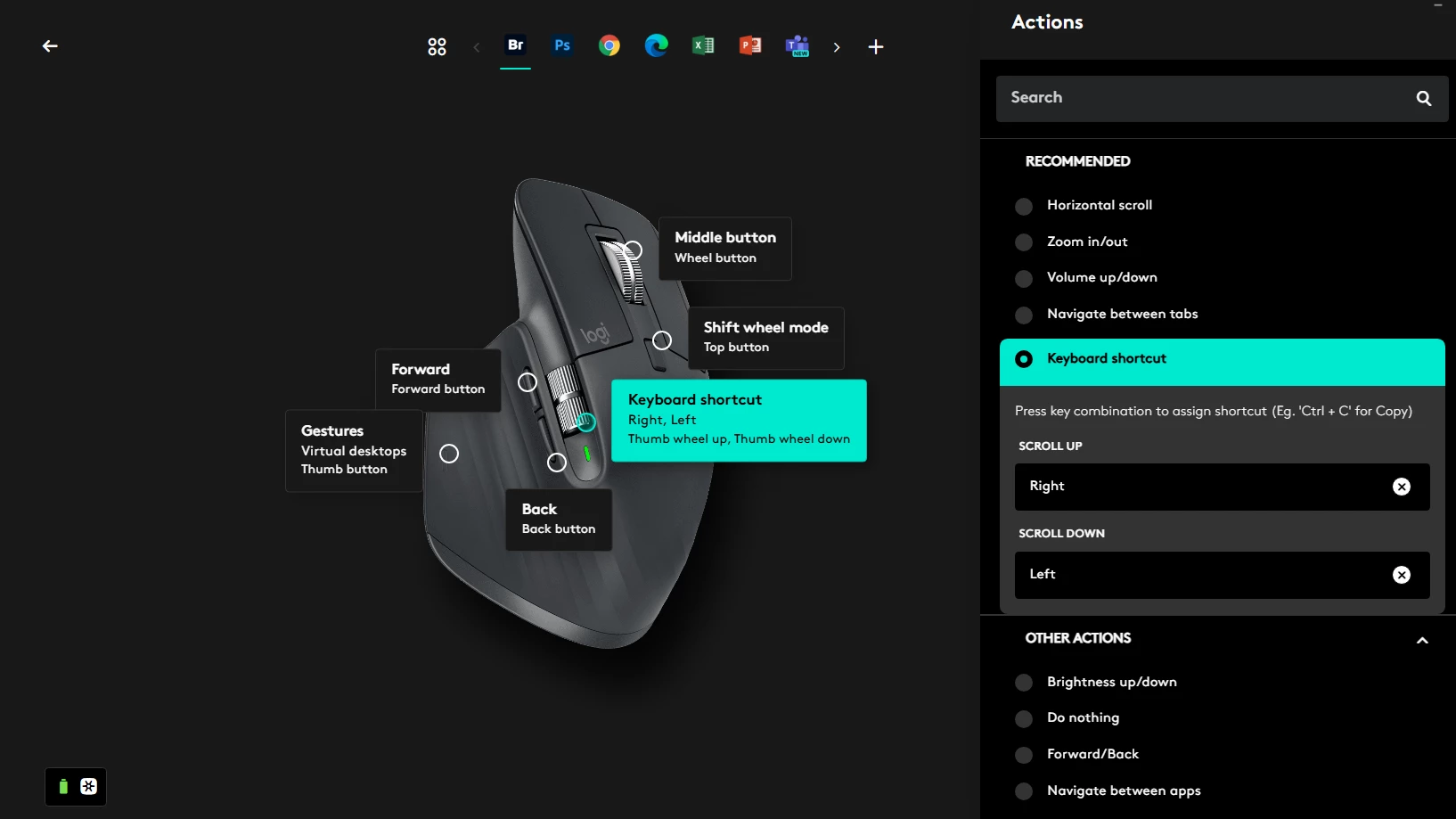
    I succeeded in customising the central scroll whell to move left and right through images in Bridge  row by row. I am sure you can do other useful customisations too. Might be worth a look at though these mice are quite expensive - depends on how much you need these features.


    2 replies

    gary_sc
    Community Expert
    Community Expert
    April 28, 2026

    I have the same Logitech mouse as Erik and agree with him that it can be done (albeit a bit tricky if you’re not familiar with their approach). FWIW, I’ve always used my extended keyboard and the up, down, right, left arrows to move through my images. Since I’ve not had the experience of using my mouse as you’ve had, I never thought to try using the mouse for this.

    I guess a lot of it falls into play of what you’ve learned to use as you develope along with your tools.

    Erik Bloodaxe
    Legend
    April 28, 2026

    There are no Bridge options I am aware of to achieve this. Looks like your mouse software is the best bet. This sort of thing is possible with Logitech mice for example using their own software customisations.

    Participant
    April 28, 2026

    Thanks for your response. I’ve tried Logitech mice without success, so I ordered another one but with the same result. I am unable to set the mouse buttons the way I want in Bridge or Xnview.. In Xnview, the wheel changes the images but I can’t program one of the buttons to delete images with one click. In Bridge the worst problem is that the wheel only enlarges the images. It is impossible for me to understand why it was programmed like that. It is very inconvenient. Thanks again.

    Erik Bloodaxe
    Erik BloodaxeCorrect answer
    Legend
    April 28, 2026

    I have a Logitech MX3 Master Mouse and I took a look at what can be achieved somewhere close to what you ask.

    I succeeded in customising the central scroll whell to move left and right through images in Bridge  row by row. I am sure you can do other useful customisations too. Might be worth a look at though these mice are quite expensive - depends on how much you need these features.