
Utility Script Pack 2.0 beta available
Version 1 of my Utility Script Pack for Bridge is available on Adobe Exchange. I have been working on a major update which is now close to feature-complete and is ready for testing.
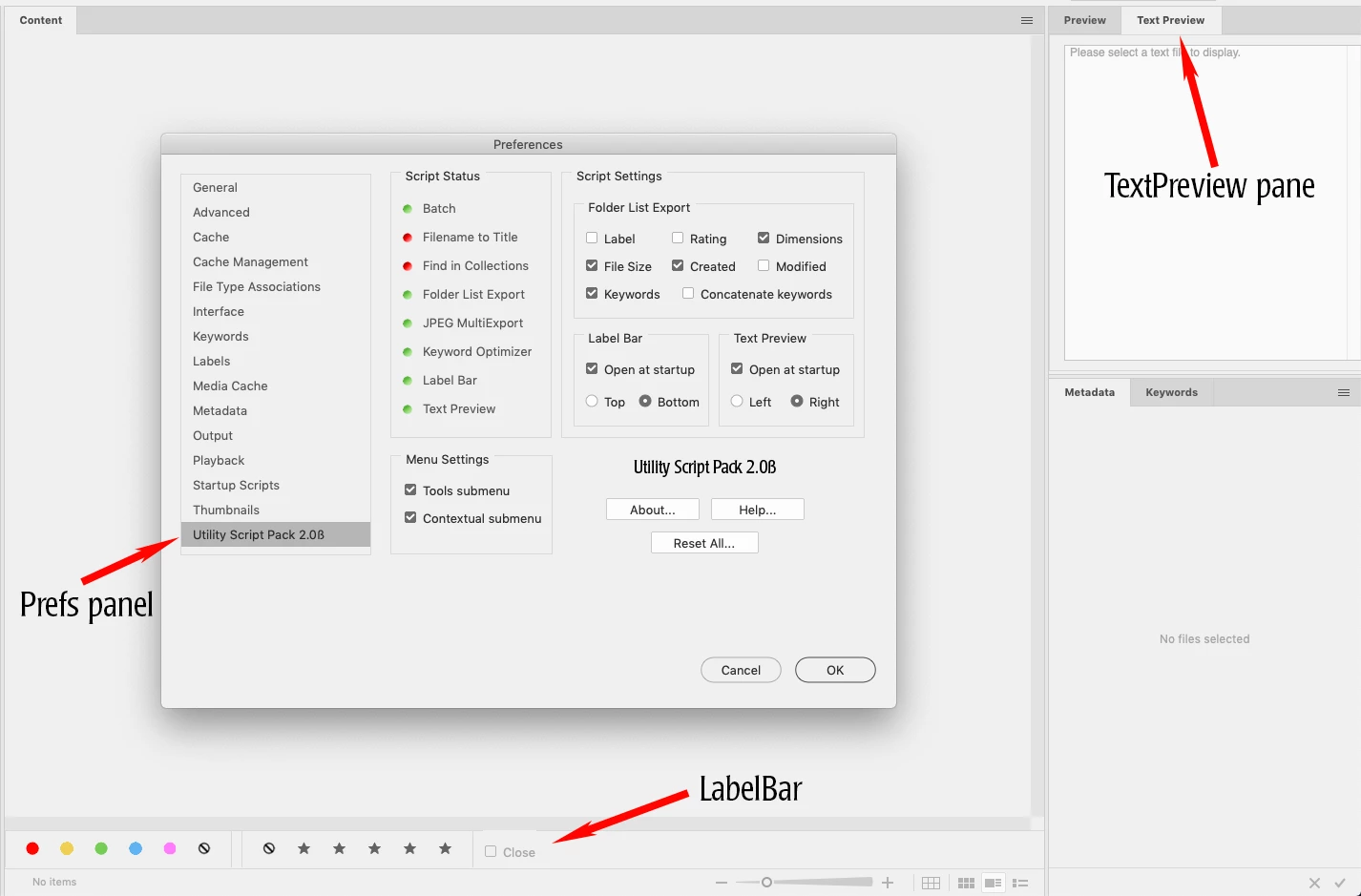
Version 2.0 contains eight utility scripts and a settings preference panel.
The entire script pack is open source freeware released under the Apache 2.0 license.
----------
- Batch adds the Tools->Photoshop->Batch command to the Bridge contextual menu
- FilenametoTitle copies the filename (stripping the file extension) to the Title metadata field
- FindinCollections searches all collections for a selected file and returns a list of found collections. The file can be removed from any collections if desired.
- FolderListExport saves a tab-delimited text file of the current folder contents. Metadata categories to include can be set in the preference panel.
- JPEGMultiexport is a replacement for the old Export panel from Bridge CS5 and earlier.
- KeywordOptimizer copies keywords from dc: subject and lr: hierarchicalSubject, sorts them alphabetically, removes duplicates and blanks, and writes them back into the file. (Both Bridge and Photoshop File Info Basic pane only write keywords to dc: subject and not the lr namespace.)
- LabelBar places a visual bar at the top or bottom of the content pane for setting labels and ratings (similar to the toolbar in Lightroom.)
- TextPreview creates a preview panel for text files. Select a plain text file and the contents will be displayed. The built-in Preview panel does not display text files.
- Utility Pack Preferences Panel indicates which scripts are active and has various script settings.
----------
Installation is easy. Unzip the file. Launch Bridge, open Preferences->Startup Scripts and click the Reveal button. Place the entire Utility Script Pack folder in Bridge Startup Scripts. Remove any older scripts from the original pack, then quit and relaunch Bridge.
Please note that this is a BETA, TESTING release and may contain bugs. There also may be future beta updates and the final version will be posted on Adobe Exchange.
Zip file can be downloaded from my Dropbox:
Utility Script Pack for Bridge
----------
Known issues:
FolderListExport and JPEGMultiexport cannot work with some special system folders due to bugs in Bridge.
JPEGMultiexport sometimes cuts off one pixel of an exported JPEG due to a Bridge bug.
Most preference setting changes are applied after relaunching Bridge. However, FolderListExport uses the current export options.
prefsReader.jsxinc must be in place or none of the scripts will run. Otherwise, scripts can be enabled and disabled independently without affecting others.
LabelBar cannot run if any images are missing. LabelBar also will not run on Bridge CC 2018 or earlier due to UI changes and Bridge bugs.
Smart Collections are not well-supported for scripting. Most functionality only works with regular Collections.
Preferences uses red and green images to indicate script status. They are distinctly different tonally in greyscale but I cannot tell how they look to someone colorblind.
Help and some tooltips are not yet implemented.
Scripts are written for Bridge CC 2019 and may not work properly on earlier versions. The preference panel does not layout properly on CC 2018 but does work.
----------


 AdChoices