
67martin
Inspiring
November 14, 2022
Answered

view folders from an external drive

  • November 14, 2022
  • 3 replies
  • 626 views

Hi everybody,

folders and files on the external drive cannot be displayed in Bridge, after last Bridge update. So far it has always worked.

 

This topic has been closed for replies.
Correct answer gary_sc

[Note: if you are on Ventura, the look of this has changed. But what I show below is sufficient for you to figure out what you need to do.] Go to your System Preferences and select Security and Privacy (found in the top section). Now click on the Privacy setting (last tab). Now click on the lock on the bottom left and provide your Administrator code. Now select the Full Disk Access option and click on the "+" symbol. This will bring up the standard Mac Open window and let you add any application you want or need to have full access. Look for Bridge, and select it; it will now appear in that window, and make sure it's checked. Next, go to the Files and Folders option and do the same thing as above (although there's nothing to check, just add. Close everything down and see if that makes it all work.

Please let me know

[Note: these images are from an older OS, the process is the same.]
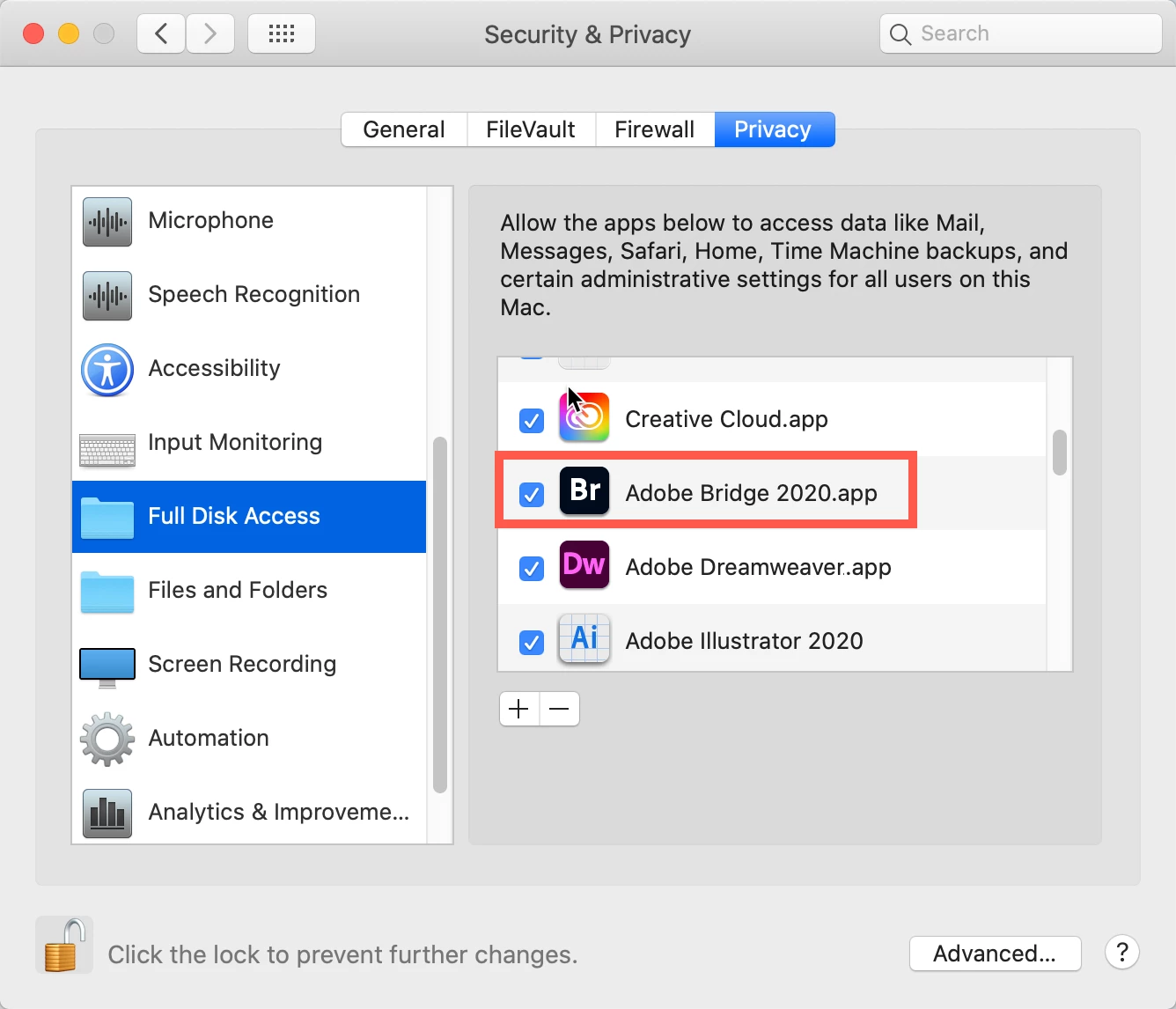


Close everything up and you should be good to go.

3 replies

gary_sc
Community Expert
gary_scCommunity ExpertCorrect answer
Community Expert
November 14, 2022

[Note: if you are on Ventura, the look of this has changed. But what I show below is sufficient for you to figure out what you need to do.] Go to your System Preferences and select Security and Privacy (found in the top section). Now click on the Privacy setting (last tab). Now click on the lock on the bottom left and provide your Administrator code. Now select the Full Disk Access option and click on the "+" symbol. This will bring up the standard Mac Open window and let you add any application you want or need to have full access. Look for Bridge, and select it; it will now appear in that window, and make sure it's checked. Next, go to the Files and Folders option and do the same thing as above (although there's nothing to check, just add. Close everything down and see if that makes it all work.

Please let me know

[Note: these images are from an older OS, the process is the same.]
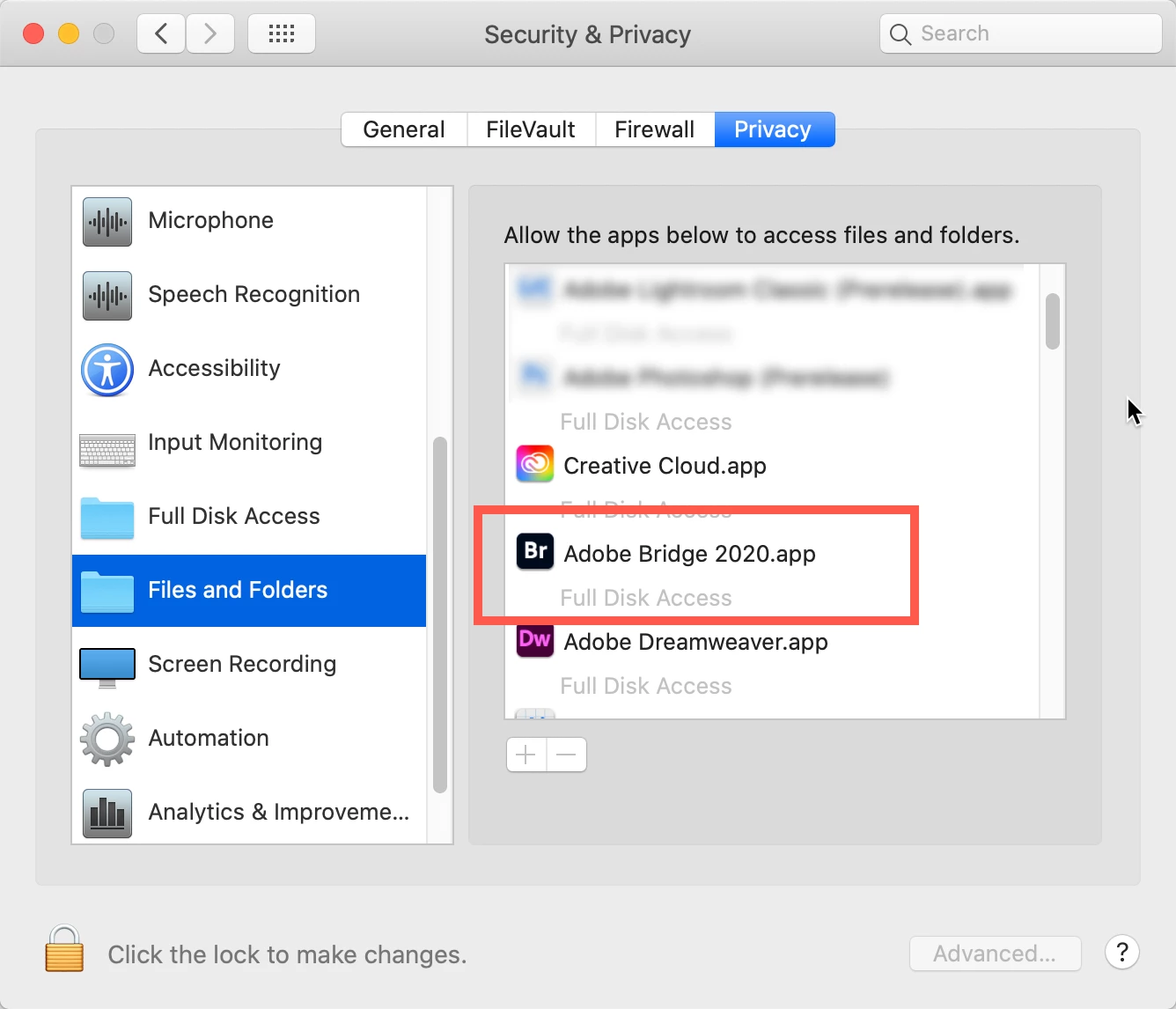


Close everything up and you should be good to go.

67martin
67martinAuthor
Inspiring
November 15, 2022

Hi, it works, thanks!
MK

gary_sc
Community Expert
Community Expert
November 15, 2022

Hi @67martin Glad it worked.


Since this could help others, could you please tap the "Correct Answer underneath my answer. That makes it easier to find for others with the same issue. Thank you!

Legend
November 14, 2022

Are you on Mac? If so, you need to give Bridge permission in System Preferences/Settings to access external drives.

67martin
67martinAuthor
Inspiring
November 15, 2022

Hi, it works, thanks.

MK

67martin
67martinAuthor
Inspiring
November 14, 2022

Folders and files on the hard disk are displayed.

MK