*Photonic
Known Participant
May 28, 2025
Answered

What does "GPU Rendering is Disabled" mean in new installation?

  • May 28, 2025
  • 1 reply
  • 498 views

I just installed Bridge 2025 on my new Mac Studio. I got an error message "GPU Rendering is Disabled" and something about Photo Downloader not working. Has something to do with Adobe not bothering to update Bridge for Apple Silicon processors (after three years?).


How will GPU Rendering being disabled affect my work experience with Bridge? What's not goin to work? Thanks.

Correct answer gary_sc

Yes, it was when I first installed Bridge 2025 that I got the message "GPU Rendering is Disabled." But where in Bridge 2025 Settings do you turn GPU Rendering ON? I can not find it.

The only reference I can find concerning GPU settings is in Photoshop 2025.  I looked back into my Bridge 2022 app and also can not find where GPU settings are mentioned in Edit > "Preferences."

Thanks.


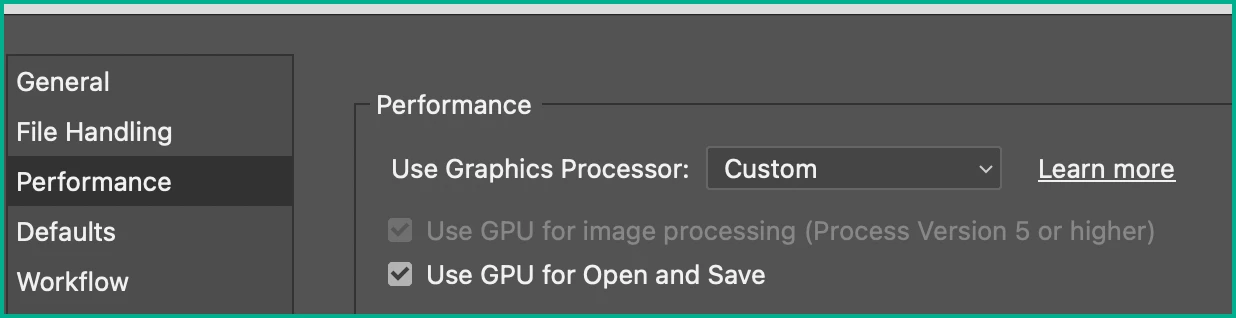
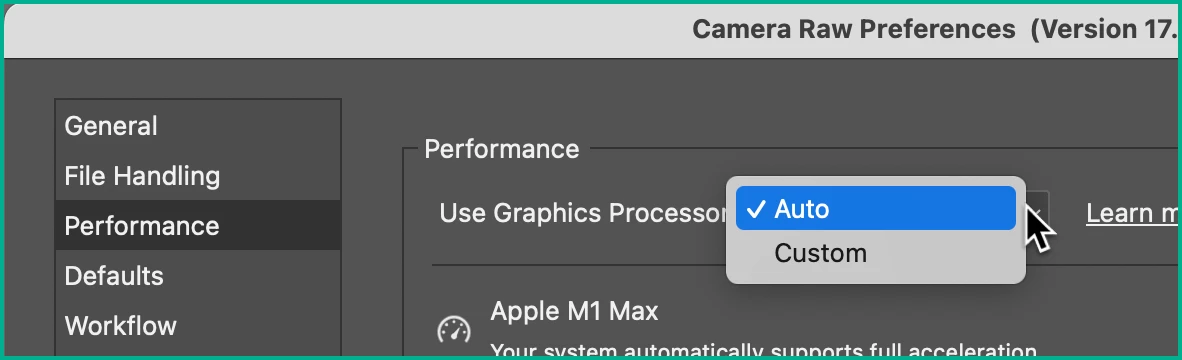
Ironically enough GPU prefs are not in Bridge's prefs. Rather, they are in Camera Raw's Prefs.

As I have an M1, I'm not sure what options you have for "Custom, but this is what I have:

In my case the "Use GPU for the image…" is default on, only GPU for Open and Save is an option.


Hope that helps

1 reply

Legend
June 2, 2025

Bridge 2025 is Apple Silicon-native. I still use Bridge 2022 because it is generally more stable but that is an Intel app.


Check Bridge Settings to be sure that GPU rendering is not turned off.

*Photonic
*PhotonicAuthor
Known Participant
June 2, 2025

Thanks ExUSA. But in my Bridge 2025 under "Settings", I can not find where to check if GPU rendering is turned on. Is this setting actually in the Photoshop > Performance > Graphics Processor Settings section? 

Legend
June 2, 2025

Isn't your problem with Bridge?