Inspiring
December 31, 2024
Answered

What is meant by 'AND' for keywords

  • December 31, 2024
  • 1 reply
  • 369 views

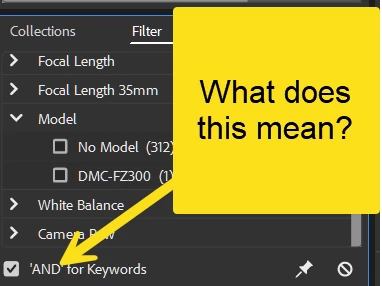
What is meant by this line?  Can we just have keywords as one of the filters?

This topic has been closed for replies.
Correct answer Erik Bloodaxe

In the Filter Panel, under Keywords, if you select multiple keywords to filter on, then the filter process will deliver all images which contain ANY of those keywords i.e. the logical OR function. If you check the 'AND' for keywords box, you will get all images which contain ALL of those keywords i.e. the logical AND function. 

In the past only the default OR was available but now you have the option of OR by default or AND by ticking the box.

Hope that makes sense. Try it out and you will quickly see how it works.

Oh, and yes, you can filter on just keywords. Simply collapse all the the other filter criteria options and ignore them, or look in the hamburger menu next to the word Filter and select only the desired filter criteria.

If a particular criteria does not appear in the list even though you have chosen that criteria as a filter option, it means that the images you have selected all share the same criteria so there is nothing to filter on.

Here is a link to Adobe's help (you will need to scroll well down to see the help on filtering):

https://helpx.adobe.com/uk/bridge/using/view-files-bridge.html
 

1 reply

Erik Bloodaxe
Erik BloodaxeCorrect answer
Legend
December 31, 2024

In the Filter Panel, under Keywords, if you select multiple keywords to filter on, then the filter process will deliver all images which contain ANY of those keywords i.e. the logical OR function. If you check the 'AND' for keywords box, you will get all images which contain ALL of those keywords i.e. the logical AND function. 

In the past only the default OR was available but now you have the option of OR by default or AND by ticking the box.

Hope that makes sense. Try it out and you will quickly see how it works.

Oh, and yes, you can filter on just keywords. Simply collapse all the the other filter criteria options and ignore them, or look in the hamburger menu next to the word Filter and select only the desired filter criteria.

If a particular criteria does not appear in the list even though you have chosen that criteria as a filter option, it means that the images you have selected all share the same criteria so there is nothing to filter on.

Here is a link to Adobe's help (you will need to scroll well down to see the help on filtering):

https://helpx.adobe.com/uk/bridge/using/view-files-bridge.html

 

JohnnyAirAuthor
Inspiring
December 31, 2024

Thank you Erik

Erik Bloodaxe
Legend
December 31, 2024

No problem. Hope you are enlightened and Happy New Year.
