Participant
November 14, 2023
Question

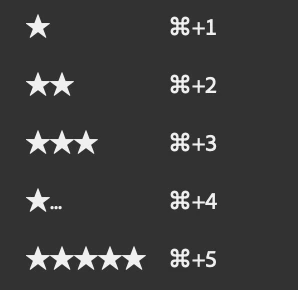
why does my star rating setting only show "a shorten icon " at "4 star" ??

  • November 14, 2023
  • 2 replies
  • 276 views

It seems like a bug or somtething wrong with the system.
 

This topic has been closed for replies.

2 replies

Adobe Employee
December 5, 2023

Hi @CHIU5CBC , 
 
Thanks for your feedback. 
 
To better investigate the issue, could you please share the following:
 

  1. Can you confirm whether you are using an external monitor or not? If yes, please provide  the details of the monitor.
  2. Display configurations and scaling of your monitor and OS
  3. Bridge Scaling screen shot from this location:
            >Go to Preferences dialog > Interface> Scaling


We might reach out to you to get more information but to start with, it would be helpful if you can give more details around the issue along with the asked details. 


Thanks, 
Bridge Team

gary_sc
Community Expert
Community Expert
November 14, 2023

Hi, @CHIU5CBC, I'm assuming that this is a screenshot of your Labels menu.


THAT is WEIRD. In the many years I've helped in these forums, that's the first time I've seen this. FWIW, I do not see that on my copy of Bridge (and never have).


For the record, what is your OS (and what release), EXACTLY which version of Bridge are you running?


If it's a bug, it would show up on other people's computers. If it is local to your computer, why? What's going on in your system that could cause that?

CHIU5CBCAuthor
Participant
November 15, 2023

Hi, @gary_sc, thank you for your reply.
Your assumption is right, that's my screenshot of my Labels menu.
I'm using macOS Ventura 13.5.2 on MacBook pro 14 inch 2023 and the version of Bridge is 14.0.1 .
I will upgrade my macOS first and check out if the new version of macOS could solve this problem.

So far I can't figure out what kind of issue which is local to my computer could cause the problem, but I will try to consider about this possibility.
