
brucem91169054
Participant
February 24, 2024
Question

wierd thumbnails in Bridge

  • February 24, 2024
  • 1 reply
  • 276 views

Anybody have any advice about how to deal with corrupted thumbnails in Adobe Bridge? The images open fine, but the thumbnail display is a mess.AND, though the images look fine, a couple of times when I moved them from PS to imagR to RD Works to laser cut, the laser starting cutting the messed up thumbnail version, even though on the screen the image looked fine.
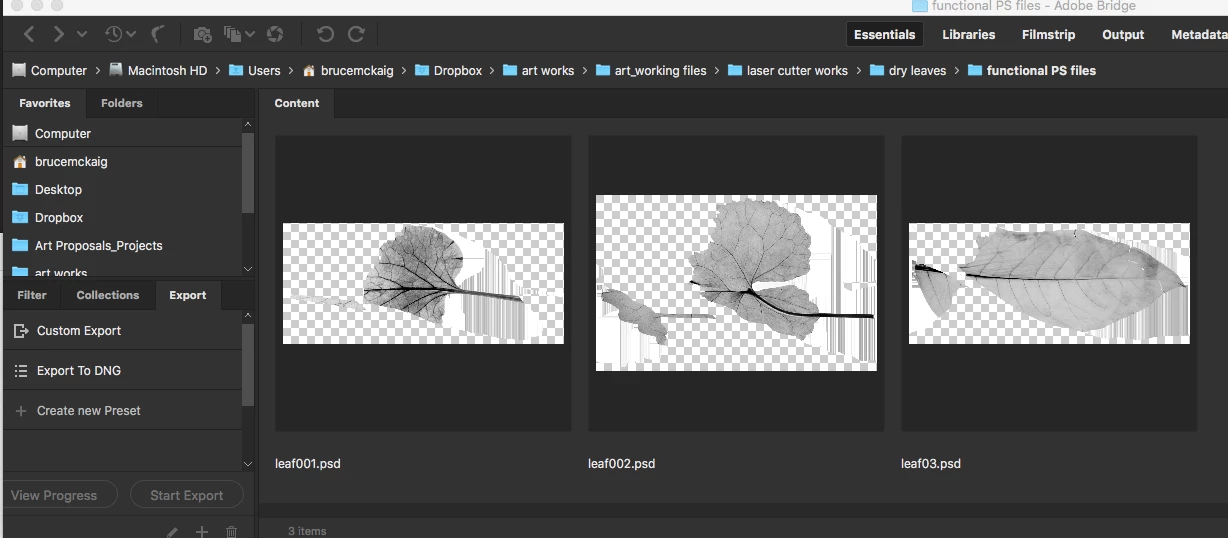
1 reply

gary_sc
Community Expert
Community Expert
February 24, 2024

Try this: go to Tools (menu) -> Cache -> delete cache for "that folder" (I'm away from my computer right now so "delete" might not be the word.)


let us know if that did it or not. 

brucem91169054
Participant
February 24, 2024

Thank you for offering your advice. I am sorry that I didn't provide that information. I have already cleared every cache, purch, reset preferencees, etc. Quit everything, reinstalled everything. No change.

gary_sc
Community Expert
Community Expert
February 25, 2024

Ah, OK. In the future, it's handy to let folks know what you have done; things can go faster that way.


Please go into Adobe Camera Raw preferences (located where Bridge's preferences are to be found, just above or below it) and go into Performance. It's probable that what I can see here might be different than what you might see, but you want to turn any option off or uncheck.