martinl47003580
Participant
Feb 6, 2017 4:51 PM UTC
Answered

Wildcard search for Batch file rename - is it possible?

Hi everyone

I'm trying to use Batch File Rename in Adobe Bridge to strip out characters left behind by the photographic stage.

eg.

F1 IDO60-BLK.jpg

F2 IDO80-GRY.jpg

I want to search with a wildcard to eliminate the F1, F2 etc and space and leave the IDO60... etc intact

Is this possible? I tried using F* but it doesn't work.

Cheers

    This topic is closed to new replies. Start a new post to keep the conversation going.
    Stephen Marsh
    Stephen MarshCorrect answer
    Community Expert
    Feb 6, 2017 8:31 PM UTC

    Hi martinl47003580, you need to use a regular expression based string substitution search/replace:

    Find: ^\w*\d*\s

    Replace: (blank)

    The above regex will look for zero or more letters and zero or more numbers and then a single space at the beginning of the filename.

    I have tried to make this expression a little more versatile/robust than your sample filenames which could have used a very simple/explicit expression:

    F\d\s or ^F\d\s

    However what if you ever had files that started with a different character than an uppercase F? Or what if you ever had two or more digits following the letter before the space? This is why I went with a more flexible/robust expression.
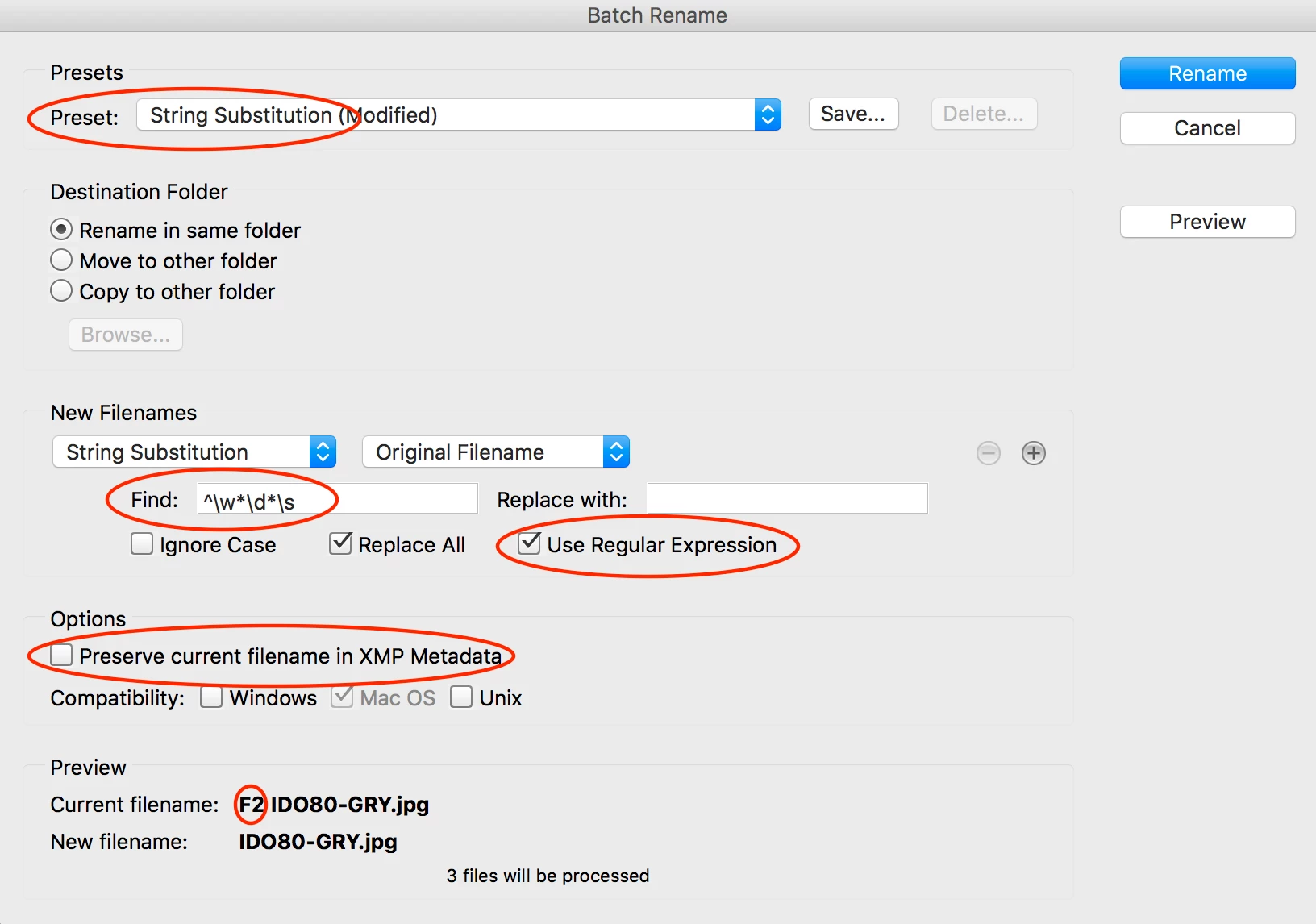
    It is usually a good idea to tick the “Preserve current filename in XMP Metadata” when batch renaming, so that you can easily recover the original filenames if required.

    EDIT: Looking at this a second time, an equivalent result and perhaps “technically better” would also be achieved with ^\w[0-9]+\s or how about ^\w+\d+\s or perhaps even ^\w+?\d+?\s etc. This is the great thing about regex, there are many ways to get to the same result (some verbose, some more elegant) – it all depends upon the context/use and how flexible the pattern recognition needs to be! Some other variations could be F.+?\s or ^.+?\s

    P.S. You can save this search/replace as a preset using the save button at the top of the interface.

    4 replies

    Legend
    Jun 1, 2018 1:16 PM UTC

    You can find a hugely useful reference at Regular-Expressions.info - Regex Tutorial, Examples and Reference - Regexp Patterns

    Keep in mind that different programs implement regex in slightly different way6s, but the core workings are pretty standard.

    Translate
    Participant
    Jun 1, 2018 7:55 AM UTC

    Thanks for this, really useful

    Translate
    Stephen Marsh
    Community Expert
    Stephen MarshCommunity ExpertCorrect answer
    Community Expert
    Feb 6, 2017 8:31 PM UTC

    Hi martinl47003580, you need to use a regular expression based string substitution search/replace:

    Find: ^\w*\d*\s

    Replace: (blank)

    The above regex will look for zero or more letters and zero or more numbers and then a single space at the beginning of the filename.

    I have tried to make this expression a little more versatile/robust than your sample filenames which could have used a very simple/explicit expression:

    F\d\s or ^F\d\s

    However what if you ever had files that started with a different character than an uppercase F? Or what if you ever had two or more digits following the letter before the space? This is why I went with a more flexible/robust expression.

    It is usually a good idea to tick the “Preserve current filename in XMP Metadata” when batch renaming, so that you can easily recover the original filenames if required.

    EDIT: Looking at this a second time, an equivalent result and perhaps “technically better” would also be achieved with ^\w[0-9]+\s or how about ^\w+\d+\s or perhaps even ^\w+?\d+?\s etc. This is the great thing about regex, there are many ways to get to the same result (some verbose, some more elegant) – it all depends upon the context/use and how flexible the pattern recognition needs to be! Some other variations could be F.+?\s or ^.+?\s

    P.S. You can save this search/replace as a preset using the save button at the top of the interface.

    Translate
    marketingc39907871
    Participant
    Feb 14, 2017 10:46 AM UTC

    Thanks Stephen. Very helpful. I ran a few batches using your search string and it worked perfectly.

    Regards,

    Martin

    Translate