Participant
May 6, 2020
Answered

Wondering Where "Comments" Section in Details Tab Shows Up in Bridge?

  • May 6, 2020
  • 1 reply
  • 2192 views

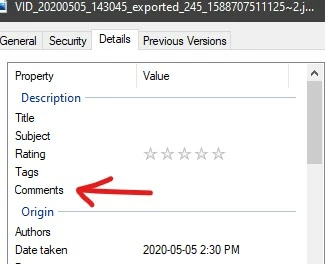
Hey all, I was wondering where the comments section in the details tab in the properties window of a file shows up in bridge? I've scoured throughthe metadata panel and I can't find it. This is an mp4 file. 


This topic has been closed for replies.
Correct answer Stephen Marsh

This is a IFD0:XPComment metadata entry:


https://exiftool.org/TagNames/EXIF.html

https://www.exiv2.org/tags.html


I believe that this is a proprietary metadata field for MS Windows that is not written to another open/cross-platform metadata tag that is available to Adobe products such as Bridge or Photoshop.


Using ExifTool as an example, it would be possible to copy this metadata to another standard open/cross-platform field, such as the Subject (Keyword) field. The following command line code would append to existing data in the XMP-DC Subject & legacy IPTC Keyword fields:


exiftool -use MWG "-Keywords+<${IFD0:XPComment}" "FILE PATH HERE"


Where you would replace FILE PATH HERE with the actual full system-path to the image file or folder to process (don't replace the open/close straight double quotes).


The problem is that if you then updated the XPComment info, it would be out of sync with the Subject and Keywords... So it is usually a good idea to avoid platform-specific (whether Win or Mac) non-standard metadata fields where possible and only use open/cross-platform metadata for Adobe products.


Just to confuse things even further, Microsoft refers to Subject metadata is "Tags" - which are written to the current open/cross-platform XMP-DC Subject field, but they are not written/mirrored in the depreciated legacy IPTC Keyword field.

1 reply

Stephen Marsh
Community Expert
Stephen MarshCommunity ExpertCorrect answer
Community Expert
May 6, 2020

This is a IFD0:XPComment metadata entry:


https://exiftool.org/TagNames/EXIF.html

https://www.exiv2.org/tags.html


I believe that this is a proprietary metadata field for MS Windows that is not written to another open/cross-platform metadata tag that is available to Adobe products such as Bridge or Photoshop.


Using ExifTool as an example, it would be possible to copy this metadata to another standard open/cross-platform field, such as the Subject (Keyword) field. The following command line code would append to existing data in the XMP-DC Subject & legacy IPTC Keyword fields:


exiftool -use MWG "-Keywords+<${IFD0:XPComment}" "FILE PATH HERE"


Where you would replace FILE PATH HERE with the actual full system-path to the image file or folder to process (don't replace the open/close straight double quotes).


The problem is that if you then updated the XPComment info, it would be out of sync with the Subject and Keywords... So it is usually a good idea to avoid platform-specific (whether Win or Mac) non-standard metadata fields where possible and only use open/cross-platform metadata for Adobe products.


Just to confuse things even further, Microsoft refers to Subject metadata is "Tags" - which are written to the current open/cross-platform XMP-DC Subject field, but they are not written/mirrored in the depreciated legacy IPTC Keyword field.

Participant
May 6, 2020

Wow, I'm starting to realize how convoluted and bloated metadata is across platforms, lol. Thank you, though. I think I'll stick with just using tags.