
Participant
August 27, 2018
Answered

working in bridge: black colours turn blue when editing. how do i set this off?

  • August 27, 2018
  • 1 reply
  • 1192 views

When i am editing in adobe bridge, the black colours in my photo turn blue.

how do i turn this off?

this wasnt like this before.

but my kitten walked on my keyboard and probably pressed some buttons and activated this.

i dont know how to turn this off.. searched everywhere.

i hope someone can help me!
This topic has been closed for replies.
Correct answer Eugenio.NYC

Hi there

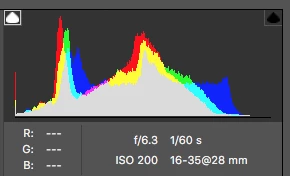
If you are editing a raw file using the camera raw plugin from Bridge

you have to click on the top left triangle of the Histogram

This is the warning for the shadow clipping 

1 reply

Eugenio.NYC
Eugenio.NYCCorrect answer
Participating Frequently
August 27, 2018

Hi there

If you are editing a raw file using the camera raw plugin from Bridge

you have to click on the top left triangle of the Histogram

This is the warning for the shadow clipping 

Participant
October 7, 2019

when editing a photo, the histogram pops up in full screen. I don't know what to do about it?