Known Participant
October 4, 2023
Answered

XMP file thumbnails in Bridge

  • October 4, 2023
  • 1 reply
  • 991 views

Since updating to Bridge 2024 every time I label or rate an image thumbnail in Bridge a XMP thumbnail is created beside the image thumbnail. I have never experienced this and it is a major distraction clogging up

my film strips. How do I turn off seeing the metadata thumbnails?

This topic has been closed for replies.
Correct answer gregreser

I'm guessing you are working with RAW files. When you add metadata to a RAW file, an XMP sidecar file with the same name is created to store the metadata.

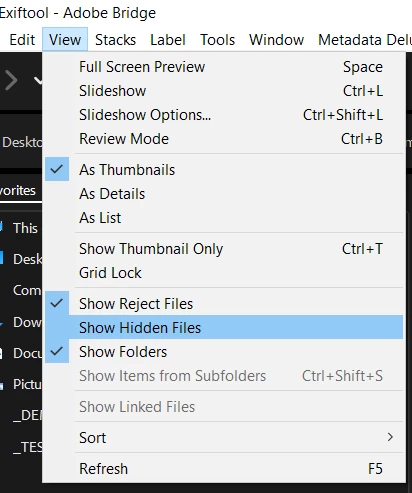
Check to see if View > Show Hidden Files is selected. Turn it off and you should not see the XMP sidecar files.


1 reply

gregreser
gregreserCorrect answer
Legend
October 7, 2023

I'm guessing you are working with RAW files. When you add metadata to a RAW file, an XMP sidecar file with the same name is created to store the metadata.

Check to see if View > Show Hidden Files is selected. Turn it off and you should not see the XMP sidecar files.


Known Participant
October 7, 2023

That's fixed it! Thanks. 

gregreser
Legend
October 7, 2023

Great, I'm glad it worked.

Can you please mark the answer correct so we know it is resolved? Thanks.