First, you have never been able to bake anything into a proprietary raw in any version; Adobe treats these raws as read only. You could and still can do so with DNG.
What has changed, and correctly outlined is that the Camera Raw Database is no more. As outlined below, it could cause more issues than it helped:
Camera Raw Database
If you want to do absolutely no file management, and you work on only one computer, the advantage of saving settings in the Camera Raw database is that they're indexed by file content rather than name. You can rename your raw images and move them anywhere on your computer, and Camera Raw will still associate the correct settings with each image.
The significant downside is that you rely on a single file on a single computer to hold all your image settings. If you move the images to a different machine, or even just burn them on a CD, the settings won't travel with the images. So while settings saved in the Camera Raw database are easy to handle in terms of file management on a single machine, they're very inflexible. This inflexibility leads me to always save my settings as sidecar .xmp files.
Sidecar XMP Files
Adobe's XMP (Extensible Metadata Platform) is an open, documented, W3C-compliant standard for saving metadata (literally, data about data), including all the EXIF data generated by the camera; IPTC information such as captioning, keywording, and copyright notices; and, last but not least, all the settings you used in Camera Raw on a given image.
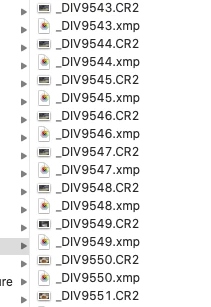
When you elect to save image settings as .xmp sidecar files, they're saved in a small file with the same name as the image and a .xmp extension. The sidecar file is automatically saved in the same folder as the image, which is usually what you want.
As you'll learn in the next chapter, Photoshop's File Browser offers features that automatically keep the sidecar files with the raw images as long as you use the File Browser to copy or move them. If you use some other software to move or copy your images, it's up to you to keep the sidecar files with the images. Since they're always saved in the same folder as the images, and the file names match those of the images, this isn't hard to do.
But whichever method you use, Camera Raw doesn't limit you to saving only the entire group of settings for a specific image. Much of the power and flexibility of Camera Raw comes from its ability to save subsets of settings in addition to complete sets of image settings.
Author “Color Management for Photographers" & "Photoshop CC Color Management/pluralsight"




 AdChoices