


kevinc98152725
Known Participant
July 24, 2018
Answered

Camera Raw 10.4.0.976 Colours are Distorted

  • July 24, 2018
  • 2 replies
  • 1578 views

I encountered an issue with Camera Raw on my desktop in May 2018. I am still running Windows 8.1 64 bit v 8.1 6.3.9600.17415.  I have an nVidia Quadro K600 graphics card.  At the time I had upgraded to Bridge 8.0.1.282x64 and Photoshop 19.1.3.   I am now on ACR 10.4.0.976, Bridge 8.1.0.383x64 and Adobe Photoshop Version: 19.1.5 20180604.r.346 2018/06/04: 1175273  x64.  The same problem has returned and is also happening on laptop ASUS GL502VM running Windows 10 64bit V10.0.17134.1 with NVIDIA GeForce GTX 1060 graphics card.  Both computers run with 2 displays, the primary monitor being EIZO CG247 on both.  They self calibrate regularly.  My issue is when I view a raw file in Bridge the colours look fine but when I open it in Camera Raw the colours are horribly distorted (magentas on skin tones are revolting).  However, when I then open the image in Photoshop the colours are fine again.  I have turned graphic processor acceleration OFF in ACR preferences but this hasn't helped.  The odd thing is that if I toggle away from ACR then back to it, the colours shift back to normal (ie the same as appears in Bridge and Photoshop).  See the snip below which shows 1. the appearance the first time I open in ACR and 2. after I toggle to another program then toggle back to ACR.  Can anyone help?  This is becoming VERY frustrating.
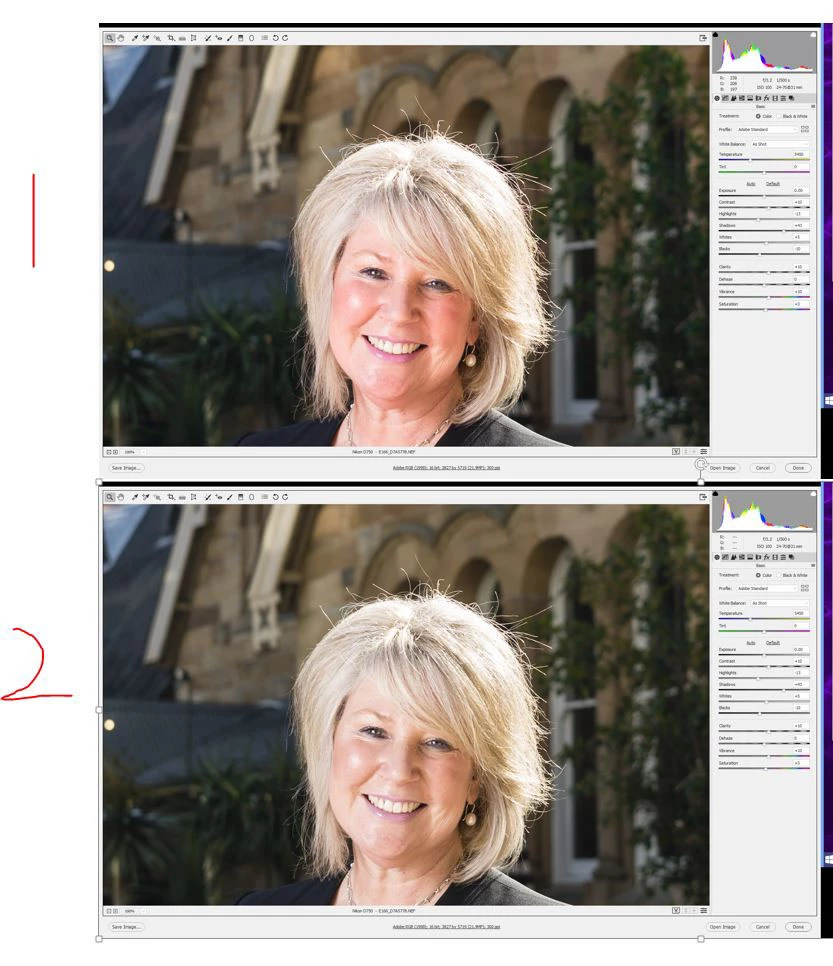
This topic has been closed for replies.
Correct answer D Fosse

Yes, this is an old familiar bug. I haven't seen it myself, but It has been reported here many times, for a long time, and also officially in the feedback forum. I'm glad if it gets some attention.

The problem is, very simply, that ACR sometimes uses the wrong monitor profile in a dual display setup. If ACR sits on the secondary display, it uses the profile for the primary display. Which results in wrong colors.

It gets very obvious when you have one standard and one wide gamut display. I actually suspect it's pretty widespread, but if you have two very similar displays the difference is more subtle and perhaps just ignored by many as not important.

2 replies

D Fosse
Community Expert
D FosseCommunity ExpertCorrect answer
Community Expert
August 22, 2018

Yes, this is an old familiar bug. I haven't seen it myself, but It has been reported here many times, for a long time, and also officially in the feedback forum. I'm glad if it gets some attention.

The problem is, very simply, that ACR sometimes uses the wrong monitor profile in a dual display setup. If ACR sits on the secondary display, it uses the profile for the primary display. Which results in wrong colors.

It gets very obvious when you have one standard and one wide gamut display. I actually suspect it's pretty widespread, but if you have two very similar displays the difference is more subtle and perhaps just ignored by many as not important.

Akash Sharma
Legend
August 21, 2018

Hi Kevinc98152725,

Sorry that you're having issues getting consistent color outputs while working with Camera raw. The issue as you've mentiobed is linked to the GPU being enables in Camera raw. I'd recommend that you take a look at the troubleshooting steps mentioned in this article Troubleshoot Photoshop graphics processor (GPU) and graphics driver issues and check if that helps is getting the problem sorted.

Regards,

Akash

kevinc98152725
Known Participant
August 21, 2018

Hi Akash,

Thank you for your assistance.  I have done all the troubleshooting steps (the only new process was updating the driver again) but the problem with ACR on both the Windows 10 notebook and Windows 8.1 desktop persists.  Rikk Flohr (Official Rep) has been in contact to acknowledge the problem with the colour distortions in ACR and said it should be fixed in the next release.  There is no ETA but hopefully it will be soon as it is ridiculous to have to toggle to another program then toggle back to ACR in order to get correct colour representation - particularly when people are in the image!
