

Inspiring
November 10, 2016
Question

color differences btw PS and ACR

  • November 10, 2016
  • 2 replies
  • 1495 views

hello

on a calibrated pro screen how come i get color differences between PhotoShop and Camera Raw ?

see photo attached

(i already tried to re-install evereything)
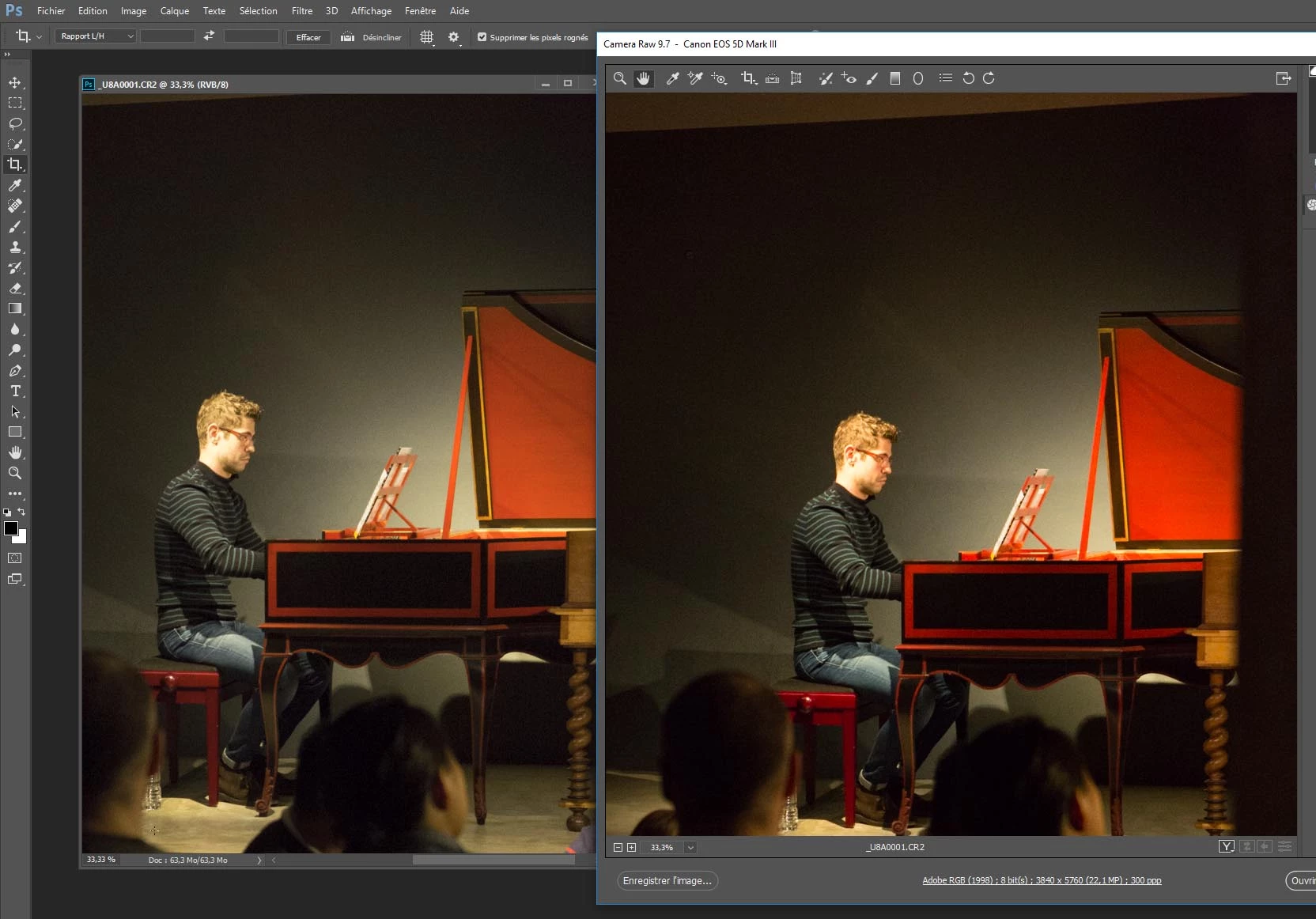
thanks

This topic has been closed for replies.

2 replies

D Fosse
Community Expert
Community Expert
November 11, 2016

Not "repair" - replace.

The display profile needs to be an accurate description of the display's actual response. I assume "SV241" means NEC Spectraview 241 - so that means you should try to replace that profile with Adobe RGB, which is the one that comes closest for this wide gamut model.

This doesn't fix anything, but will unambiguously confirm or reject whether it is in fact a broken profile. If the difference disappears, you need to take a closer look at the Spectraview software (if that's what you use).

Look at the screenshot above again. If you have Adobe RGB listed, just click to select it and then click "set as default". This is now the profile that PS/ACR will use. If Adobe RGB is not listed, click "add" and navigate to it.

PS and ACR use the profile set as system default, for each display, whichever that might be. The profiles are loaded when the application starts, and then those profiles are used until next startup. The OS has no role in this other than to make the profiles available. So while the app needs to be restarted, a full reboot is not necessary.

tpakAuthor
Inspiring
November 11, 2016

thans again for your help.

your're right ! setting up Adobe RGB as the default profile makes the color accuuracy much better (although not perfect).

yes i'm using Spectraview for a long time. it used to be OK, what is wrong now i don't know (i tried different settings)...

what is the use calibrating a screen if i can use the standard Adobe RGB ?

D Fosse
Community Expert
Community Expert
November 11, 2016

I have only used the US Spectraview II software, and I'm not familiar with the EU edition of Spectraview which is in fact made by BasICColor of Germany.

But the first thing to check is profile policy. I see from your screenshot that SV is set to make LUT-based profiles (as opposed to matrix-based). LUT profiles are supposedly more accurate, but also heavier, more complex, and prone to errors. Matrix-based profiles should always be the safer option, so try that instead.

Another thing is that profiles can be made according to the version 2 specification from the icc, or the version 4 specification. The latter has also been reported to cause problems for some, and v2 should always be safer.

I currently use Eizo ColorNavigator, and LUT profiles can be slightly tricky in some applications and configurations. I consistently stick to matrix profiles for this reason. But I have never seen problems with v4.

Other than that I don't have any immediate suggestions, except maybe update the software. At any rate, the sensor you're using, the i1Display Pro, is generally regarded as the best on the market (perhaps aside from the much more expensive BasICColor Discus).

D Fosse
Community Expert
Community Expert
November 10, 2016

Either the monitor profile is defective/corrupt, or one of the apps is using the wrong profile (that can happen in a dual display setup).

A defective profile can affect applications differently.

Try to replace the current profile with a known good one. If the monitor is a wide gamut model try Adobe RGB, otherwise sRGB. This is done in Windows Control Panel > Color Management. Relaunch Photoshop when done.

If the difference persists (and you have a dual display setup), try to switch primary and secondary displays.

tpakAuthor
Inspiring
November 10, 2016

Thanks.

the right profile is set to the right screen ; i don't think it is corrpupted (i tried with 2 softwares).

Remaining is the color management ; are yu talking about this window (it's in french sorry ..) ? what should be the setup ?

thanks

D Fosse
Community Expert
Community Expert
November 10, 2016

Don't change anything in the "Advanced" tab, leave everything there at defaults.

The display profile is set up in the "Devices" tab. It looks like this. Make sure the correct profile is assigned - marked default - for display 1 and 2 as the OS sees them. That's the profile Photoshop and ACR should use:

And again, you need to relaunch Photoshop if you make any changes, so that it can load the new profile at startup. This is important!

Either way, this is a problem in the conversion from source profile and into the monitor profile. The profile itself is always the first suspect, next whether it's actually the right one, and finally it could also be the conversion process if it is performed by the GPU. To test this last possibility, try to uncheck "use graphics processor" from both apps' preferences.