

alfredmack
Inspiring
September 6, 2018
Question

Captivate 2017 export swf and pdf

  • September 6, 2018
  • 3 replies
  • 370 views

Hi,

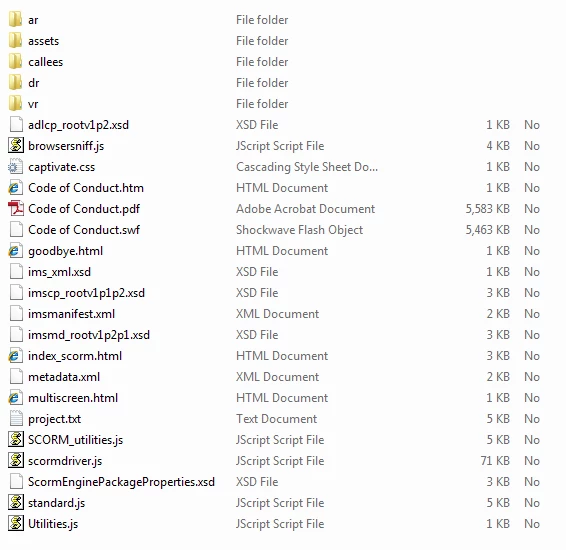
I have a project which is converted to responsive design,I exported the document to pdf and flash before conversion. After conversion and did some changes in my responsive design, I come to notice that when I export to SCORM the zipped folder comes with pdf and swf in it,which seems that the old settings before conversion are still there. I have tried to upload but didn't work the file was blocked by chrome,I have tried in Mozilla the file requested flash player but after enabling the file didn't play.

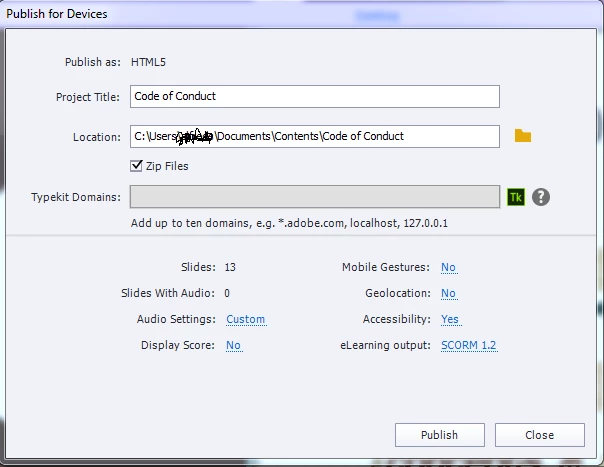
Now, I'm looking for the solution to disable pdf and swf export in my captivate 2017. Please see attachments of my exported folder and export window.
This topic has been closed for replies.

3 replies

alfredmack
Inspiring
September 7, 2018

Thanks RodWard I have managed to solve my issue by creating a new project and copy all my slides to my new project.

Lilybiri
Legend
September 7, 2018

Thanks for posting this problem, looks like a bug. I have never converted a non-responsive project to a responsive project because of too much editing needed for all the items that are not supported in Fluid Boxes. Will try to check however...

alfredmack
Inspiring
September 7, 2018

Hi, I have tried this but still swf is generated

RodWard
Community Expert
Community Expert
September 6, 2018

Try deleting everything in the publish folder and then republish again.  Do you THEN still see SWF files?