
Geоrge
Legend
August 30, 2018
Answered

Captivate 2019 can't start installing

  • August 30, 2018
  • 6 replies
  • 1506 views

See the screenshot. It looks like window is not full, there is no "next" button
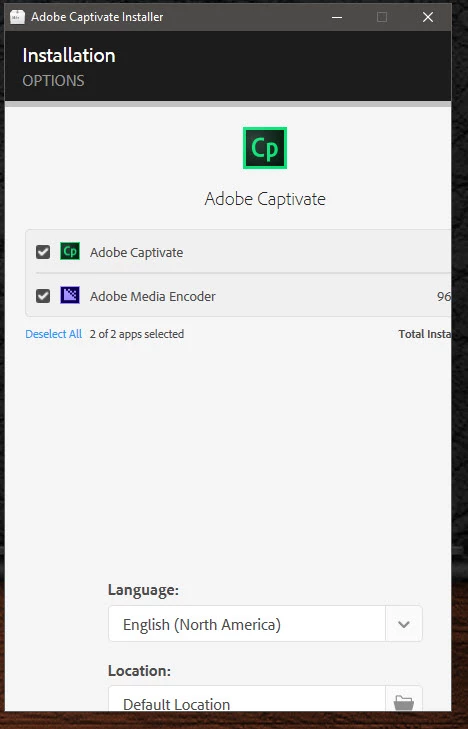
How to "deploy" this window to full?

Win 10 x64 Corporate Edition with all updates.

    This topic has been closed for replies.
    Correct answer Geоrge

    No, this is some conflict with Adobe ID logon as I understand. (I have installed many Adobe software). I'm find a solution and do installation

    - logoff from current user and logon with another on your windows

    - and installations starts with adobe id logon screen (on my current user this window don't shows) and after enter Adobe ID screen from first post scales normally and have some "next" button.

    Some crazy bug, but I'm glad that find the bypass.

    Lilybiri​ Thanks for the company

    6 replies

    marcog44254421
    Participant
    May 15, 2019

    When you get that screen, you should use the TAB key on the keyboard and it will scroll down to where the NEXT button is located.

    Geоrge
    GeоrgeAuthorCorrect answer
    Legend
    August 30, 2018

    No, this is some conflict with Adobe ID logon as I understand. (I have installed many Adobe software). I'm find a solution and do installation

    - logoff from current user and logon with another on your windows

    - and installations starts with adobe id logon screen (on my current user this window don't shows) and after enter Adobe ID screen from first post scales normally and have some "next" button.

    Some crazy bug, but I'm glad that find the bypass.

    Lilybiri​ Thanks for the company

    Remember, never say you can't do something in InDesign, it's always just a question of finding the right workaround to get the job done. © David Blatner
    Lilybiri
    Legend
    August 30, 2018

    Whow! I also have almost all applications from the CC installed, but never experiienced any problems with Captivate installing. I use the same ID for both. Only the connection with Typekit is sometimes broken, and then I have to close the CC app, and restart it to solve the problem.

    Glad you found the solution. If yo have any question about Captivate, would be glad to help, being also an ACP myself.

    Lilybiri
    Legend
    August 30, 2018

    You do not specify the OS nor the screen properties. Can you look for the Display Percentage and lower it, if you are on a retina screen?

    Geоrge
    GeоrgeAuthor
    Legend
    August 30, 2018

    OS - win 10 x64 Corporate (data in the first post). Display resolution do changes up and down, no matter.

    Remember, never say you can't do something in InDesign, it's always just a question of finding the right workaround to get the job done. © David Blatner
    Lilybiri
    Legend
    August 30, 2018

    Sorry, missed the information on OS. What is the display resolution? Do you have a retina screen? It really looks related to the resolution.