
marcusmatthews
Known Participant
June 13, 2019
Answered

Captivate 2019 new v11.0.5 "Fatal Error" in hidden window; Assessment one screen

  • June 13, 2019
  • 10 replies
  • 8216 views

After the new version install today and a restart I have had three cases of the following error but hidden behind active applications. Also the recording in assessment mode starts OK but stops the shutter sounds and only records first of many screens.
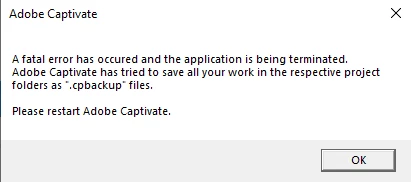
Anyone else with same issue?

Comments?

    This topic has been closed for replies.
    Correct answer shreya

    Is it possible to get a download of that Capture.dll file? Selecting the link doesn't do anything for me.


    Navigate to the link: https://adobe.ly/31VzNYN

    Click on Download icon as shown below:

    Copy Paste Capture.dll in the install folder of Captivate.

    Do not forget to take backup of original Capture.dll


    Hope this helps.

    10 replies

    Participant
    August 17, 2021

    Hello,


    I'm having the same Fatal Error issue, I tried following the steps provided, but it seems the link is no longer available. I receive a 404 Error when I click it.  Your assistance would be appreciated.

    Lilybiri
    Legend
    August 17, 2021

    Can you please check the exact version number you are using? Most recent version for Windows is now 11.5.5.553. You can find it under Help, About Captivate.

    Known Participant
    December 26, 2019

    I have had the same issue with all screen recordings regardless of Assessment, Demo or Training.  my mouseclicks are not being recorded properly.  I get the first slide, maybe a slide where a dialog box pops up, and the last slide as I end the recording.  None of the in-between steps are recorded.  I'm using Captivate 2019 11.5.0.476.  Does the latest update fix this problem?  Please help.  I use captivate every day as part of my job, and I cannot complete my tasks without this working properly.  Thank you!

    Lilybiri
    Legend
    December 28, 2019

    Pllease upgrade to 11/5/1/499 if you are on Windows.

    Lilybiri
    Legend
    September 17, 2019

    Problem was fixed with recent patch. Make sure you use 11.5.1.499!

    Participant
    September 17, 2019
    Can you tell me how to get that patch? I don't see it when I type it in.
    Participant
    September 17, 2019

    Having the exact issue and I cannot get it to work. I am being ignored in the chat as well for any technical help. This is ridiculous.

    marcusmatthews
    Known Participant
    June 28, 2019

    BUG FIXED ;-) Had a new Capture.dll file today from Shreya in support. Tested on brand new software simulation and existing, and all works. Thanks ;-)

    "

    Hello Marcus,

    We have fixed the issue at our end. Below are the steps to try out the fix.

    For Windows:

    1. Download Capture.dll from https://adobe.ly/31VzNYN

    C:\Program Files\Adobe\Adobe Captivate 2019 x64 

    1. Rename existing Capture.dll to any name, e.g. Capture_original.dll (this is for backup purpose)

    1. Launch Captivate.

    Thanks for reporting the issue. Please try out at your end and let us know if it works for you.

    Regards

    Shreya"

    shreyaAJIT_M

    Lilybiri
    Legend
    June 28, 2019

    Marcus, did Shreya allow to post the link sent to you?  Have some duties as moderator...

    marcusmatthews
    Known Participant
    June 28, 2019

    I did think of asking, however I assume it is OK given she has emailed me and acknowledged my reply to her saying its fixed. and I trust users here will use their judgment until any official notice if they wish to test.

    marcusmatthews
    Known Participant
    June 18, 2019

    UPDATE: CAUSE FACTOR identified. This ONLY happens IF I use the Assessment recording WITH the extra Checkbox "Use Smart shapes instead of Captions" (which I definitely want as it saves a heap of extra development).

    And I am NOT using any migrated projects only a brand new "Software Simulation" from the first menu window.

    Thanks to email from shreya​ for pointing me here.

    This happens when running as administrator as well. It works fine WITHOUT this checkbox in use.

    So question is: what has changed in new version that this no longer works with this key (to me) function ie causes Fatal Error?

    Is this linked to other posts re issues with Assets?

    AJIT_M
    Community Manager
    Community Manager
    June 19, 2019

    Hi Marcus,

    Thanks for the update.

    I would like to inform you that this issue has been identified as a bug and Product Team is looking into it on priority. We will share an update with you soon.

    Regards,

    Ajit

    marcusmatthews
    Known Participant
    June 23, 2019

    Maybe a long shot however is there any way of tracking bug fix status or before that having an ETA or what priority it is? Thx!

    marcusmatthews
    Known Participant
    June 15, 2019

    UPDATE - SOLUTION below worked...for a while. ISSUE has recurred.

    Steps to reproduce (this is after another CleanPreferencesWIN.bat beforehand btw)

    1. Open existing project (all settings checked)

    2. choose a slide afew slides in

    3. CTRL-SHIFT-O to start recording

    4. Choose Assessment, and window to record as Google Chrome window with Sporfire

    5. Enter a value; TAB; to second field - camera sounds and keyboard sounds ok to this point

    THEN in BACKGROUND the error message appears. This i can tell by the small second shadow of another Captivate miniwindow on the taskbar of the other (non-main) monitor).

    Captivate either has closed or I need to close. And only one screen has been captured if I had gone to another recording screen.

    Adobe Employee
    June 17, 2019

    Hello Marcus,

    Apologies for the inconvenience caused.

    Can you please share the project where you are adding the assessment slides. We want to investigate the issue at our end.

    Regards

    Shreya

    Adobe Captivate Engineering team

    email: shrgupta@adobe.com

    marcusmatthews
    Known Participant
    June 17, 2019

    What method are you suggesting for sharing? The files are 250MB plus.

    marcusmatthews
    Known Participant
    June 14, 2019

    Thx. Adobe support has been very good and contacted me proactively.

    SOLUTION to Fatal Error (and probably another error namely "Failed to Back up data" appears to beone or more of the following:

    1. Run C:\Program Files\Adobe\Adobe Captivate 2019 x64\utils\CleanPreferencesWIN.baas you and Ajit recommended (DOS window appears 1/2 second and closes)

    [gut feel this was main fix)

    and/or

    2. Edit the C:\Program Files\Adobe\Adobe Captivate 2019 x64\AdobeCAptivate.ini file to

    DpiAwareness = 1 (from 0), save to Dekstop, then overwrite the original verision (needs admin rights).

    Lilybiri
    Legend
    June 14, 2019

    Glad to hear positive comment on the Adobe support team!

    Frist point: I always clean Preferences before installing any patch, that has been recommended since over 10 years.  Nevertheless, got same issues with installation on one system.

    The last change is for retina screens, I never do it because my interface in CP will become totally unusable, too tiny. Only needs to be done for software simulations and Video Demo recording. For those I keep an older desktop alive which has no retina screen, but a HF monitor.

    CDubber
    Known Participant
    July 31, 2019

    Lilybiri  wrote

    Frist point: I always clean Preferences before installing any patch, that has been recommended since over 10 years.

    If cleaning the Preferences is a known "must-do" with Captivate updates, why doesn't Adobe just include this action in the updater/installer?

    AJIT_M
    Community Manager
    Community Manager
    June 14, 2019

    Hi Marcus,

    I have sent you a private message. Please check and provide the requested information so that we can connect and look into the issue.

    Regards,

    Ajit

    marcusmatthews
    Known Participant
    June 15, 2019

    Hi Ajit

    Per post:

    UPDATE - SOLUTION below worked...for a while. ISSUE has recurred.

    Steps to reproduce (this is after another CleanPreferencesWIN.bat beforehand btw)

    1. Open existing project (all settings checked)

    2. choose a slide afew slides in

    3. CTRL-SHIFT-O to start recording

    4. Choose Assessment, and window to record as Google Chrome window with Spotfire

    5. Enter a value; TAB; to second field - camera sounds and keyboard sounds ok to this point

    THEN in BACKGROUND the error message appears. This i can tell by the small second shadow of another Captivate miniwindow on the taskbar of the other (non-main) monitor).

    Captivate either has closed or I need to close. And only one screen has been captured if I had gone to another recording screen.

    Going to revert to previous version for now….

    Marcus

    Moderator: please do not add personal credentials in a public forum. I took them out.

    RodWard
    Community Expert
    Community Expert
    June 13, 2019

    Did you reset your Preferences after you did the Update?

    marcusmatthews
    Known Participant
    June 14, 2019

    HI Thx for suggestion. I am not sure if there is any "reset" preferences.

    I gather that all preferences are held within each .cptl file and I reviewed them and they are all there.

    Lilybiri
    Legend
    June 14, 2019

    Are you using cptl files which are templates? They are pretty buggy since quite a while.

    Preferences can be reset using the CleanPreferences…. file appropriate for your OS, which you find in the subfolder 'utils' under the installation folder. CP needs to be closed and you'll need sdmin rights.