

Inspiring
September 23, 2015
質問

Captivate 8 Table of Contents - titles do not advance in time with slides

  • September 23, 2015
  • 返信数 1.
  • 779 ビュー

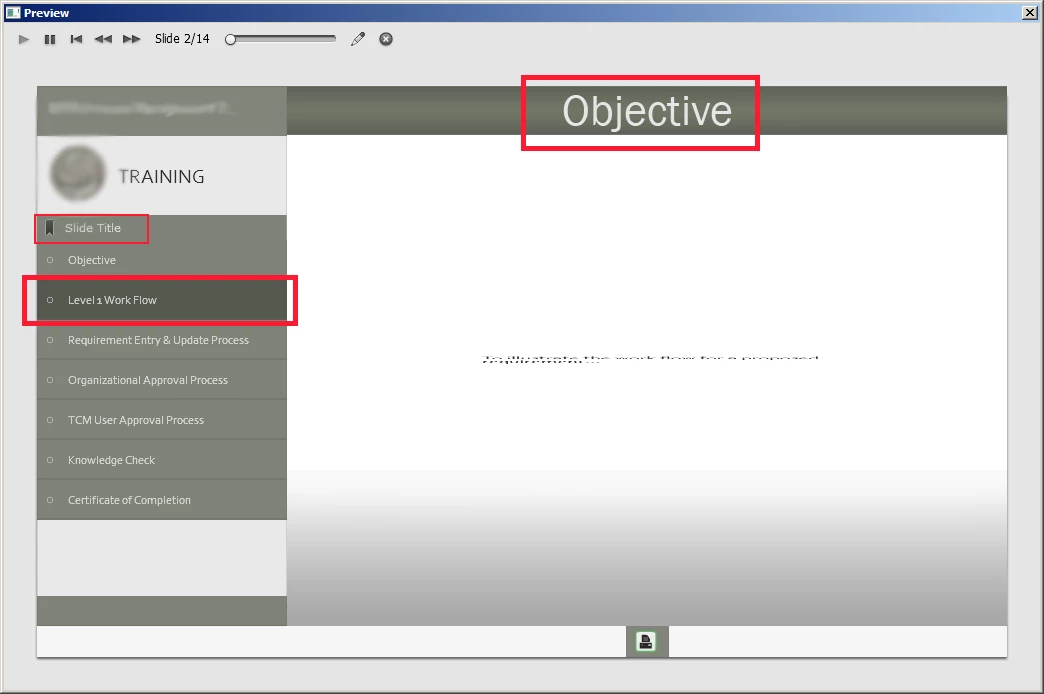
Maybe this is a simple issue, I haven't been able to figure it out on my own yet:  I have a table of contents (see image below) - the slides are advancing properly however, the TOC titles are always one title behind.  As you can see in my example, I'm on the "Objective" slide however, the "Level 1 Work Flow" title is highlighted.  How do I make the TOC titles highlight for the actual slide they're on?

Also - see where it says, "Slide Title?"  - Is it possible to remove this?  It's redundant and my client is very quirky about redundancies.
    このトピックへの返信は締め切られました。

    返信数 1

    Lilybiri
    Legend
    September 25, 2015

    I see nobody answered. I am bit confused, because you are one the second slide, and the second slide is highlighted in the TOC? Can you check Preview in Browser? Or did you take out some slides in the TOC, make them invisible?

    CutlassKelley作成者
    Inspiring
    October 7, 2015

    I think I understand what's happening.  The TOC highlights the next slide, not the current slide.  Odd, because I would think that the current slide would be highlighted to show you where you are in the program, but that's what's happening.  I wish this was more customizable, I'd like to make the title blocks thinner, the TOC thinner, and I'd take away the "slide title" redundancy.  Also, I'd make it easier to horizontally center the word, "training," because I had to do a few tricks to get it to center where it is. Thanks for responding, Lilybiri!

    RodWard
    Community Expert
    Community Expert
    October 8, 2015

    Whenever I see the TOC not showing the correct slide like this I usually suggest restting the TOC again.  It may be getting confused after some changes you've made since the last time it was reset.