
ruthg84
Known Participant
October 29, 2016
Question

Captivate 9 freezing when exporting captions

  • October 29, 2016
  • 3 replies
  • 369 views

I am trying to export the captions from my project and it seems that every time, Captivate freezes at 20% and I have to force quit. It still creates a file but the file is incomplete, with the last few slides missed off. Also, the entire file comes out in two columns, with all the text doubled.
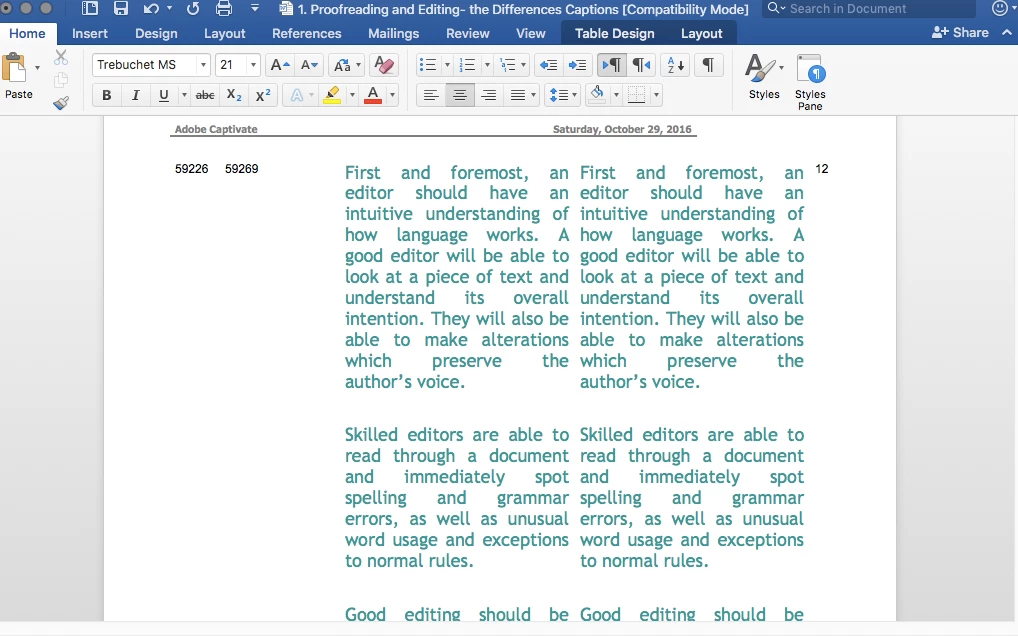
I'm on a Mac, OS 10.11.6 El Capitan, Word for Mac 2016, and Captivate 9.0.1.320

Any ideas?

Thanks,

Ruth

    This topic has been closed for replies.

    3 replies

    BDuckWorks
    Inspiring
    October 31, 2016

    Is your goal of doing this to create a file to enable translation, or are you looking to build a handout of some sort?

    As RodWard​ says: " Look for any unusual punctuation marks."

    I've gone through this with multiple projects and found that the flaw in my workflow was getting text from a storyboard (word) or presentation (PowerPoint) via copy and paste, would cause the Captivate file to become corrupt.

    Taking the added step of saving text to an un-formatted .txt file has eliminated most of these issues.

    ruthg84
    ruthg84Author
    Known Participant
    October 31, 2016

    I'm working with a proofreader who wants access to the text so that he can correct and rephrase things without having to copy everything out again. He doesn't have Captivate, so this seemed like the easiest solution.

    Is there a better way?

    Thanks

    Lilybiri
    Legend
    October 31, 2016

    Look at the options under File, Print, maybe?

    RodWard
    Community Expert
    Community Expert
    October 30, 2016

    There may be some punctuation characters in the text around the point where the export fails that is causing this issue.  If you have a partial output, look carefully at the text on slides immediately following where the output stops.  Look for any unusual punctuation marks.  Left and right chevrons, curly braces, ampersands etc can sometimes cause issues in Captivate because those characters are also used in programming code.

    Lilybiri
    Legend
    October 29, 2016

    That export option is meant for translations. For that reason you do see two identical columns. The translator is supposed to translate the second column, when importing that Word document again in Captivate, the original captions and notes will be replaced by the translations. This is simply the design of that Export option.

    Tip: please install the patch to 9.0.2.437.