
isaiahb41795372
Participating Frequently
August 10, 2017
Question

Help! Why are the hints on buttons, becoming visible and stuck when user returns to module?

  • August 10, 2017
  • 3 replies
  • 1340 views

Hello Friends!

First time posting to this forum, but a loooong time follower. I've usually been able to find answers on here or at least get on the right track when problem solving glitches - so a big thanks to all forum contributors.  I'm really hoping you can help me again as I've almost broken my brain with this one. 

We are currently experiencing a problem with some of our live modules, where hints added to buttons on the first slide of our module are visible and won't disappear when a Learner resumes the module after previously exiting.

These buttons either form the progress bar, or, act as a tooltip on close buttons etc on our hints and tip, resource overlays etc.  These buttons have been configured to display for rest of project - no matter where learner is in the module, the hints on these buttons should behave like a standard rollover i.e. when mouse rollover the button, hint appears, and when they move the mouse off of button, the hint will disappear.

The modules requires the learner to get a bit of info through this module and then is instructed to go away and observe or complete activities before coming back and proceeding with the online module.  When the learner closes module part way through and returns at a later time to continue, the resume data function ensures that they are taken back to the last slide they visited BUT all the hints for the buttons referred to above, are visible and won't disappear even if user rolls over them or interacts with associated buttons.   I have highlighted this in green in the below image.
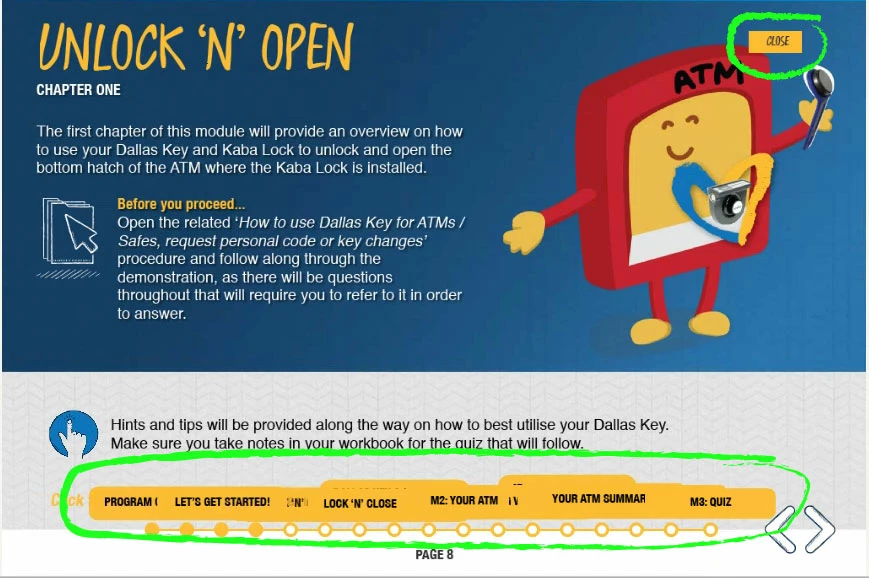
As you can see, these 'stuck' hints overlap text that is on the stage.  The only way we seem to be able 'reset' this glitch is if the learner, in the same active session, returns to the first slide and then progress with their learning.  But as you can imagine, this isn't ideal.

We're publishing SCORM 1.2 from Captivate 8 and 9, and get this result on various modules regardless of the version used to build them.  Halogen Software is our LMS.

Thanks in advance for any help you can provide for this time sensitive issue. 

This topic has been closed for replies.

3 replies

isaiahb41795372
Participating Frequently
August 29, 2017

Thank you @Lilybiri and @RodWard for your suggestions which I have tried and still getting the same results which only occur when the user returns to the module after having a previously attempting and exiting.

So on first launch, everything behaves as it should.  But if the learner decides to exit the module and return at a later date, that is when the captions will be visible and 'stuck' - only when the learner returns to the module after previously attempting and exiting.  We have resume data on, so as you know this means upon re-entering the module, the learner will be returned to the last slide they were on before exiting.  IF however, the learner happens to go back to Slide 1 on their on volition, and progressed from their, the captions will disappear and start behaving like normal.

So I wasn't sure if the blank slide would assist being the module isn't forced to start on slide 1 upon re-entry, but tried anyway, but still getting the same results unfortunately.  

It sounds like, by your suggestions, that the module needs to return slide 1. So I turned resume data off which allows this to happen, but then we obviously lose any 'data' that was captured from previous session.  Is it possible to have the module upon entry, to go to slide 1 without losing any 'resume data'? 

Thanks again to you both for your time and suggestions.

RodWard
Community Expert
Community Expert
August 30, 2017

I've not personally experienced this issue before but I'm thinking now that you need to log this as a bug with Adobe.  It should not happen.

isaiahb41795372
Participating Frequently
August 29, 2017

Hi Lilybiri​!

I have uploaded to SCORM Cloud and still get the same issue.

I have also included a screen shot of the publish settings.  Thanks!

RodWard
Community Expert
Community Expert
August 29, 2017

Could I suggest you try placing a short extra blank slide of about 1 second duration right at the start of your project and then test whether the issue still occurs?  Make sure there are NO OBJECTS whatsoever on this initial blank slide.  If the slide you are currently using to start the project has these rollover objects timed for Rest of Project, then the issue might be occurring for that reason and adding another slide in front of it might help.  Just a thought.

Lilybiri
Legend
August 10, 2017

Am I correct to assume that those hint captions are custom made? They are not the normal hint messages attached to an interactive object?

isaiahb41795372
Participating Frequently
August 11, 2017

Hi Lilybiri!

They are just standard smart shapes with the 'use as button' property enabled which then allows you to select if you want to display the 'hint'.

The action for the majority of them (all the hints stuck at bottom of original image) are just to jump to another slide.  The action for the one at the top is to hide a group that acts as an overlay. i.e. user clicks on resource icon from anywhere in module, and the Resource overlay will display over the top of what ever slide they are currently on.  This overly has a close button hence the close tooltip/hint, which will hide the resource group.

I hope that helps

Lilybiri
Legend
August 11, 2017

Just hint messages for Shape buttons, right?

Can you give me some more details so that I can double-check because I never experienced this type of problems:

  • Which exact version of 9 do you use; you should have the latest which is 9.0.2.437
  • They are timed for the rest of the projectn always on top, correct?
  • This is experienced after publishing, but to which output: HTML5 or SWF?

I suppose it is not a responsive but a normal project?