Inspiring
January 6, 2012
해결됨

How can I make the text caption box to display a text variable which is longer than its length?

  • January 6, 2012
  • 1 답변
  • 1486 조회

Hi all, I wish to realize this: to make a text caption to display a variable which contains a paragraph of text that the user typed in earlier.

I  set up the maximum length of the variable as 1000 and I am able to make the variable partially displayed in the text caption --- only to the end of the first line of the text caption.

ICan someone tell me how to set up the text caption so that it can wrap texts? I can't find it in the properties panel.

Thank you very much.

이 주제는 답변이 닫혔습니다.
최고의 답변: Lilybiri

Thanks for answering my question, but my problem is to re-display things that the user typed in.

I think the Text area widget is cool and it definitely gives more control. However, what I wish to realize here, is to RE-display texts that were typed in the Text area/Text entry box inside of a Text Caption.


No need to shout, although I'm not a native English speaker, I understood your question quite well and this can be done with the enhanced TextArea widget as I mentioned. Here is a screenshot:
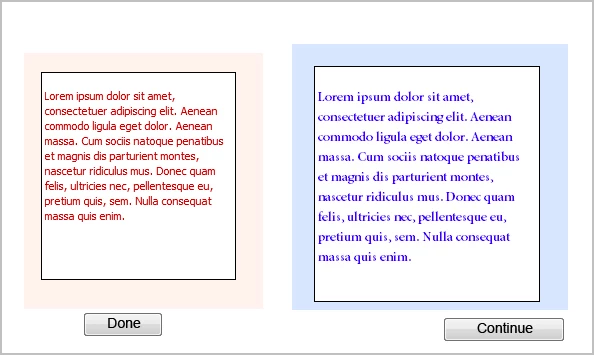

Work flow:

  • Create a user variable, I labeled it
  • Insert twice the TextArea widget with variables (Jim Leichliter, CaptivatePro), on the screenshot those are the two rectangles on the red and blue backgrounds
  • Configure the first Widget to be associated with v_text and to show this variable by inserting it as default $$v_text$$
  • Configure the second Widget to show this variable by inserting is again as default $$v_text$$
  • You'll need a button to refresh, so that the text shows up in the second widget. Here I used the button Done, and assigned the action 'Jump to slide' with the same slide number so that the playhead rewinded to the start of the slide
  • The text in the second widget shows up; as you can see it can be formatted like you wish.

If you want to show the text on another slide, no need to do the refresh action, it will automatically show when you get to that slide.

It is not a Text Caption that displays  but the widget. Is that such a problem?

Lilybiri

1 답변

Lilybiri
Legend
January 6, 2012

Hi,

You have to activate the option 'Show scrollbar' for the TEB

I will often use the TextArea widget in this case.

Lilybiri

maggiehu2011작성자
Inspiring
January 9, 2012

Thank you for responding again, Lily. I just check the "allow scrollbar" option for the TEB. Now the text I typed in the TEB is wrapped, however, the displayed texts in the text caption are still limited to the first line. I also tried to use the Text area widget. But it seems for text entry instead of text displaying. Can you please let me know how I can display the entire length of the text?

Thank you very much.

I just took two screenshots in order to better explain what is happening here:

this is what I typed in the text entry box:

and this is what shows when I clicked on the Submit buttone:

So from the image above, you can see the left text caption only shows the first line of the texts that I typed in and it is the length of the text caption that I defined.

I changed the layout of the two text captions as vertically distributed, and then this time it is displayed like this. So you can see that the texts I typed in still can't be displayed in full length, because it seems that there is no scrollbar option for a regular Text Caption.

Lilybiri
Legend
January 9, 2012

TextArea widget is associated with a user variable, just like the TEB, that is why you can use it. The enhanced version by Jim Leichliter (CaptivatePro) is even better because you can control it better.

Have a look at my blog post where I'm showing some use cases:

Extended Text Area widget

Lilybiri

