
Known Participant
April 4, 2017
Question

How to create Captivate module custom layouts

  • April 4, 2017
  • 1 reply
  • 388 views

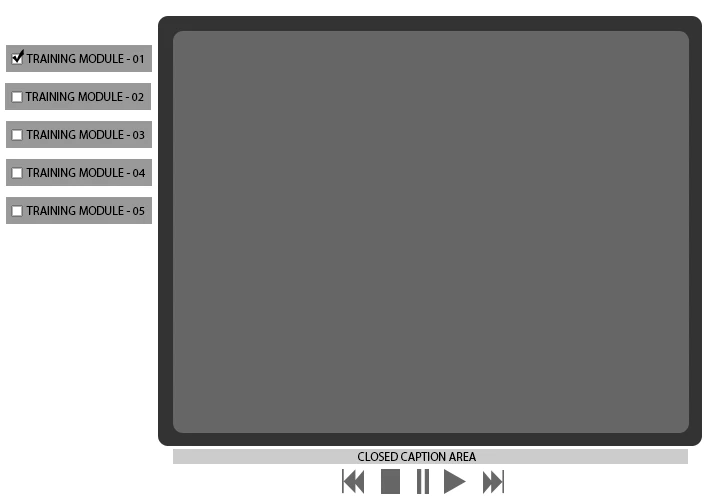
I have seen many modules in the past inserted into custom layouts similar to the concept image below.

How does someone go about creating custom layouts like this and can a layout like this still be HTML5 or does this have to be done only in Flash?

Any links, resources, or suggestions are welcome.

Thank you
This topic has been closed for replies.

1 reply

Lilybiri
Legend
April 4, 2017

You have to create a theme. More info:

What's in a Theme - a Template? - Captivate blog

BP72Author
Known Participant
April 4, 2017

Lilybiri​ oh you are such a wealth of knowledge.

So... I thought within any theme you couldn't change the location of the CC area.
That in order to display anything beyond the basics such as time remaining, or move the CC area you had to create a custom XML container. The custom xml in order to get around the base Captivate absolute positioning of elements. 

I can see how the left column menu items could just be linked buttons in a theme.

Other than diving deep in the CSS for each module each time it is published I cant imagine how to change the alignment or position of the CC.

Or do you know a better way?

Also, to display time remaining in a module would that require including a actionscript / javascript for each captivate file?

Or do you know a better way?

Thank you

Lilybiri
Legend
April 4, 2017

No, the CC location is not part of the theme, you'll need some programming for that. Maybe a future release will offer more functionality for CC, not the case in this release.

As for time remaining: you are talking about the 'editor's' time which can be totally different from the time spent by the user. I find the display time in the TOC a good alternative. It is possible to show time in a text container as well (both editor's time and real time), or create a custom progress bar. I have some blog posts about that.