Participating Frequently
February 12, 2016
Answered

How to put the on-mouse-click action box at the end of the page?

  • February 12, 2016
  • 1 reply
  • 313 views

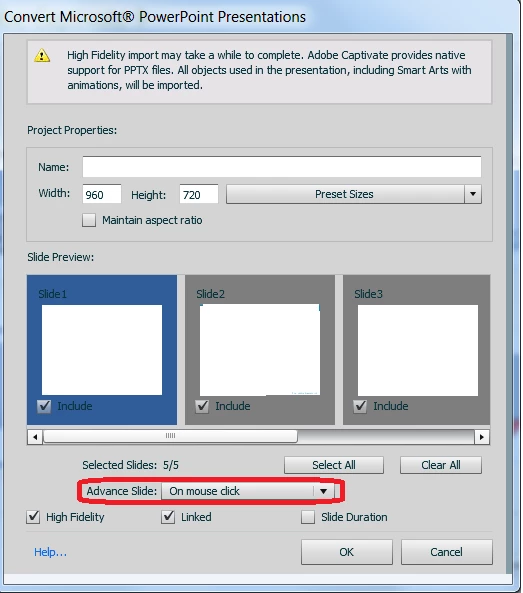
While importing from slides, I chose "On mouse click" for Advance Slide.

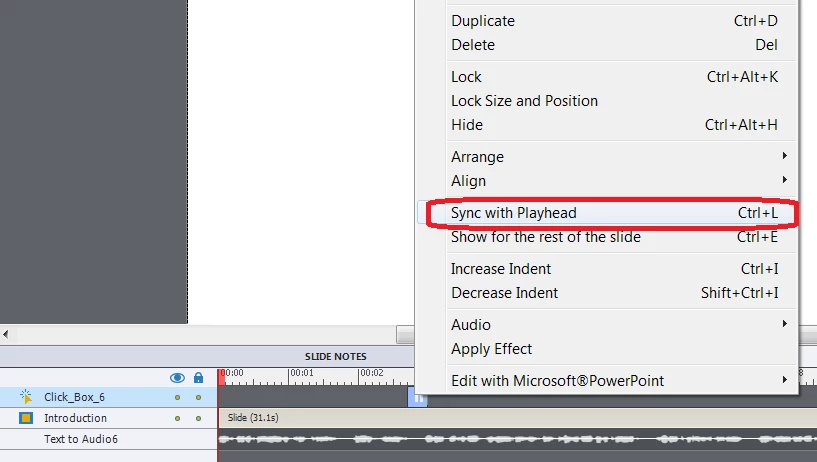
The on-mouse-click action Click_Box was  initially set at the end of each page. However, after I generated audio from the notes, the duration of the page changed to longer, but the Click_Box position remain the same. This would make the progress bar stop there during the video play, even though the audio is progressing forward.

I saw there is one option to put the Click_Box Sync with Playhead. Is there any option to put it Sync with Playend, rather than dragging it to the end manually?

Thanks!
    This topic has been closed for replies.
    Correct answer Lilybiri

    No, that is a feature request that I have logged several times, being able to align the end of a timeline to the playhead (CTRL-R instead of CTRL-L), but it has never got on the priority list.

    It is too late now, but if you had attached the click box to the end of the slide (you'd have seen a red triangle), increasing the duration of the slide would have moved that click box, keeping its duration.  Now, since it is a click box, the pause will always be at the end of its timeline, why not just increase the duration of the click box timeline till the end of the slide with CTRL-E? That will mean that the user can click earlier, but will he know that?

    1 reply

    Lilybiri
    LilybiriCorrect answer
    Legend
    February 12, 2016

    No, that is a feature request that I have logged several times, being able to align the end of a timeline to the playhead (CTRL-R instead of CTRL-L), but it has never got on the priority list.

    It is too late now, but if you had attached the click box to the end of the slide (you'd have seen a red triangle), increasing the duration of the slide would have moved that click box, keeping its duration.  Now, since it is a click box, the pause will always be at the end of its timeline, why not just increase the duration of the click box timeline till the end of the slide with CTRL-E? That will mean that the user can click earlier, but will he know that?

    Participating Frequently
    February 12, 2016

    Hi Lilybiri,

    Thanks for your suggestion!

    I was expecting to have a easy way. Now it looks like not possible..

    Lilybiri
    Legend
    February 12, 2016

    The easy way was before changing the slide duration.