
Known Participant
February 20, 2017
Answered

Is it possible to put a sound loop in slides?

  • February 20, 2017
  • 1 reply
  • 984 views

can i put a sound loop in a slide (or project) that can run as loop (it starts again when audio ends as long the slide/project is playing)? a very long audio is such a waste of time to load and besides i don't know how long a learner will view certain slides? By the way, I am using Captivate 9
    This topic has been closed for replies.
    Correct answer RodWard

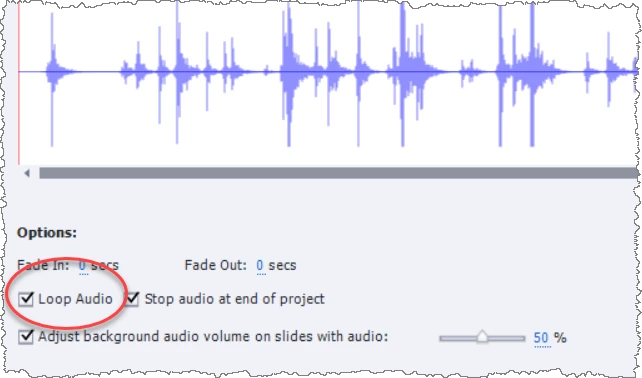
    When you insert audio to the background there is an option one the Audio dialog to loop the audio clip.

    There is a similar option for Slide Audio in the Properties tab > Options area when you have a slide selected in the Filmstrip.

    1 reply

    RodWard
    Community Expert
    RodWardCommunity ExpertCorrect answer
    Community Expert
    February 20, 2017

    When you insert audio to the background there is an option one the Audio dialog to loop the audio clip.

    There is a similar option for Slide Audio in the Properties tab > Options area when you have a slide selected in the Filmstrip.

    rsramiroAuthor
    Known Participant
    February 20, 2017

    RodWard  wrote

    When you insert audio to the background there is an option one the Audio dialog to loop the audio clip.

    There is a similar option for Slide Audio in the Properties tab > Options area when you have a slide selected in the Filmstrip.

    Okay it works for a background audio... too bad it doesn't work for slide audio (or does it?) do you have an idea how?RodWard

    RodWard
    Community Expert
    Community Expert
    February 20, 2017

    Did you look where I indicated at the Properties tab > Options area?