
andresRuiz
Inspiring
March 11, 2019
Question

JSON brower issues/errors

  • March 11, 2019
  • 4 replies
  • 2633 views

Hi there!

I have several animations made with Adobe Animate, and imported into my Captivate project as oam animations.


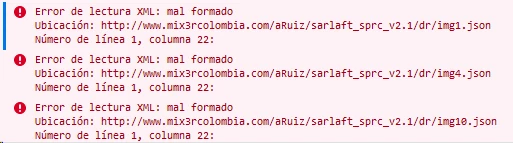
Some of them works just fine, but others doesnt. I've seen in the browser's console, that it shows some errors regarding JSON files bad formed.
Anybody else is having the same issue? I used a JSON checker from the web and it also points to some errors in the first line.
This topic has been closed for replies.

4 replies

VickieM
Participating Frequently
March 15, 2019

Hi Andres,

You may find an article I posted sometime back helpful.  It’s on issues I as well as others have experienced with SharePoint and JSON. 

The article may give you some idea of how to resolve your JSON issues with browsers and Adobe Captivate HTML5’s output.

Adobe Captivate 2019 vs. SharePoint: The Issue is real

Thanks

David Burnham HBA
Inspiring
March 16, 2019

Thank you for this. I am working in an environment at the moment which is Sharepoint as are most large corporations who use Microsoft technology.  I had not been confronted with the blocking issue until upgraded to 2019, as they had used V7 and V9 previously. Now as the article says the issue is real. What it means is that most of the development work is now being completed with Storyline which works seamlessly with SharePoint. No one in their right mind is going to ask ID’s to try and fix this issue when they publish their files. NOT going to happen. Any other ideas? Would love to hear.

TLCMediaDesign
Inspiring
March 18, 2019

Might be a little bit of a pain.

But you can rename the json files with a .js extension.

Then edit the index.html and rename the json extension there also.

andresRuiz
Inspiring
March 12, 2019

Hi everyone!

RodWard​, I'am using Firefox and Chrome to navigate the courses. The console print screen I attach to the first message is taken from Firefox.

TLCMediaDesign​ this is the top of one of the the JSON files that are showing errors.

RodWard
Community Expert
Community Expert
March 12, 2019

This looks to me like your web server or LMS hasn't been configured to serve or allow JSON files.  The code is talking about not being able to find PNG files.  In Captivate HTML5 output the PNGs are serialized and require JSON.

TLCMediaDesign
Inspiring
March 11, 2019

Can you post the top of the JSON file?

JSON is a very structured format just like XML, it cannot contain any single quotes and each key value pair must be seperated by a comma.

All browsers are capable of reading properly formatted JSON.

RodWard
Community Expert
Community Expert
March 11, 2019

We are currently using quite a lot of Animate OAMs in our Captivate 2019 courses now.  We encountered this same issue with IE11 not showing the animations recently for a client we had.

It turned out the issue was due to the fact that IE11 doesn't cope with the latest ECMASCRIPT version code that Animate publishes in the HTML file buried inside the OAM.

The solution was unzip the OAM, copy the code in the HTML file that relates to the symbols in the animation that Create.JS is referencing, and then process that part of the code through a JavaScript engine called BABEL that changes the incompatible code into code that IE11 can understand.

David Burnham HBA
Inspiring
March 11, 2019

Rod. Thanks for this. (BABEL)  My son Dylan is currently working with me and his background is Unity, Maya and a number of programming languages. We also are working and building more oam files to replace flash content. I know Tristan your son was very versed in Flash. Has he encountered any issues in working with oam output from Flash other than what you describe here with IE11.

RodWard
Community Expert
Community Expert
March 11, 2019

Are you perhaps using IE 11 to view this content?  If so, change to a current version of MS Edge or Google Chrome and check to see if you get a different result.

Animate uses current version ECMASCRIPT standard code in the HTML file that it publishes for OAM output.

(An OAM file is really just a renamed ZIP file.  If you change the OAM file ending to ZIP, and then unzip it, you will be able to browse through the published output.  Inside at the top level there is an HTML file containing a lot of code that references all the objects (symbols) in the Animate file.  It is THIS code that is likely to be causing your problem because the syntax of the code cannot be understood by older browsers like IE11.)

David Burnham HBA
Inspiring
March 11, 2019

It really begs the question and response when will Microsoft finally pull the plug on IE11. They have been their worst enemy by keeping it around with no incentive to companies to abandon it and move to Edge or the new iteration of Edge that is coming.

RodWard
Community Expert
Community Expert
March 11, 2019

Microsoft has told everyone that they are no longer supporting IE11.  But they cannot really 'pull a plug' that prevents people from using any older version browser if they choose to do so.

The issues with IE11 are well known.  The reasons some businesses still choose to keep it in their SOE is quite simple.  The cost of rebuilding some of their mission-critical systems to use more modern browsers is huge.  They make a commercial decision and keep IE11 around until they have systems to replace the ones that will ONLY run on IE.

These organisations will all eventually migrate their way over to the current browser technologies that are better for HTML5.  However, by the time they do that, even newer technologies are likely to have emerged that put them behind the curve yet again. 

Trying to stay up to date with internet technologies is like trying to change the wheel on a moving car.