

IDOLproff
Known Participant
June 16, 2020
Question

Multiple Advanced Actions

  • June 16, 2020
  • 2 replies
  • 649 views

I have an E-learning course that has multiple Flipcard advanced Actions.  I made a mistake an overwrote the existing Advanced FlipcardV3.  I've tried using the Advance action wtih the new name, but the effect isn't working.  

Is there a way to get the original advanced action back?  

Should I create a new Advanced Action from an existing one for every image that I want that effect?  

Not sure if I'm making things worse by trying to create new actions.
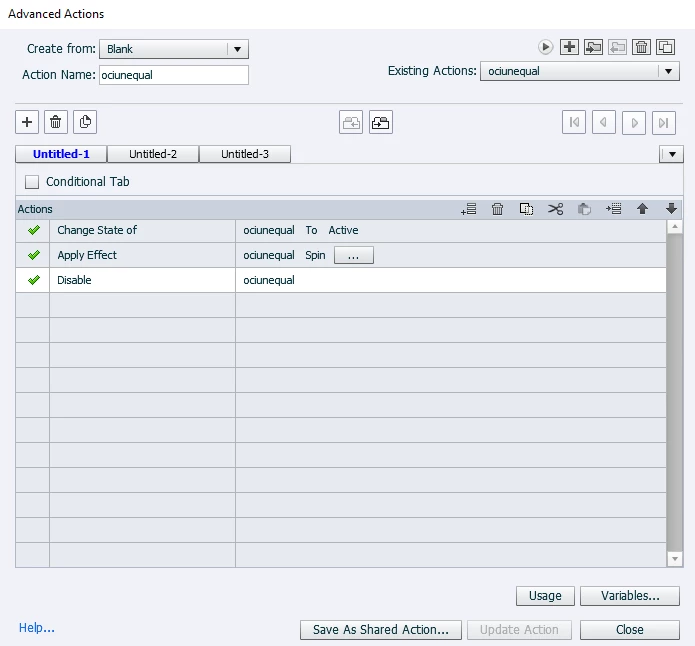
 

Any help would be greatly appreciated.


Thanks,


IDOLProff

    This topic has been closed for replies.

    2 replies

    Lilybiri
    Legend
    June 17, 2020

    Maybe my suspicion is not correct, but are you talking about a slide from the Assets panel? Reason is the name you mentioned and the advanced action you show. I recognize that action because I will be using this as example in a presentation next week at the Adobe eLearning Wordl conference. I will convert it to a Shared action which would avoid the problems you are now facing.

    If this is indeed the case, that action is correct but you probably do not point to the correct flipcards, or didn't create them as expected, or did not attach them to the correct event.

    Hwever there is one big mistake: you do use the SAME name for the flipcard and for the action. Do not do that, please. Change at least one lower case character in the action to a capital one.

    Confirm my suspicion and I'll explain how you can get back the original slide iwith those flipcards. I need to know the name of the Quick Start Project and the name of the used slide. 


    IDOLproff
    IDOLproffAuthor
    Known Participant
    June 17, 2020

    Hi Lilybiri,


    Yes, this is from the Alliance Theme.  It's the same project that you helped me with on my previous case from 5/18/2020 (Advanced Actions) (https://community.adobe.com/t5/captivate/advanced-actions/m-p/11141037?page=1#M280683)


    You said in your post "Hwever there is one big mistake: you do use the SAME name for the flipcard and for the action. Do not do that, please. Change at least one lower case character in the action to a capital one."  

    Do you mean that anytime I use the Existing Action, I should change it to identify that action on that card?


    Lilybiri
    Legend
    June 17, 2020

    Captivate is very strict about names. You cannot use the same name for two different objects, actions, variables. In that advanced action screenshot I see that the name of the Action is the same as the name of the Flipcard. I know about some situations where this is possible, but always tell everyone NEVER to use the same name for two different items. But names are case sensitive. FlipCard1 can be a name, and Flipcard1 is another name. That is why I mentioned the change of lower case to capital.


    That is another reason why Shared actions are much more flexible. You can attach the same advanced action to multiple Flipcards, but they will always point in that case to the same flipcard for the effect and the disabling. You need to create a duplicate action for each flipcard, because each of them will have another name. With shared actions that is much easier.  You apply the same shared action and just have to enter the used parameters... 

    If you have time, please come to the presentation I told you about. You'll see live how to handle these flipcards, and even to extend the functionality. I provide example projects for free.

    RodWard
    Community Expert
    Community Expert
    June 17, 2020

    If you did not save a backup of an earlier version of your CPTX then there is no way to get back that overwritten Advanced Action.  I always have backups turned on in Preferences, but that only gives you the state of your project as of the last time you saved and closed the CPTX.  If you want to have backups for each and every day, you need to open yesterday's file, and then do Save AS with a new filename.  I usually append today's date in reverse order like this: 2020-06-17.  This gives me a different file for each day I work on the CPTX.  After a week or two, if no serious issues have emerged, I just delete all files older than a given number of days.


    If you have a lot of objects that need to be manipulated by a similar action, you are probably better off looking at using Shared Actions where the name of the object can be set as a parameter.