
dowbright
Known Participant
January 1, 2015
Answered

Pan and Zoom for beginners

  • January 1, 2015
  • 2 replies
  • 1481 views

I am reading stories to my students, and working on words at the same time. I read about pan and zoom in C8 here Is there a pan and zoom or smart focus option in Captivate 8?

But unfortunately, it is ahead of my curve. I know that I need to open a project in video demo. But right there, I am stopped, because I don't know what choices to make.
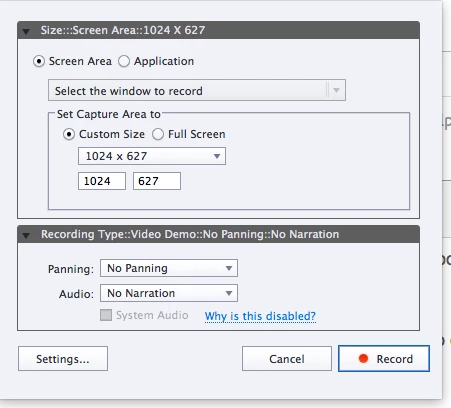
Does anyone know of a BEGINNER video for pan and zoom, rather that videos that assume you already know how to do this, and just focus on changes between Captivate releases? I have some info from Kevin Siegal's Beyind the Essentials Captivate 7.

But it doesn't help me understand about this. Let's say I want to zoom in to the word was. Then say stuff about it. then go back to the story. What are the right steps to take?

If there's a step-by-step method online I'd be thrilled if you told me where it is. Thanks!

This topic has been closed for replies.
Correct answer Lilybiri

Hmmm, my answer in the other thread was about the HD Video demo application that is included with Captivate 8.  It was an answer, not a tutorial, I didn't assume anything, just talked about that alternative. The screenshot you are showing is for a normal software simulation, which uses slides. I never used the panning during a software simulation recording at all. My first question would be: do you need interactivity in this 'movie'? If not, you can try the Video Demo (is available in the welcome screen, third icon in the first row). There are not many tutorials around, it seems that very few people are using it. I published two movies created with the Video Demo, you could have a look at one to check if this is what you want to do:

Standard vs simple action

You will see some pan and zoom in that movie. Advantage over the panning in a software simulation during capturing, is that in Video Demo the pan and zoom can be applied later during editing in the dedicated Video editor. And the quality is much better, since it is HD, and non-destructive.

If you want to stay with the software simulation (maybe because you need interactivity), I would never do the panning during the capturing, but capture in different parts, and for the Zoom to have sufficient quality, create separate images and apply effects to it. A combination of Video Demo slides with normal slides is another possibility.

Now you'll tell me again that I'm not offering you tutorial links, as I told there are very few around and most of them are very limited (have a look at Youtube, some are ridiculously simple). After all, Camtasia offers more than HD Video Demo in Captivate and is perhaps easier to use (not from Adobe, separate purchase).

2 replies

dowbright
dowbrightAuthor
Known Participant
January 1, 2015

No, I don't need interactivity. This would be a 30-40 second teaching video.

At my skill level, going to another slide with the part I want illuminated makes far more sense. For one, thing, it's something I can actually do.

I think pan and zoom is somewhere down the road in my future, as I continue to find time to really try to learn Captivate. I spend hours and hours a week, often, and come away knowing not much more than I did before. It's an incredibly frustrating learning curve for someone like me.

I keep looking at Storyline, which everyone says is so much easier. Yet I don't leave. I don't know why. Maybe because I hate Microsoft, and hate Powerpoint? I don't know.

Allen Partridge put up a 4 lesson course for educators on Youtube. (Probably on Adobe too.) I swear to God, if he would just continue those short lessons, taking one little idea at a time for beginners, the teachers who look to me for guidance (HA!) on whether or not to try Captivate, would all sign up for it. I keep telling them how awesome it would be...but we need tutorials from scratch, from the beginning, to get good at it. Not the ones Adobe currently has out, nor the Adobe written support. Adobe just doesn't want us, I think.

It's got such potential for us...but our skills lie elsewhere (like---handling 30 kids and teaching them while we do so), so we're not Captivate techies, most of us. But I have a thousand uses for Captivate already, if I could just make it work. No, ten thousand!

I wish Adobe would listen, and do the A. Partridge videos for beginners, and just keep going and going with them. He assumes we know nothing (he's right), and he could just add topic after topic, in simple form, and sequentially introduce us to all the power that Captivate has. I don't think it would take that long for him to do this, and he's a GREAT teacher. Especially on these beginner lessons. I'd watch a million of them if they existed. But no.

They stopped after four. BUMMER. Why didn't they just have him continue????

I'd give anything to be able to use it well. But most videos assume I know things I don't, and all the many books I've bought focus on software simulations and other things not relevant to me, rather than using it as an elearning tool for teachers.

I'm so frustrated with trying to learn, but I'm NOT giving up! Thanks,

Lilybiri, for your reply. I'll read it again many times and try to understand it!

Lilybiri
LilybiriCorrect answer
Legend
January 1, 2015

Hmmm, my answer in the other thread was about the HD Video demo application that is included with Captivate 8.  It was an answer, not a tutorial, I didn't assume anything, just talked about that alternative. The screenshot you are showing is for a normal software simulation, which uses slides. I never used the panning during a software simulation recording at all. My first question would be: do you need interactivity in this 'movie'? If not, you can try the Video Demo (is available in the welcome screen, third icon in the first row). There are not many tutorials around, it seems that very few people are using it. I published two movies created with the Video Demo, you could have a look at one to check if this is what you want to do:

Standard vs simple action

You will see some pan and zoom in that movie. Advantage over the panning in a software simulation during capturing, is that in Video Demo the pan and zoom can be applied later during editing in the dedicated Video editor. And the quality is much better, since it is HD, and non-destructive.

If you want to stay with the software simulation (maybe because you need interactivity), I would never do the panning during the capturing, but capture in different parts, and for the Zoom to have sufficient quality, create separate images and apply effects to it. A combination of Video Demo slides with normal slides is another possibility.

Now you'll tell me again that I'm not offering you tutorial links, as I told there are very few around and most of them are very limited (have a look at Youtube, some are ridiculously simple). After all, Camtasia offers more than HD Video Demo in Captivate and is perhaps easier to use (not from Adobe, separate purchase).