

Inspiring
April 19, 2021
Question

Pause Smartshape

  • April 19, 2021
  • 1 reply
  • 483 views

Hey Captivate Forum.

I am attempting to fix a problem with my Captivate 2019 Responsive quiz by following this remedy. 

However I don't know how to pause a smartshape. How do you pause a smartshape in the timeline?
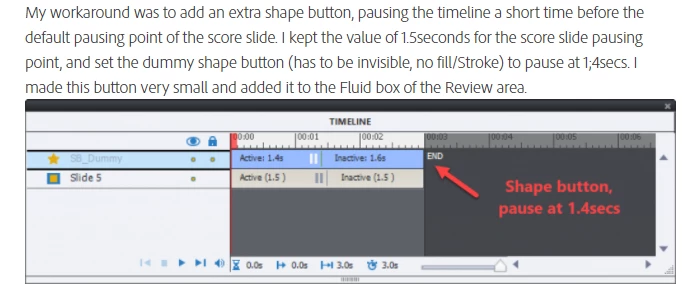
 

Thanks

    This topic has been closed for replies.

    1 reply

    Lilybiri
    Legend
    April 19, 2021

    OK, you are pointing to one of my blogs. What is the exact problem here?  Can you explain?

    Lilybiri
    Legend
    April 20, 2021

    You posted the same question as comment to my blog post in the eLearning community.

    I now have seen that the screenshot in this thread is not from your setup, but copied from my blog.

    You marked my answer to your first question  as being correct, but then you posted this thread, and the same question again in the eLearning community. The answer will always be the same: convert the shape to a shape button by checking the option 'Use as button' and you'll have a pausing point at 1.5secs. You will need to edit this timing in the Timing properties since it needs to be 1.4secs for this workaround.

    What is the remaining problem? Are you very new to Captivate or do you have issues with English? Nothing to be ashamed of, but if it is the second reason, please post in yout native language. There is a translation functionality which I can use if I don't understand your tongue.