
Poster Slide and the Playbar
Captivate 2010
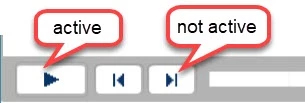
When Captivate publishes and adds the "Poster" at the beginning, it also displays the playbar for the course. This would not normally be a problem except that it appears that all the buttons are enabled and active, and some are not (very confusing for the user). They show active with tooltips when you roll over, but only the play button works. Since the desired result is to have the user click the big button center screen, why is the playbar shown at all? I can't find a way to remove it because it displays before any advanced actions or javascript are processed.
I am hoping this is fixed in 2019, but we can't upgrade until the fix for "Bricked" is made generally available.
Bricked, cannot publish to HTML 5 with Upgraded from CP2017 to CP2019
Apparently, the hot path worked for JoeCap but I have not seen confirmation of a GA patch.
Does anyone have any ideas?


 AdChoices