
Participating Frequently
August 12, 2019
Question

Publish Failed issue on Captivate 2019

  • August 12, 2019
  • 2 replies
  • 2670 views

Hello,

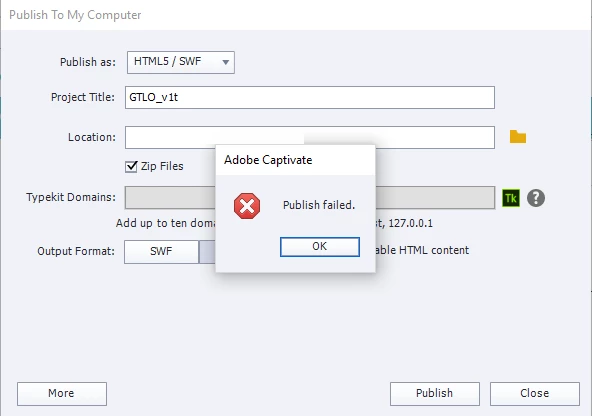
I am facing an issue while publishing the course in HTML/SWF. I am able to preview the full course in Captivate 2019.

We have used web objects and video files in our developed course. Earlier it was working fine but after updating some graphics facing published failed issue.

In the attached screengrab location hidden due to privacy.

Can you please help to resolve this issue.
Lilybiri

This topic has been closed for replies.

2 replies

Participant
May 5, 2020

were you ever able to get your project to publish?  I am having the same problem - but what makes this even more strange is I was able to publish it earlier that day.  I am using Cp 2019 11.0.0.243.

Lilybiri
Legend
May 5, 2020

Please update at least to 11.0.1.266 (or 11.5.1.499) and check again.

rachel_22033
Participant
May 6, 2020

Lilybiri - I updated to the latest version (11.5.1.499) and am still getting the Internal Error > Publish Failed message when trying to publish.  I tried with both the Scalable HTML box selected as well as unselected.  Any other thoughts?


Rachel

Lilybiri
Legend
August 12, 2019

You are publishing a non-responsive project to HTML5, correct? I can deduct that from the screenshot. Just cannot see if it is Scalable?

Are you on:

  • 11.0.1.266
  • 11.5.0.476
  • 11.5.1.499?

You can find the version number under Help, about Captivate.

Are you aware of the fact that for this type of project, the only Preview method which uses HTML temporary folder is F11, Preview HTML in Browser? The other Preview methods use a temporary SWF output and are not representative. Can you confirlm that F11 is working correctly?

Participating Frequently
August 12, 2019

Yes we are publishing a non-responsive project and we have 11.0.0.243 version.

And also tried using F11 same issue replicate.

Lilybiri
Legend
August 12, 2019

First of all, update at least to 11.0.1.266, that was a bug patch.

If F11 gives the same problems something is incompatible with HTML5 output. Did you check the HTML Tracker under Project menu?