Participant
January 27, 2016
Answered

Some effects not working in Captivate 9 on text

  • January 27, 2016
  • 2 replies
  • 1692 views

Hi all,

Has anyone come across an issue of effects not working on text in Captivate 9? 

Am "AlphaFromTo" works fine in the software but if I preview or output to a SCORM the text just appears rather than fading in.  Entrance effects such as EaseInRight work in the software, not in a preview but fine in the SCORM.

Ive also tried "AlphaFromTo" on an object that contains text. again the text just appears but the filled object is affected by the effect.

Is this an inability for captivate to adjust the alpha on text?  Many thanks in advance.

    This topic has been closed for replies.
    Correct answer Lilybiri

    Morning,


    Lilybirimohanadas

    So Im on 9.0.0.233.

    I used AlphaFromTo as it seemed like the best one to use for a simple fade in.  I couldnt find anything else or the "old" transition you were referring to, though I did try FadedZoomIn (as suggested by mohanadas below). This worked fine in terms of the scaling (zoom) and adjusting the values for scale affected the results in both browswer preview and SCORM.  However adjusting the alpha however didn't.

    Based on mohanadas's reply its does seem alpha effects do not work on responsive text which is something I discovered last night whilst looking into it further and trying different projects.  Not the best but at least its a known issue.

    I might just have to work around and overlay an object with the same BG colour and then fade that out to reveal the text.

    Thank you both for your time and help


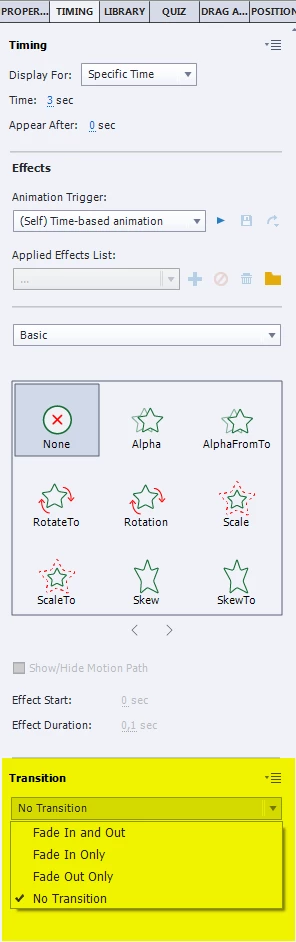
    Really? Mohana offered the same suggestion as me. Transition is in the Timing panel at the bottom, below the effects. Why make it complicated when a simple solution exists since eons?

    2 replies

    mohanadas
    Adobe Employee
    Adobe Employee
    January 28, 2016

    Hi,

    Are you using a responsive project? Currently the text in a responsive project will not play Alpha effects, however it will work for a non-responsive project.

    We are aware of the issue, and thanks for reporting it. Meanwhile, can you try using the Fade In transition with a motion path instead?

    Thanks,
    Mohana

    dtsokeefe
    Participating Frequently
    March 16, 2017

    mohanadas​ can you point me to a location where I can see a list of features like this that do not work as expected? While I'm unhappy that a feature like this doesn't work, a list like this would certainly save me a bunch of time searching forums,only to find out that a function I'm looking for isn't possible. Is anything like this available? thanks

    Lilybiri
    Legend
    January 27, 2016

    There is no text object, either your text is in a text caption or in a shape used as text container, and Alpha has to be set for that object. Can you show the timeline with the Effects timelines expanded?

    As for Preview: which Preview method did you use?

    Participant
    January 27, 2016

    In terms of Preview I used the drop down "preview from this slide option" but as I say, it doesnt output in the SCORM

    Ive attached a screenshot of the timeline.

    The SMARTSHAPE_748 is the object with text in, the others are simply text captions.  Ive checked the FX are set up correctly with a full alpha of 100% at the end of the associated FX time but no luck.

    p.s Thank you for your help on this