shooterstache
Inspiring
July 26, 2018
Answered

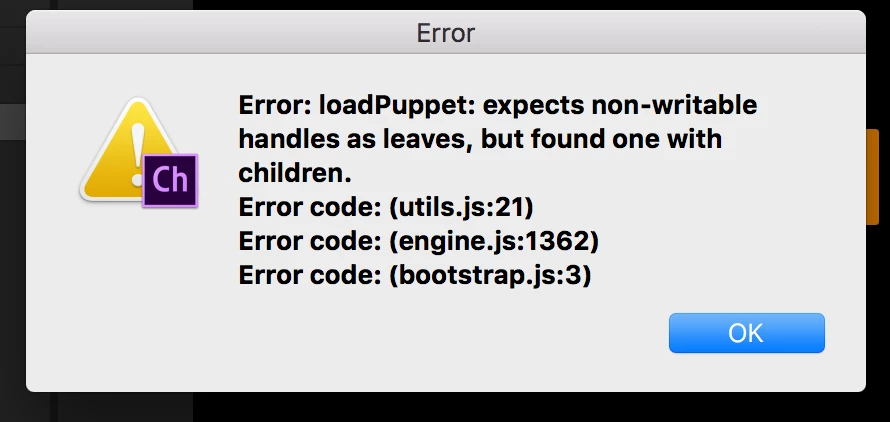
3 error codes

  • July 26, 2018
  • 1 reply
  • 1021 views

Loaded up a new puppet for the first time and I get this. This puppet was created based on another puppet that works fine in CH. I think I just made this one bigger in size. Thanks in advanced if you have any ideas what this means.

Lamar Jackson.psd - Google Drive

    This topic has been closed for replies.
    Correct answer alank99101739

    Wow! That's a cool one. (Looks like a Character Animator bug.)

    I downloaded your file, imported it, got exactly the same error.

    I then tried resizing, deleting bits, etc - and eventually got a different error message. Clicking refresh in the scene window started working. So I downloaded your original again... and it worked. Like what? So I started a new project and re-imported. Failed again with your error message (phew! I'm not going crazy!).

    Conclusion: I found if I delete the "anchors" layer inside the puppet before importing, it works. You could report that as a bug if you wanted to (there are links at the top of the forums for bug reports), but hopefully that at least gets you around your problem.

    1 reply

    alank99101739
    alank99101739Correct answer
    Legend
    July 26, 2018

    Wow! That's a cool one. (Looks like a Character Animator bug.)

    I downloaded your file, imported it, got exactly the same error.

    I then tried resizing, deleting bits, etc - and eventually got a different error message. Clicking refresh in the scene window started working. So I downloaded your original again... and it worked. Like what? So I started a new project and re-imported. Failed again with your error message (phew! I'm not going crazy!).

    Conclusion: I found if I delete the "anchors" layer inside the puppet before importing, it works. You could report that as a bug if you wanted to (there are links at the top of the forums for bug reports), but hopefully that at least gets you around your problem.
    shooterstache
    Inspiring
    July 30, 2018

    This is indeed the answer, thanks for solving that.

    DanTull
    Adobe Employee
    Adobe Employee
    August 7, 2018

    I got to this one too late. It looks like the psd linked in Google Drive has already been adjusted to avoid the bug. Out of curiosity, what was in the anchors layer that triggered the error?

    Dan Tull