



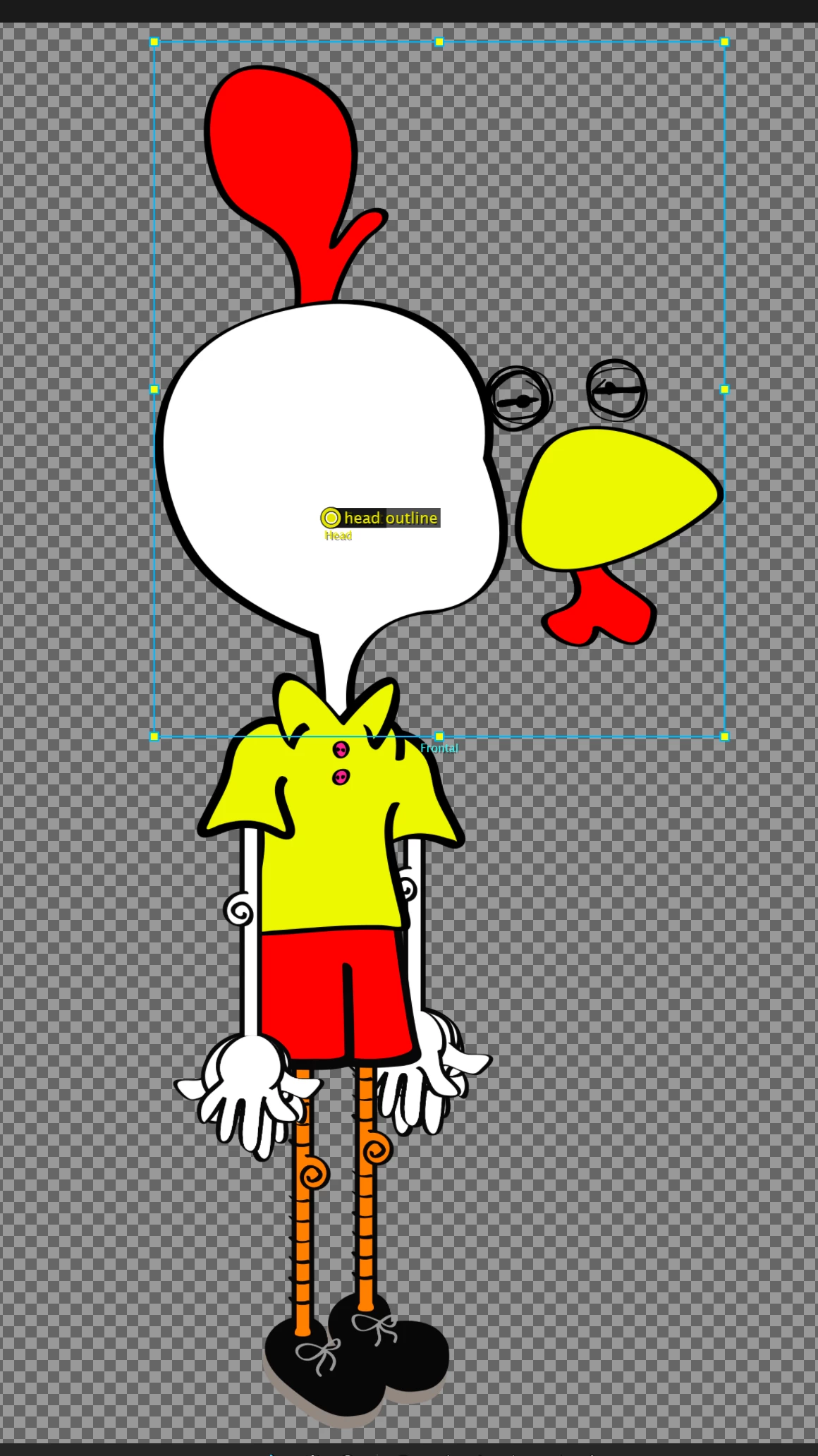
Added Body to puppet, head displaced eyes, mouth, nose, etc.
Hello, I've been learning how to use Character Animator over the last few weeks by following the tutorial video
Making Your First Character (Adobe Character Animator Tutorial)
I created and modified the same head over and over until I got the movement, blinks, mouth movement, etc perfectly. I moved on to step 2, adding a body.
I continued working on the same file where I had the head (Illustrator), and I added a body layer. When I went back to Character Animator, all the heads "fell apart", the eyes, nose, mouths, etc became separated from the main head that housed them. They all moved over to the right, away from the head. I did move the heads on the original illustrator file, so I believe this caused the error...
Is there anything I can do to align these parts back correctly in Character Animator? Or do I have to re-rig everything and re-tag all my layers? I feel like there must be an easier way to re-align the faces back onto the heads...
Also, one other question. How can I make my puppet shrink in Character Animator so that the whole puppet can fit in the scene that I'm recording?
Thank you for any help!
 AdChoices