
craymondr
Participant
April 10, 2017
Answered

Adobe Ch Headless

  • April 10, 2017
  • 3 replies
  • 1038 views

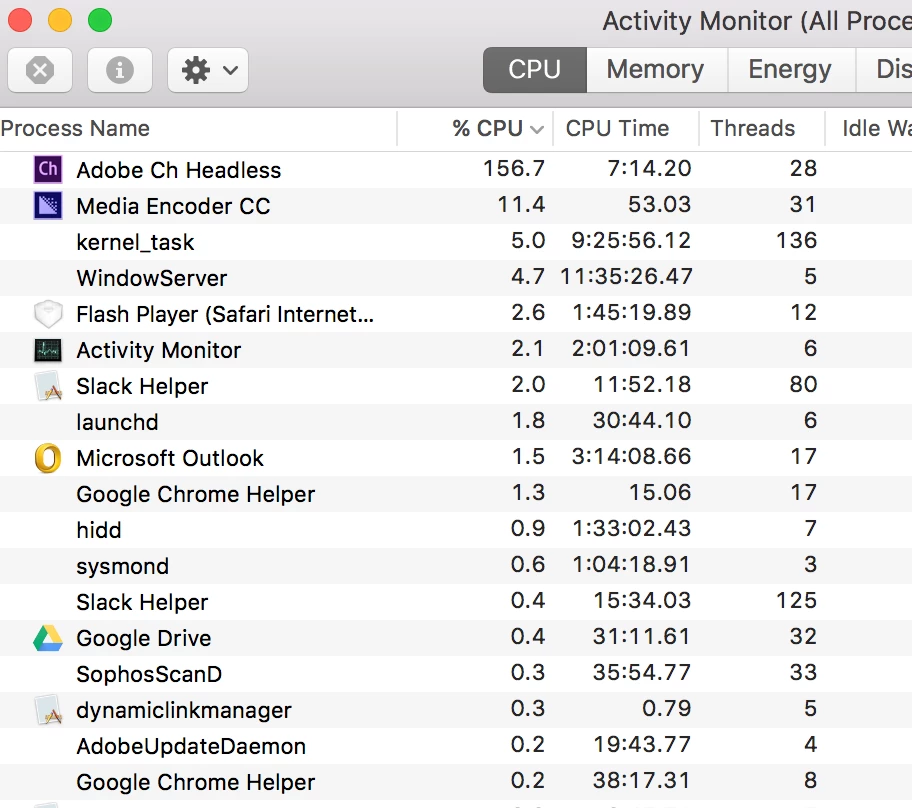
I'm loving playing around with Character Animator! However, it puts a huge strain on my CPU. The image below is actually after I'd closed CA and the video was rendering, but it's also at least that high while the program is running as well. I'm on a MacBook Pro with 16G of ram and I've never seen anything like this. I can only use the program for a short amount of time before it slows my computer down so much that I have to close out of it. Is anybody else experiencing this? Does anyone have a solution for this? Thanks!
    This topic has been closed for replies.
    Correct answer DanTull

    I notice Media Encoder is running as well. At least while it is rendering a scene exported from Ch, that seems like a normal amount of CPU to be using (about 1 1/2 cores). Does it quiesce (and/or exit) once the render is done?

    If it isn't finishing properly, or if it seems to be taking an excessive amount of time to complete given the length of the scene being exported, it might be useful to double click on the process in Activity Monitor and click the sample button to get a summary of what it is busy doing and post it here.

    Thanks! -- Dan Tull

    3 replies

    DanTull
    Adobe Employee
    DanTullCorrect answer
    Adobe Employee
    April 10, 2017

    I notice Media Encoder is running as well. At least while it is rendering a scene exported from Ch, that seems like a normal amount of CPU to be using (about 1 1/2 cores). Does it quiesce (and/or exit) once the render is done?

    If it isn't finishing properly, or if it seems to be taking an excessive amount of time to complete given the length of the scene being exported, it might be useful to double click on the process in Activity Monitor and click the sample button to get a summary of what it is busy doing and post it here.

    Thanks! -- Dan Tull

    craymondr
    craymondrAuthor
    Participant
    April 10, 2017

    Yeah, this helps, thanks! As soon as the rendering is complete, the Adobe Ch Headless disappears. Just wanted to make sure this was normal.

    Inspiring
    April 10, 2017

    You likely have a Character Animator scene queued up in Adobe Media Encoder.

    Adobe Ch Headless is an instance of CH without application UI that we use for rendering content over Dynamic Link. This process should go away if you remove your CH scene from AME(or AE or PR), or if those applications are closed while a link is still active.

    Dan R.
    CH QA

    KJerryK
    Legend
    April 10, 2017

    I'm not seeing anything like that (on Windows 10). It's about 1% if nothing is going on, and about 15 to 20 % when recording.