


Torin Inc
Inspiring
March 4, 2017
Answered

Adobe Illustrator Puppet Size?

  • March 4, 2017
  • 1 reply
  • 506 views

I've been learning how to use CA now for months and I'm really enjoying the process.

I created a few puppets and today finally got some of the scenes into After effects for video editing- but my backgrounds and closeups (of my puppets) were pixelated. I know this has to do with the correct sizes for the puppets in Illustrator- I've been creating them at 3000x3000 pixels, shouldn't that be big enough? I saw in a tutorial video that the puppet was mad in 1500x1500pixels size, and it didn't have any pixelation (I think the tutorial was making a video for youtube- my video was an HD full version so maybe that's why I'm getting pixelation)...

What is the "best" puppet size to use when creating one in Illustrator? I have a new iMac so I'm not afraid to push on upping the size so as to not get any pixelation...

    This topic is closed to new replies. Start a new post to keep the conversation going.
    Correct answer oksamurai

    I'd say it all depends on your final video size. I've primarily been doing 1280 x 720 videos for tutorials, so 1500 x 1500 is plenty big for me - enough for a 100% closeup. Really it's whatever size you can feel confident will look good as 100% in CH and 100% everywhere else.

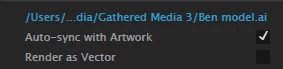
    Depending on what you do in AI you may have some flexibility - if you don't have transparency or clipping masks or that sort of thing (not currently supported in CH), you can click "Render as Vector" in CH to get it as a vector, perfectly scalable puppet inside CH:

    However, as soon as you export to other stuff like AE, that vector becomes rasterized. So my general rule would be - never scale the puppet more than 100% in any program. Know what the closest up shot you want is, and make that the max size.

    If it's pixelated even with all of this, then it's possible there's a setting in AE that might be causing this, like a less than full resolution preview or something. CH characters should come in looking crisp and full res...

    1 reply

    oksamurai
    oksamuraiCorrect answer
    Legend
    March 6, 2017

    I'd say it all depends on your final video size. I've primarily been doing 1280 x 720 videos for tutorials, so 1500 x 1500 is plenty big for me - enough for a 100% closeup. Really it's whatever size you can feel confident will look good as 100% in CH and 100% everywhere else.

    Depending on what you do in AI you may have some flexibility - if you don't have transparency or clipping masks or that sort of thing (not currently supported in CH), you can click "Render as Vector" in CH to get it as a vector, perfectly scalable puppet inside CH:

    However, as soon as you export to other stuff like AE, that vector becomes rasterized. So my general rule would be - never scale the puppet more than 100% in any program. Know what the closest up shot you want is, and make that the max size.

    If it's pixelated even with all of this, then it's possible there's a setting in AE that might be causing this, like a less than full resolution preview or something. CH characters should come in looking crisp and full res...