


Reallyenglish
Participating Frequently
September 15, 2017
Question

Ae - Ch dynamic link not pulling in sound?

  • September 15, 2017
  • 3 replies
  • 1241 views

So I've imported my Ch scenes into Ae, and they don't seem to have any audio.
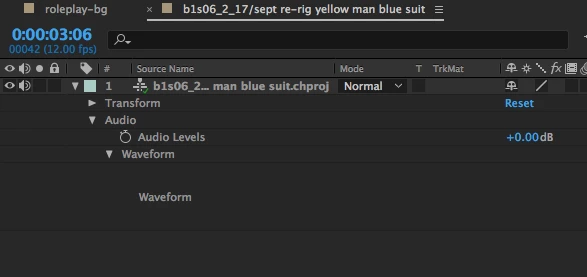
The original Ch scene does have audio - a wav track and lip sync.
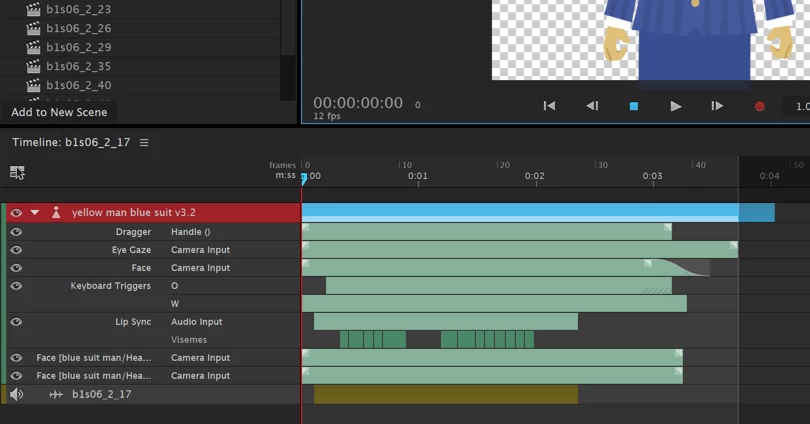
How can I get it to include the audio when it imports? Is this normal?

This topic has been closed for replies.

3 replies

Kevin J. Monahan Jr.
Legend
January 4, 2018

Hi SilverAJ,

Can you try with BobV has suggested here? Re: Ae - Ch dynamic link not pulling in sound?

Thanks,
Kevin

Kevin Monahan - Sr. Community and Engagement Strategist – Adobe Pro Video and Audio
Participant
December 22, 2017

I'm experiencing the same thing, I think.

I have an AE project with a linked Ch project. It used to work fine, until I decided to keep the animation, but redo the speech (from a separately recorded wav file).

I deleted every other media file there in the project, apart from the narrative from which I redid the lip synching.

Result: Ch preview works fine (good sound), rendering the Ch animation works fine. In AE, the lipsynching is fine, but the old sound is transferred.

So IMO there's something broken.

Any ideas are welcome, although the WAV+PNGs way does not sound very appealing.

Participant
December 22, 2017

As a reaction to my own issue: I seem to have fixed it by closing Ch and AE, then emptying the directories for CC Cache and CC DiskCache and then restarten Ch and AE. Maybe it's a help for you or others.

Edit: you may want to move the files instead of deleting, just in case. YMMV.

oksamurai
Legend
September 15, 2017

It should just show up. I was just doing this yesterday and working for me, weird.

If you try another audio file format like wav or aiff, does that work?

And AE is definitely playing other audio?

Restart doesn't help? Changing preview options? Doesn't magically start working if you export?