Inspiring
November 19, 2018
Answered

Alt Keys?

  • November 19, 2018
  • 1 reply
  • 478 views

I'm on Character Animator 1.5.  I've put together puppets and added the walk behavior.  In the walk, I set it to start on the arrow keys.

When I hit the arrow keys, the walk begins but also, my selection in the puppet panel moves from item to item.  Also, groups are expanded to show their contents.  At times, the walk behavior doesn't work at all, but the puppet panel selection always scrolls down through every group and layer.

If I understand correctly, Alt + arrow keys is the keyboard method to move down and expand the contents in the puppet panel.  I am not holding the alt key.  I do not have sticky keys on.  My alt keys are not stuck.

Any thoughts?

    This topic has been closed for replies.
    Correct answer alank99101739

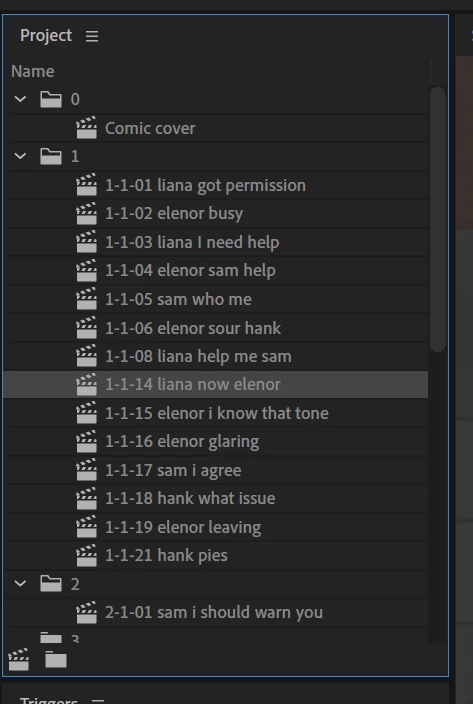
    Try clicking in the scene window so it has a blue outline before using the arrow keys. Basically select a panel what will ignore the arrow keys first. If I have the project window selected, using arrow keys moves the puppet, but as you say also messes around with what is in the panel. Selecting a different panel first seems the easiest workaround.

    E.g. Not:

    With the project pane selected, the up/down arrow keys will move the current selection around. Changing focus to the scene panel (by clicking on it) seems the easiest solution.

    1 reply

    alank99101739
    alank99101739Correct answer
    Legend
    November 19, 2018

    Try clicking in the scene window so it has a blue outline before using the arrow keys. Basically select a panel what will ignore the arrow keys first. If I have the project window selected, using arrow keys moves the puppet, but as you say also messes around with what is in the panel. Selecting a different panel first seems the easiest workaround.

    E.g. Not:

    With the project pane selected, the up/down arrow keys will move the current selection around. Changing focus to the scene panel (by clicking on it) seems the easiest solution.